
Руководство по веб-скрапингу OpenClaw: создавайте ИИ-скраперы с резидентными прокси



AI-агенты меняют то, как люди извлекают данные из интернета. Вместо того чтобы писать хрупкие CSS-селекторы, вы описываете, что вам нужно, и позволяете агенту самому разобраться, как это получить. OpenClaw — один из фреймворков, движущих этот сдвиг.
Это руководство проведёт вас через веб-скрапинг с OpenClaw от чистой установки до готового к продакшену скрапера. Вы узнаете, что такое OpenClaw на самом деле, как работает его конвейер скрапинга под капотом и почему прокси-слой под вашими запросами важен не меньше, чем код поверх него.
К концу вы получите рабочий конвейер веб-скрапинга списка товаров на навыке программирования OpenClaw, который можно направить на реальные страницы e-commerce.

Создавайте надёжные скраперы на OpenClaw с премиальными прокси. Начните с NodeMaven всего за $3.50 и получите 750 MB прокси-трафика
Что такое OpenClaw?
OpenClaw — это фреймворк AI-агентов с открытым исходным кодом. Считайте его шлюзом, который соединяет языковую модель с внешним миром: вашим браузером, файловой системой, мессенджерами и любым инструментом, который вы регистрируете как «навык».
В своей основе OpenClaw состоит из четырёх частей:
- Шлюз — демон, который работает непрерывно и маршрутизирует сообщения между каналами, моделью и инструментами
- Brain — провайдер LLM, к которому вы подключаетесь (Anthropic, OpenAI, Google или локальная модель)
- Руки — инструменты, которые агент может вызывать: управление браузером, команды shell, доступ к файлам, HTTP-запросы
- Навыки — markdown-файлы с инструкциями (SKILL.md), которые учат агента, как и когда использовать инструмент для конкретной задачи
Из этих четырёх компонентов навыки веб-скрапинга OpenClaw наиболее важны для данного руководства.
OpenClaw Coding Skill — это просто папка с файлом SKILL.md и, как правило, вспомогательным скриптом. Когда вы просите агента сделать что-то, что соответствует описанию навыка, он читает инструкции и следует им.
Именно это делает веб-скрапинг с OpenClaw принципиально отличным от Playwright или Selenium. Это библиотеки, которые вы импортируете в собственный скрипт и управляете ими строка за строкой. OpenClaw переворачивает эту логику: агент анализирует страницу с помощью дерева доступности, решает, как по ней перемещаться, и вызывает код вашего навыка, когда ему нужна детерминированная, повторяемая логика извлечения данных.
Вы по-прежнему пишете настоящий код, но агент сам решает, когда и как его запускать.
| Функции | OpenClaw | Playwright | Selenium |
| Модель управления | Агент определяет действия исходя из целей на естественном языке | Вы явно прописываете каждое действие в скрипте | Вы явно прописываете каждое действие в скрипте |
| Настройка | CLI + мастер онбординга, реестр навыков | пакет npm/pip | Привязки для конкретных языков |
| Адаптивность | Анализирует структуру страницы, адаптируется к изменениям вёрстки | Ломается при изменении селекторов | Ломается при изменении селекторов |
| Расширяемость | Навыки (SKILL.md + скрипты) | Пользовательские скрипты | Пользовательские скрипты |
| Лучшее для | Извлечение под управлением агента, беспорядочные или меняющиеся сайты | Стабильные, хорошо изученные сайты | Стабильные, хорошо изученные сайты |
| Работа с прокси | Настраивается для каждого навыка или каждого агента | Настраивается для каждого контекста | Настраивается для каждого драйвера |
Именно такая адаптивность и составляет главную привлекательность фреймворка веб-скрапинга OpenClaw по сравнению с фиксированным скриптом. Преимущество этой архитектуры в её устойчивости. Традиционный скрапер, который жёстко прописывает .product-title ломается в тот момент, когда сайт переделывает свою разметку.
Фреймворк веб-скрапинга OpenClaw, построенный на деревьях доступности и рассуждениях агента, обычно переживает небольшие изменения макета.
Как работает веб-скрапинг с OpenClaw
Прежде чем открывать терминал, полезно увидеть весь путь запроса. Типичная задача веб-скрапинга OpenClaw выглядит так:
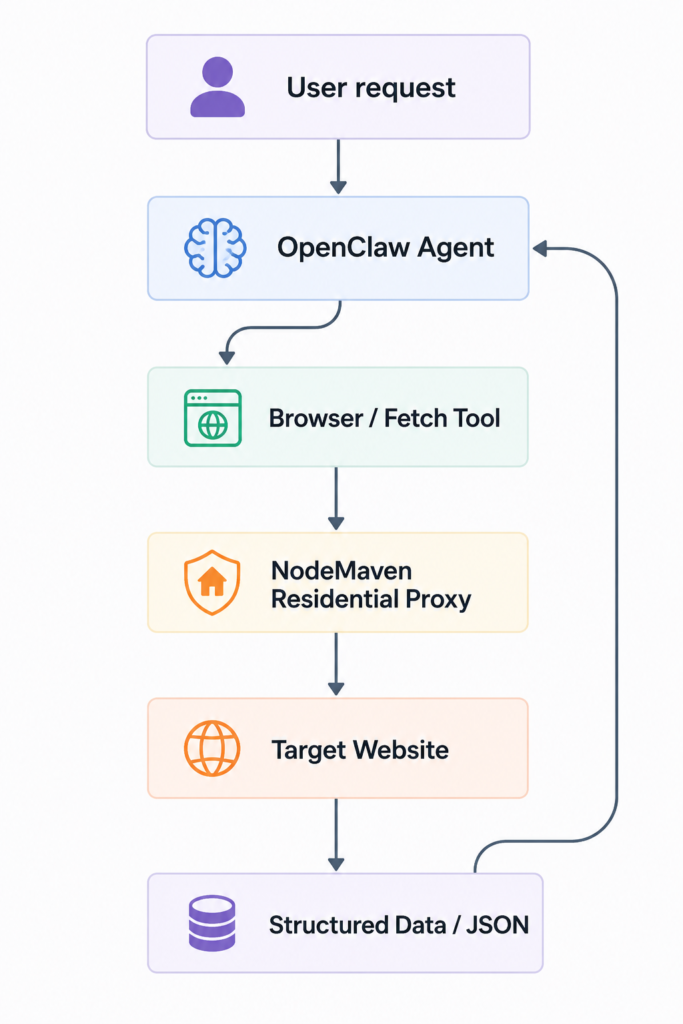
Разберём каждый шаг:
Запрос пользователя
Вы говорите агенту, что вам нужно, простым языком: «спарси списки товаров на этой странице и дай мне название, цену и рейтинг»
Агент OpenClaw
Gateway направляет это в настроенную вами модель, которая сопоставляет запрос с установленными навыками и выбирает подходящий.
Инструмент Browser / Fetch
Скрипт навыка запускается либо как лёгкий HTTP-запрос fetch, либо, для страниц с большим объёмом JavaScript, как полноценная сессия браузера.
NodeMaven резидентский прокси
Каждый исходящий запрос маршрутизируется через резидентный IP вместо собственного адреса вашего сервера, поэтому целевой сайт видит обычный пользовательский трафик.
Целевой сайт
Запрос достигает сайта так, будто он пришёл от реального посетителя из реальной локации.
Структурированные данные
Ответ парсится, проверяется по вашей схеме и возвращается агенту в виде JSON.
Этот промежуточный переход через прокси легко пропустить в демо и дорого пропустить в продакшене. К тому, почему так, мы перейдём в следующем разделе.
Почему важны резидентные прокси
Скрапинг без стратегии использования прокси работает ровно до тех пор, пока не перестаёт. Вот с чем вы на самом деле сталкиваетесь:
- Репутация IP. Дата-центры используют узкий диапазон известных блоков IP. Анти-бот системы ведут списки этих блоков и сразу блокируют их или выдают проверку.
- Ограничения скорости. Даже «чистый» IP начинает троттлиться, как только объём запросов перестаёт выглядеть человеческим.
- CAPTCHA. Подозрительные паттерны трафика запускают страницы с проверкой, которые скрипт не может решить самостоятельно.
- Рендеринг JavaScript. Многие сайты раскрывают реальный контент только после выполнения клиентских скриптов, которые скраперы с одиночным запросом никогда не запускают.
- Отпечаток браузера. TLS-рукопожатия, порядок заголовков и canvas-отпечатки — всё это влияет на оценку доверия к вашему соединению.
- Гео-ограничения. Некоторый контент отображается только для посетителей из определённой страны, региона или даже города.
- Сохранение сессии. Скрапинг под авторизацией и многошаговое оформление заказов ломаются, если ваш IP меняется посреди сессии.
Разные типы прокси решают разные пункты из этого списка:
| Тип прокси | IP-источник | Стабильность | Лучшее для |
| Центр обработки данных | Провайдеры облачного хостинга | Высокая скорость, низкое доверие | Нечувствительные цели с низким риском блокировки |
| Резидентские | Реальные домашние устройства | Медленнее, высокое доверие | Электронная коммерция, SERP, социальные платформы |
| Интернет-провайдер | Зарегистрированы у ISP, размещены в дата-центре | Скорость дата-центра, доверие как к резидентным | Авторизованные сессии, длительные задачи |
| мобильные | Сети операторов связи (3G/4G/5G) | Наивысшее доверие, переменная скорость | Крайне агрессивные цели с анти-бот защитой |
Для большинства настроек инструмента скрапинга OpenClaw разбивка выглядит так:
- Скрапинг e-commerce → резидентные, с ротацией на каждый запрос, для широкой выгрузки каталогов
- Поисковые системы → резидентные, с ротацией, так как SERP агрессивно снимают отпечатки
- ИИ-агенты выполнение автономных запросов → резидентные с фильтром качества, так как агенты не могут вручную решить CAPTCHA посреди выполнения задачи
- Социальные сети → резидентные или мобильные, липкие сессии, так как эти платформы внимательно отслеживают непрерывность сессии
- Сессии с авторизацией → ISP или закреплённые резидентные прокси, так как IP должен оставаться неизменным на протяжении всей сессии
Вот где NodeMaven вписывается в настройку OpenClaw для веб-скрапинга.
Он даёт вам резидентные и мобильные прокси из одной панели управления, с автоматической ротацией IP для высоконагруженных задач.
Пул IP насчитывает более 30 миллионов резидентных адресов в 190+ странах и 1 400+ городах, и каждый IP проходит фильтр качества который удерживает долю чистых IP выше 95%.
Избегайте блокировок и CAPTCHA с OpenClaw. Попробуйте NodeMaven за $3.50 и получите 750 MB трафика резидентных и мобильных прокси
Установка OpenClaw
Требования
- Node.js 22.19+ (рекомендуется Node 24) — Node 23 не поддерживается
- Python 3.10+ для скрипт-скраперов из этого руководства
- API-ключ от провайдера моделей: Anthropic, OpenAI, Google или локальный эндпоинт модели
- macOS, Linux или Windows (пользователям Windows следует запускать OpenClaw под WSL2)
Установка
Самый быстрый путь — это скрипт-установщик с хостингом. Он определяет вашу ОС, устанавливает Node, если он отсутствует, устанавливает OpenClaw и автоматически запускает онбординг:
В Windows (PowerShell):
Если у вас уже установлена поддерживаемая версия Node и вы предпочитаете управлять установкой самостоятельно:
Совет: если sharp не собирается во время установки (частая проблема в macOS, когда через Homebrew libvips уже установлен), принудительно используйте готовые бинарные файлы вместо сборки из исходного кода:
openclaw onboard –install-daemon делает три вещи:
- Подключает вашего провайдера модели — вы вставляете API-ключ по запросу
- Устанавливает Gateway как фоновую службу (systemd в Linux, launchd в macOS), чтобы она сохранялась после перезагрузок
- Проводит вас через необязательную настройку каналов и навыков, которую пока можно спокойно пропустить с помощью openclaw configure будет доступно позже
Частая ошибка: запуск обычной команды openclaw onboard без –install-daemon оставляет Gateway запущенным только в текущей сессии терминала. Закройте терминал — и агент остановится. Всегда добавляйте этот флаг, если хотите, чтобы OpenClaw продолжал работать.
Верификация
openclaw status подтверждает, что демон Gateway запущен и слушает, обычно на порту 18789. openclaw doctor проверяет наличие типичных ошибок конфигурации: отсутствующих API-ключей, заблокированных портов или рискованных настроек прав доступа. Если любая из команд возвращает ошибки, устраните их, прежде чем двигаться дальше, поскольку каждый скилл и скрапер ниже зависит от исправного Gateway.
Предупреждение: Никогда не открывайте порт 18789 на общедоступном сервере без аутентификации перед ним.
Настройка OpenClaw для веб-скрапинга
Конфигурация OpenClaw хранится в одном JSON-файле по пути ~/.openclaw/openclaw.json, но для задач скрапинга вы в основном взаимодействуете с ней через переменные окружения и настройки на уровне скилла, а не путём ручного редактирования этого файла.
Создать .env файл внутри рабочего каталога вашего скилла:
Вот что делает каждая переменная:
- ANTHROPIC_API_KEY — аутентифицирует вызовы модели агентом; замените на OPENAI_API_KEY или переменную другого провайдера, если вы используете другую модель
- OPENCLAW_MODEL — модель, используемая агентом по умолчанию; для задач скрапинга обычно достаточно быстрой модели среднего уровня, поскольку вам не нужна самая дорогая модель, чтобы решить «нажать следующую страницу»
- NODEMAVEN_USERNAME / NODEMAVEN_PASSWORD — ваши учётные данные прокси из панели управления NodeMaven; имя пользователя также может напрямую кодировать параметры страны, города и сессии (например, username-country-us-sid-98213)
- NODEMAVEN_HOST / NODEMAVEN_PORT — адрес шлюза NodeMaven; порт 8080 используется для HTTP, 1080 — для SOCKS5
Скиллы читают секреты через skills.entries.*.env в конфигурации OpenClaw, которая внедряет их в процесс скилла только для этого хода, а не в общую песочницу. Так пароль от вашего прокси не попадает в промпты и логи.
Как только ваш .env настроен, проверьте подключение к прокси независимо от OpenClaw, прежде чем подключать его к скиллу:
Если в ответ приходит IP-адрес, отличный от вашего собственного, прокси работает, и вы готовы к разработке.
Создание вашего первого скрапера
Прежде чем перейти к полному руководству по скрапингу списка товаров, давайте создадим более простой скрапер, который можно запускать автономно, вне какой-либо обёртки-скилла. Эта версия загружает страницу через прокси NodeMaven, парсит её, повторяет попытку при сбое и записывает чистый JSON на диск.
Краткий разбор того, что делает каждая часть:
- Импортирует — запросы обрабатывает HTTP, BeautifulSoup парсит HTML, python-dotenv загружает ваш .env файл, чтобы учётные данные никогда не хранились в самом скрипте
- Настройка прокси — PROXY_URL формирует единую строку авторизованного прокси из ваших учётных данных NodeMaven, используемую как для HTTP-, так и для HTTPS-трафика
- fetch_with_retry — повторяет неудавшиеся запросы с экспоненциальной задержкой (2 ** attempt секунд), поэтому единичный разрыв соединения не обрушивает весь прогон
- scrape_page — собственно логика извлечения; это та часть, которую вы будете настраивать под каждый сайт
- save_json — записывает результаты на диск в формате, который может использовать любой последующий инструмент
Перед запуском установите зависимости:
Этот скрипт работает автономно, но по форме он в точности соответствует скрипту, который оборачивает skill OpenClaw. Это базовый строительный блок веб-скрапинга с OpenClaw в любом масштабе, и именно его мы дальше обернём в полноценный skill.
Обеспечьте веб-скрапинг с OpenClaw чистыми резидентными IP. Начните пробный период NodeMaven за $3,50 и получите 750 MB прокси-трафика
Навык программирования OpenClaw (пример веб-скрапинга списка товаров)
Это самый важный раздел, если вы собираете данные электронной коммерции. Мы обернём приведённый выше скрапер в полноценный skill OpenClaw, чтобы агент мог вызывать его каждый раз, когда вы просите его получить список товаров.
Приведённый ниже паттерн skill для написания кода в OpenClaw (веб-скрапинг списка товаров) извлекает шесть полей по каждому товару: имя, цена, наличие, рейтинг, URL товара, и URL изображения, и всё это выдаётся в формате JSON.
Начните со структуры папок:
SKILL.md требуется YAML-фронтматтер плюс инструкции, которым следует агент:
Объявление env в блоке frontmatter metadata.openclaw.requires имеет значение: если скрипт ссылается на переменную, которую frontmatter не объявляет, сканирование ClawHub помечает несоответствие метаданных и блокирует публикацию навыка. Держите оба в синхронизации.
Теперь сам скрипт извлечения:
Разберём построчно, что стоит выделить:
- Селекторы намеренно сделаны нестрогими (.product-card, .product, [data-product]), поскольку реальные страницы каталогов редко используют одинаковые имена классов; настройте их под свою цель после того, как изучите страницу
- Все поля необязательны, кроме name — отсутствующая цена или рейтинг не должны рушить весь скрапинг, они просто должны возвращаться как null
- try/except внутри цикла означает, что одна некорректная карточка товара не выведет из строя остальные сорок на странице
- argparse позволяет навыку OpenClaw вызывать этот скрипт напрямую из команды, которую запускает агент, передавая URL и путь вывода в качестве аргументов
Как и большинство навыков веб-скрапинга OpenClaw, этот устанавливается путём помещения папки в ~/.openclaw/skills/product-scraper/ и перезапустите Gateway:
Убедитесь, что он загрузился корректно:
Если product-scraper появляется в этом списке, попросите агента напрямую: «Соберите список товаров на https://example-store.com/bestsellers». Он читает навык, запускает скрипт через ваш прокси NodeMaven и сообщает, что нашёл. Эта настройка навыка кодинга OpenClaw — тот же шаблон, который вы будете использовать для любой задачи структурированного извлечения, только с другими селекторами.
Примеры веб-скрапинга с OpenClaw
Как только приведённый выше шаблон заработает, большинство других примеров веб-скрапинга на OpenClaw окажутся вариациями того же скрипта с иной логикой парсинга. Ниже приведены пять распространённых из них.
Пример 1: новостной сайт
Обратите внимание на word_count вместо полного текста статьи. Копирование полного текста статьи создаёт риски нарушения авторских прав; извлекайте метаданные и краткое содержание, а не дословный контент.
Пример 2: документация
Полезно для построения карты сайта портала документации, прежде чем решать, какие страницы требуют более глубокого скрапинга.
Пример 3: поиск Google
Предупреждение: Разметка результатов Google часто меняется и жёстко ограничивает скорость скриптового трафика. Вращающиеся резидентные IP-адреса на каждый запрос здесь практически обязательна, но даже при этом будьте готовы регулярно обновлять селекторы.
Масштабируйте скрапинг на OpenClaw с автоматической ротацией IP. Начните работу с NodeMaven за $3.50 и получите 750 MB прокси-трафика
Пример 4: Страницы товаров
Повторно используйте parse_products функцию из предыдущего раздела, но нацельте её на отдельную страницу товара вместо списка и замените CSS-селекторы под макет детальной страницы (таблицы характеристик, галереи изображений и количество отзывов вместо сеток карточек).
Пример 5: Статьи блога
Подходит для того, чтобы построить контент-календарь блога конкурента, не извлекая сам текст постов.
Лучшие практики
Хорошие привычки здесь экономят реальное время на отладку в будущем:
- Уважайте robots.txt — проверяйте его перед скрапингом и соблюдайте запрещённые пути
- Добавляйте задержки между запросами — даже случайная задержка в 1-3 секунды выглядит менее механической, чем фиксированный интервал
- Встраивайте повторные попытки во всё — сети сбоят, прокси иногда отваливаются по тайм-ауту, сайты ограничивают частоту запросов; повторные попытки с экспоненциальной задержкой компенсируют все три случая
- Кэшируйте ответы во время разработки — не запрашивайте одну и ту же страницу десять раз, пока вы всё ещё настраиваете селекторы
- Логируйте всё — коды состояния, количество повторных попыток и ошибки парсинга, чтобы неудавшийся запуск можно было отладить постфактум
- Ротируйте IP для объёмов, используйте один IP для сессий — подстраивайте поведение прокси под задачу, а не наоборот
- Поддерживайте единообразие структурированного вывода — стабильная JSON-схема значительно упрощает дальнейшую обработку
- Отслеживайте процент успешных запросов во времени — медленно снижающийся процент успеха обычно первый признак того, что сайт изменил свою защиту
Устранение неисправностей
Большинство проблем следуют предсказуемым закономерностям. Вот с чем вы, скорее всего, столкнётесь и как это исправить.
| Проблема | Причина | Решение |
| 403 Запрещено | IP или отпечаток помечен как бот | Переключитесь на резидентный прокси, ротируйте IP, проверьте, что заголовки соответствуют реальному браузеру |
| 429 Слишком много запросов | Превышен лимит запросов | Добавьте задержки, снизьте параллелизм, ротируйте IP более агрессивно |
| Тайм-ауты | Прокси или целевой сервер медленно отвечает | Увеличить тайм-аут, повторите попытку с экспоненциальной задержкой, проверьте, что регион прокси соответствует целевому |
| JavaScript не рендерится | Странице требуется выполнение на стороне клиента | Используйте браузерный инструмент OpenClaw вместо обычного HTTP-запроса |
| Пустой HTML | Система обнаружения ботов отдаёт пустую страницу-заглушку | Сначала проверьте в реальном браузере, проверьте наличие JS-испытания |
| Заблокированный IP | Слишком часто используемый адрес или адрес с низкой репутацией | Смените провайдера или включите фильтр качества в пуле прокси |
| Недействительный прокси | Неверные учётные данные или некорректная строка прокси | Скопируйте учётные данные из панели управления заново и проверьте их с помощью отдельного теста curl |
| Ошибки OpenClaw в логах | Неправильно настроенный skill или отсутствующая зависимость | Беги openclaw doctor и openclaw skills list –eligible |
| Ошибки установки | Проблема с PATH после npm install | Проверить npm prefix -g находится в вашем $PATH, перезапустите терминал |
| Ошибки API | Недействительный или просроченный API-ключ модели | Запустить снова openclaw configure и введите ключ заново |
Зачем использовать NodeMaven вместе с OpenClaw?
Разрыв между «работает в демо» и «работает каждый день» почти всегда сводится к слою прокси. Вот как варианты на самом деле сравниваются на практике:
| Настройка | Что происходит |
| Без прокси | IP вашего сервера получает флаг в течение нескольких часов на любом умеренно защищённом сайте |
| Дешёвые/общие прокси дата-центров | Быстро блокируются, поскольку диапазон IP уже есть в большинстве списков блокировки анти-бот систем |
| Премиальные резидентные прокси (обычные) | Работают, но ротацию и управление сессиями часто неудобно настраивать |
| NodeMaven | Автоматически Вращение, закреплённые сессии, чистота IP 95%+ и стабильные показатели успеха для e-commerce, поисковых и социальных целей |
В реальном сценарии: инструмент для скрапинга OpenClaw, ежедневно собирающий данные о ценах у десятка ритейлеров, нуждается в свежем IP на каждый запрос, чтобы избежать обнаружения шаблонов, тогда как рабочий процесс на LinkedIn или на основе аккаунтов требует обратного — одного стабильного IP, удерживаемого на протяжении всей сессии.
Панель управления NodeMaven позволяет переключаться между ротируемыми и закреплёнными сессиями из одного аккаунта, в 190+ странах и 1400+ городах, без необходимости жонглировать отдельными провайдерами для каждого сценария использования.
Скрапьте с OpenClaw, используя надёжные прокси. Попробуйте NodeMaven за $3.50 и получите 750 MB прокси-трафика
Заключение
OpenClaw дает вам агентно-управляемый способ скрапинга веба, который адаптируется лучше, чем жестко закодированные скрипты с селекторами, а skills позволяют легко упаковать эту логику во что-то многократно используемое.
Но ничего из этого не работает без прокси-слоя, благодаря которому ваши запросы выглядят как обычный трафик. Теперь у вас есть полноценный навык кодирования веб-скрапинга в OpenClaw, подкрепленный чистыми резидентными IP и готовый к работе с реальными целями.
Если вы хотите протестировать прокси-сторону этой настройки, прежде чем выбирать тарифный план, пробный период NodeMaven это недорогой способ увидеть, как ведет себя ваш конкретный целевой сайт с реальным пулом резидентных IP за ним.


