
ChatGPT без блокировок: доступ к ChatGPT без VPN в 2026 году



Доступ к ChatGPT не всегда прост в каждом регионе. Многие пользователи ищут решения для разблокировки ChatGPT, которые не требуют VPN, особенно когда VPN-соединения замедляют работу или прерывают сессии.
Хорошая новость заключается в том, что существуют более гибкие способы доступа к ChatGPT без VPN. Для пользователей, которым нужен стабильный ежедневный доступ, Прокси ChatGPT могут быть лучшим вариантом, чем краткосрочные решения, поскольку они дают больше контроля над качеством IP-адреса, местоположением и стабильностью сессии.
Это руководство объясняет, как разблокировать ChatGPT шаг за шагом и как обеспечить стабильность вашего соединения.

Попробуйте высококачественные резидентские и мобильные прокси для ChatGPT всего за $3,50 и получите 750 МБ трафика
Почему ChatGPT блокируют в некоторых регионах
Доступ к ChatGPT может различаться в зависимости от вашего местоположения, используемой сети и применяемых местных интернет-ограничений. В некоторых случаях chatgpt.com может открываться нормально. В других случаях веб-сайт может загружаться медленно, отображать ошибки подключения или вообще не открываться.
Вот почему многие пользователи ищут способы обойти блокировку ChatGPT, не зависящие от VPN.
Региональные ограничения доступа
Одной из наиболее распространенных причин недоступности ChatGPT являются региональные ограничения. Некоторые страны или сети ограничивают доступ к определенным инструментам ИИ из-за местной политики, доступности платформ или правил фильтрации интернета.
Для пользователя результат прост: ChatGPT может не открываться, даже если само подключение к Интернету работает исправно. Это часто заставляет людей искать альтернативные способы доступа к ChatGPT без VPN, особенно если он нужен им для работы, учебы или повседневных задач.
Фильтрация на сетевом уровне
ChatGPT также может быть ограничен на сетевом уровне. Это означает, что блокировка может исходить от интернет-провайдера, рабочей сети, школьной сети или общедоступного Wi-Fi.
Эти ограничения обычно работают через DNS-фильтрацию, блокировку по IP-адресу или правила трафика, применяемые сетью. Точную причину вы не всегда видите. Иногда страница просто не загружается или соединение постоянно прерывается из-за истечения времени ожидания.
В такой ситуации изменение способа доступа к chatgpt.com может помочь восстановить доступ. Именно здесь часто используются DNS-инструменты, прокси-серверы и другие методы подключения.
Почему резидентские прокси работают лучше VPN для доступа к ChatGPT
VPN — это распространенный способ доступа к заблокированным веб-сайтам, но они не всегда являются самым удобным вариантом для ChatGPT.
VPN обычно направляет весь трафик устройства через другой сервер. Это означает, что он может одновременно влиять на ваш браузер, приложения, загрузки и другие веб-сайты. Для повседневного использования это может привести к снижению скорости, изменению соединения и прерыванию сессий ChatGPT.
Настройка с использованием прокси более целенаправленна. Она позволяет направлять только необходимый вам трафик, например, через браузер, в котором вы используете ChatGPT, в то время как остальное ваше интернет-соединение остается неизменным.
Больше контроля над вашим подключением
С помощью прокси-серверов вы можете контролировать, где и как используется соединение.
Вы можете выбрать браузер, местоположение и тип сессии вместо того, чтобы направлять все ваше устройство через VPN. Это дает больше гибкости и упрощает поддержание стабильного доступа к ChatGPT при обычном использовании.
Лучшая стабильность с чистыми IP
Качество прокси имеет значение. Бесплатные или некачественные прокси могут помочь вам открыть ChatGPT один раз, но они часто вызывают сбои соединения, частые выходы из системы, медленное время отклика или нестабильные сессии.
Для регулярного использования ChatGPT чистые IP-адреса и стабильные сессии важнее, чем временный доступ.
Более высокая производительность с резидентскими прокси
Резидентские прокси обычно являются самым сильным вариантом для пользователей, желающих использовать ChatGPT без VPN.
Они используют реальные IP-адреса пользователей, что помогает создавать более естественный профиль подключения. С высококачественными резидентскими прокси вы получаете более чистую репутацию IP-адресов, стабильные сессии, постоянную производительность и меньше прерываний во время длительных сессий ChatGPT.
Если ваша главная цель — использовать ChatGPT без VPN, настройка на основе прокси может быть более практичной. Это позволяет направлять только нужный вам трафик, например, через браузер или определенное приложение, сохраняя при этом остальное интернет-соединение без изменений.
Попробуйте высококачественные резидентские и мобильные прокси для ChatGPT всего за $3,50 и получите 750 МБ трафика
Как получить доступ к ChatGPT без VPN: Пошаговое руководство
Если вы хотите ChatGPT разблокирован Для регулярного использования прокси NodeMaven предлагают более стабильную альтернативу VPN или DNS-трюкам.
Вместо того чтобы направлять весь трафик ваших устройств через VPN, вы можете использовать прокси-серверы только там, где это необходимо, например, в браузере, системных настройках или на мобильном устройстве.
Шаг 1: Настройте прокси NodeMaven
Создайте учетную запись NodeMaven и откройте свой личный кабинет.
Для большинства пользователей, желающих использовать ChatGPT без VPN, резидентские прокси являются лучшей отправной точкой, поскольку они предоставляют гибкие местоположения, чистые IP-адреса и стабильные сессии. Мобильные прокси также может хорошо работать, если вам нужно поведение мобильного IP или вы хотите протестировать доступ из мобильной первой среды.
Для пользователей, которым нужна более статичная установка, ISP прокси также может быть полезно. Они предоставляют выделенные, долгосрочные IP-адреса с высокоскоростным и неограниченным трафиком, что делает их хорошим выбором для стабильного доступа с одного и того же соединения в течение длительного времени.
В личном кабинете выберите:
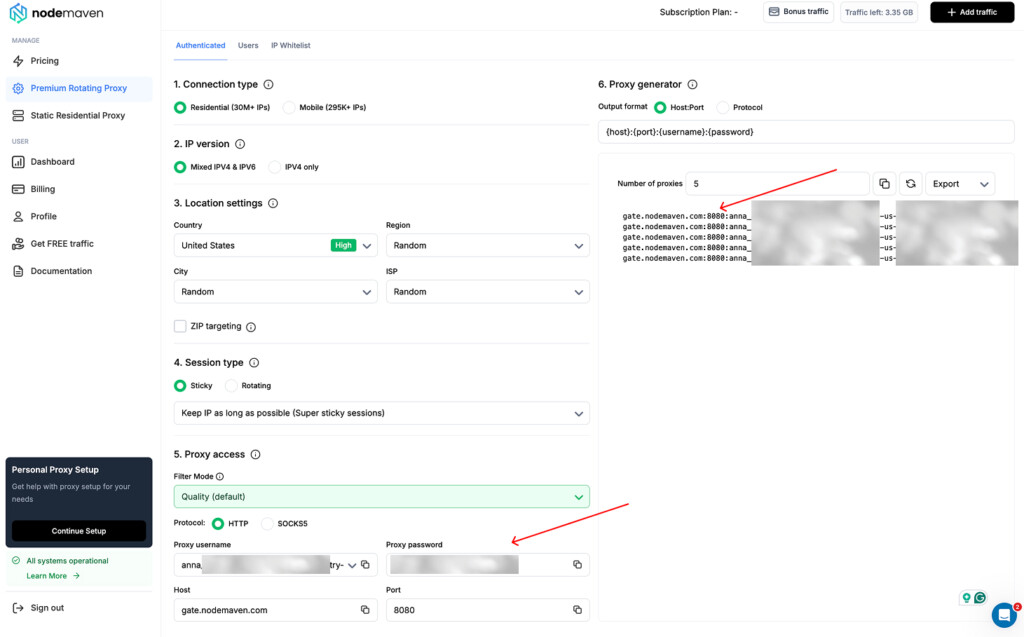
- Тип прокси: резидентские или мобильные прокси для гибкого доступа к ChatGPT
- Местоположение: Выберите страну, где доступен ChatGPT
- Фильтрация включить фильтр качества IP для более чистых IP-адресов
- тип сессии используйте Sticky Sessions для более стабильного доступа
- Протокол: выберите HTTPS или SOCKS5
Когда ваши настройки будут готовы, сгенерируйте учетные данные для прокси-сервера.
Вам понадобится:
- Прокси-хост
- Порт
- Имя пользователя
- Пароль
- Тип протокола
Попробуйте высококачественные резидентские и мобильные прокси для ChatGPT всего за $3,50 и получите 750 МБ трафика
Шаг 2: Добавьте прокси в свой браузер или устройство
Выберите способ настройки, который соответствует тому, как вы хотите получить доступ к ChatGPT.
Расширение прокси для браузера
Лучший вариант, если вы хотите, чтобы через прокси проходил только трафик вашего браузера.
- Установите прокси-расширение, такое как Простой переключатель прокси или похожий инструмент
- Создать новый профиль прокси
- Добавьте ваш узел NodeMaven, порт, имя пользователя, пароль и тип прокси
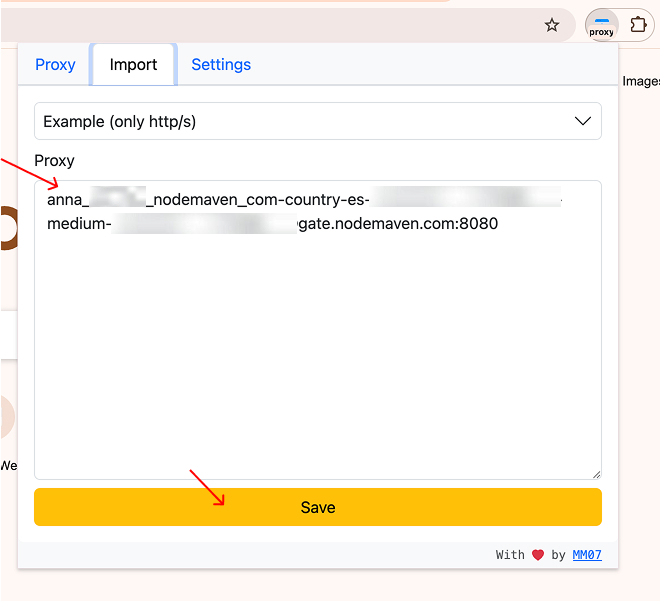
- Сохранить профиль
- Включите его перед открытием ChatGPT
Настройка Windows
Лучше всего, если вы хотите, чтобы прокси применялся на уровне всей системы.
- Открыть Настройки
- Иди Сеть и Интернет
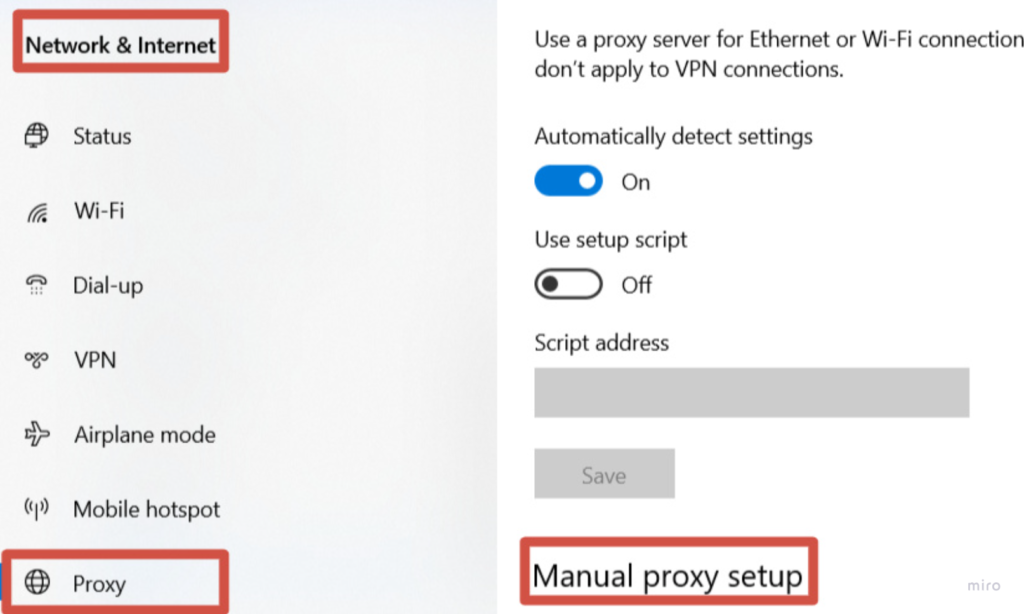
- Выберите Прокси
- Включить ручную настройку прокси
- Введите адрес и порт вашего прокси-сервера NodeMaven
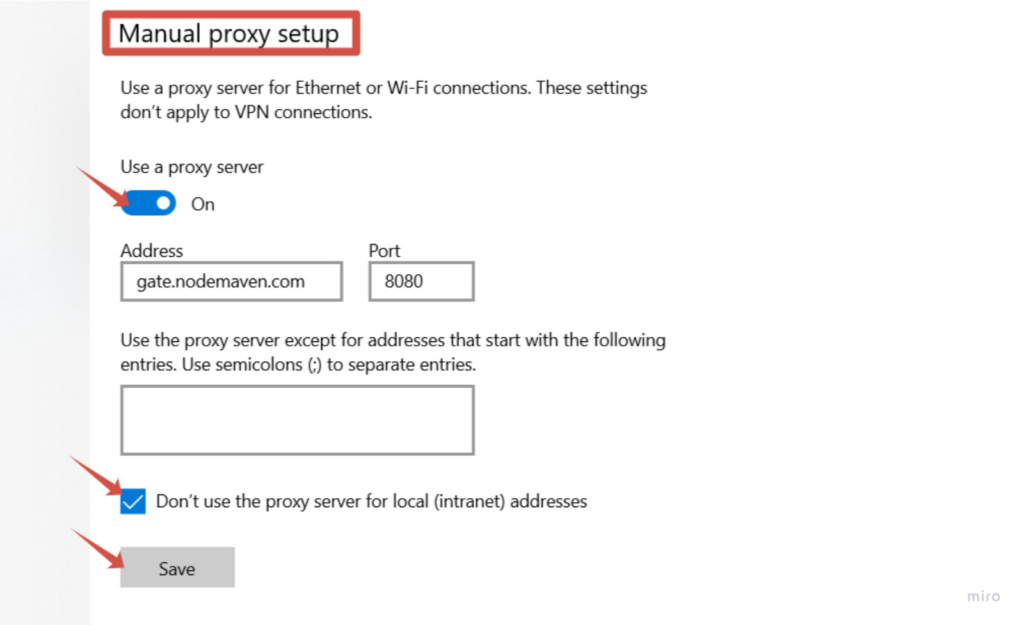
- Сохранить изменения
- Попробуйте перейти на любой веб-сайт и ввести свои учетные данные прокси при появлении соответствующего запроса. Вкладка "Войти" (Перейдите в личный кабинет NodeMaven, чтобы скопировать имя пользователя и пароль вашего прокси)
Настройка macOS
- Открыть Настройки системы
- Иди Сеть
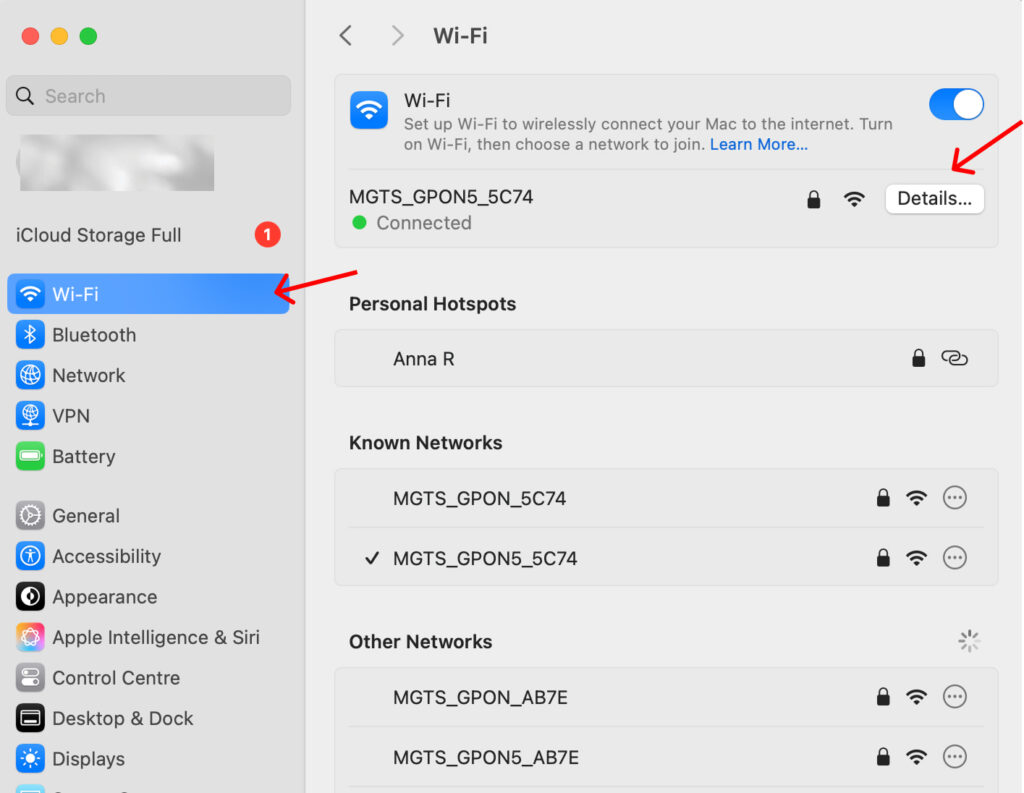
- Выберите ваше активное Wi-Fi соединение
- Открыть Подробности
- Иди Прокси
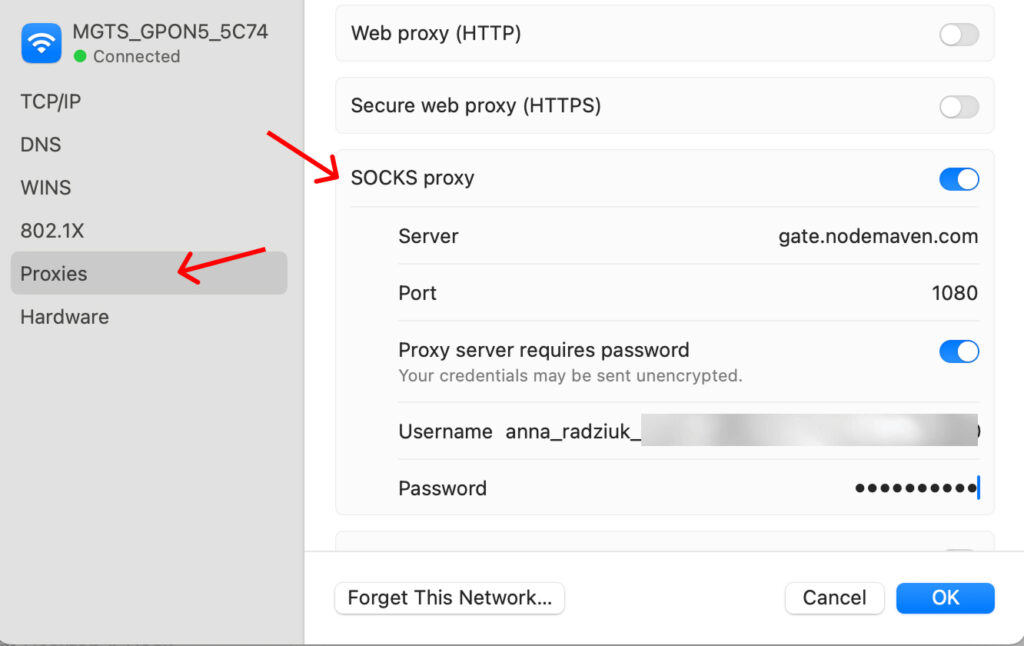
- Введите данные вашего прокси
- Нажмите Ладно или Применить
- Если требуется, включите аутентификацию и введите свой имя пользователя и пароль из личного кабинета NodeMaven.
Настройка Android
- Открыть Настройки на вашем устройстве Android.
- Иди Wi-Fi и найти подключенную сеть.
- Нажмите и удерживайте название сети, затем выберите Изменить сеть.
- Открыть Расширенные настройки.
- Изменить Прокси от Нет към Инструкция.
- Введите данные прокси-сервера:
• Имя хоста прокси, например gate.nodemaven.com
• Порт прокси, 1080 для соединения SOCKS5 - Сохранить настройки.
Если ваш прокси требует аутентификации, ваш браузер или приложение могут запросить у вас ввод имя пользователя и пароль предоставленной в Личный кабинет.
Настройка iPhone
- Открыть Настройки
- Иди Wi-Fi
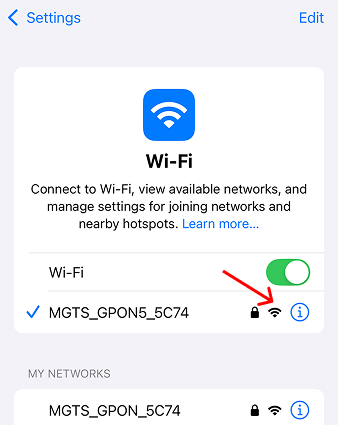
- Нажмите на активную сеть
- Выберите Настроить прокси
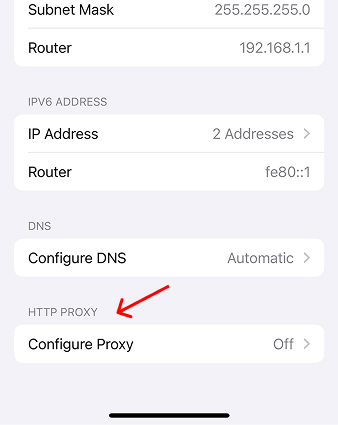
- Выберите Инструкция
- Введите адрес прокси-сервера и порт
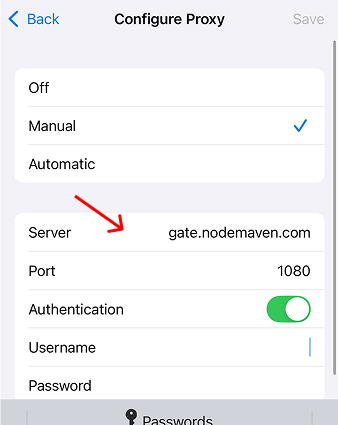
- Добавить аутентификацию, если потребуется
- Сохранить изменения

Исследуйте наш Руководство по настройке SOCKS5 чтобы найти больше способов настройки вашего прокси-сервера
Шаг 3: Открыть ChatGPT
После того, как ваш прокси будет активен, откройте chatgpt.com в вашем браузере.
Затем:
- Войти или создать аккаунт
- Начните использовать ChatGPT как обычно
- Сохранить ту же локацию прокси для лучшей стабильности сессии
Если все настроено правильно, вы сможете получить доступ к ChatGPT без VPN.
Шаг 4: Проверьте настройку, если ChatGPT не открывается
Если ChatGPT не загружается, сначала проверьте простые вещи.
Убедитесь, что ваш:
- Прокси-сервер указан верно
- Порт — правильный
- Имя пользователя и пароль введены правильно
- Тип протокола соответствует вашей настройке
- Прокси-профиль включен
- Выбранное местоположение поддерживает доступ к ChatGPT
Большинство проблем с настройкой возникает из-за неправильных учетных данных или несоответствия типа прокси.
Шаг 5: Поддерживайте стабильность вашей сессии ChatGPT
Один раз разблокировать chatgpt.com недостаточно, если вы пользуетесь им ежедневно. Вам также нужен стабильный доступ.
Для лучшей производительности:
- Сохранить то же место
- Используйте сессии sticky
- Реже переключайте прокси
- Используйте чистые IP-адреса вместо бесплатных прокси
- Выберите надежного поставщика со стабильной производительностью
Вот где фокус NodeMaven на чистых IP-адресах, стабильных сессиях и стабильной производительности действительно имеет значение. Вы также получаете резидентские и мобильные прокси в одном плане, перенос трафика и гарантию качества, если прокси не соответствуют ожидаемым стандартам производительности.
Почему NodeMaven - надежный выбор для доступа к ChatGPT
Когда вы хотите использовать ChatGPT без VPN, стабильность становится важнее всего остального.
Чистые IP-адреса, снижающие проблемы с подключением
NodeMaven использует систему фильтрации, которая удаляет ненадежные IP-адреса перед вашим подключением.
- Предварительно проверенный пул IP-адресов
- Лучший успех соединения
- Меньше перерывов
Стабильные сессии для непрерывного использования
Вам не нужно постоянно переподключаться.
- Длительные сессии входа
- Стабильная идентичность
- Плавный пользовательский опыт
Стабильная производительность по всем запросам
Скорость и бесперебойная работа встроены в сеть.
- Быстрое время отклика
- Высокие показатели успеха
- Надежные соединения
Гибкая настройка без ограничений VPN
Вы сами контролируете маршрутизацию трафика.
- Настроить для каждого приложения или браузера
- Нет необходимости направлять весь трафик устройства
- Лучше общая производительность
Встроенное значение для долгосрочного использования
NodeMaven фокусируется на устойчивой производительности.
- Таргетинг по стране, городу и провайдеру
- Резидентские и мобильные прокси в одном тарифе
- Гарантия качества с компенсацией за проблемы
- Кэшбэк за использование трафика
Это делает его подходящим не только для временного доступа.
Попробуйте высококачественные резидентские и мобильные прокси для ChatGPT всего за $3,50 и получите 750 МБ трафика
Распространенные ошибки при попытке разблокировать ChatGPT
Разблокировка ChatGPT один раз не всегда означает, что настройка будет работать надежно завтра. Большинство проблем с доступом возникают из-за нестабильных инструментов, низкого качества IP-адресов или частых смен подключения.
- Используя бесплатные прокси
Бесплатные прокси могут выглядеть удобными, но обычно ими пользуются слишком много пользователей, и они часто имеют плохую репутацию IP-адреса.
Это может привести к:
- Медленная загрузка
- Неудачные соединения
- Частые выходы из системы
- Нестабильные сессии ChatGPT
Для регулярного использования чистый резидентский прокси от такого поставщика, как NodeMaven, является более безопасным выбором, поскольку он создан для стабильных сессий и постоянной производительности.
- Используя только трюки с DNS
DNS-методы могут быть полезны для быстрого доступа, и они могут открывать несколько ограниченных ресурсов одновременно.
Но они дают вам меньше контроля. DNS-провайдер решает, как обрабатываются запросы, и трафик может маршрутизироваться так, как вы напрямую не управляете.
Для ежедневного использования ChatGPT это может быть непредсказуемо. Доступ через прокси с NodeMaven дает вам больше контроля над IP-адресом, местоположением и стабильностью сессии.
- Игнорируя качество IP
Качество IP является одним из наиболее важных факторов стабильного доступа к ChatGPT.
Низкокачественные IP-адреса могут вызывать ошибки подключения, повторные проверки или прерывания сессий. Чистые IP-адреса помогают создать более стабильное соединение и уменьшить ненужные трения.
Вот почему NodeMaven фокусируется на предварительно отфильтрованных IP-адресах, стабильных сессиях и стабильной производительности вместо того, чтобы просто предлагать большой пул прокси.
Попробуйте высококачественные резидентские и мобильные прокси для ChatGPT всего за $3,50 и получите 750 МБ трафика
Финальные мысли
Разблокировка ChatGPT полезна только в том случае, если соединение остается стабильным.
По мере того как ChatGPT становится ежедневным инструментом для профессионалов и покупателей, бизнес начинает задаваться другим вопросом: «Действительно ли ChatGPT рекомендует наш бренд?» Хотя стабильный доступ — это первый шаг, понимание того, как ваша компания представлена в ответах, сгенерированных AI, становится не менее важным. сравнение инструментов AI-видимости поможет оценить ведущие платформы для измерения рекомендаций AI, цитирований, видимости конкурентов и общей эффективности в AI-поиске.
DNS-трюки, бесплатные прокси и случайные браузерные инструменты могут работать для быстрого доступа, но они часто подводят, когда вам нужен ChatGPT для ежедневной работы, исследований или длительных бесед.
Для стабильного доступа сосредоточьтесь на трех вещах:
- Чистые IP-адреса, снижающие проблемы с подключением
- Стабильные сессии, которые не прерывают ваш сценарий
- Надежная производительность, которая не замедлит вас
Прокси-сервер дает больше контроля, чем VPN, поскольку через него можно перенаправлять только необходимый трафик. С NodeMaven вы получаете чистые резидентские прокси, стабильные сессии и стабильную производительность, разработанные для надежного доступа к ChatGPT без VPN.


