
How to change your TikTok location (iPhone & Android guide 2026)




Your TikTok location affects more than just the content you see. It shapes your recommendations, local trends, available features, and which audiences your videos reach.
Here’s the catch: TikTok doesn’t have a simple “select your country” button. The platform determines your location using a combination of signals. To effectively change your TikTok location, you need to update several of these signals at once.
This guide explains exactly how TikTok determines your location, what you can and can’t control, and how to change your TikTok location on both iPhone and Android.

Change your TikTok location with real residential IPs — 750MB trial traffic for just $3.50
How TikTok determines your location
TikTok doesn’t rely on a single setting to figure out where you are. It cross-references multiple signals simultaneously, which is why simply switching your language or turning off GPS often isn’t enough.
Here’s what TikTok looks at:
| Signal | What It Does |
| IP address | Primary location indicator — shows the country of your internet connection |
| Device language | Helps TikTok identify your target market and relevant content |
| App language | When it matches your device language, it strengthens your location signal |
| GPS / geolocation | Used if you’ve granted location access to the app |
| SIM card / carrier | Mobile network data can indicate the country where your SIM card was issued |
| Viewing history | The content you watch, skip, save, or rewatch helps shape your location profile |
| Engagement signals | Likes, comments, shares, and follows help TikTok determine which audience you belong to |
| Published content | The language, hashtags, audio, and topics in your posts signal your target market |
The key takeaway: When these signals conflict TikTok receives mixed data and may default to your historical location. For example, your device tells “US” but your IP is from another country. For a stable location change, you need multiple signals pointing to the same country.
Can you change your TikTok location?
Yes, but it’s not a one-click switch.
There’s no official setting that lets you select a new country from a dropdown. Instead, changing your TikTok location means changing the signals TikTok uses to identify where you are.
What you can control:
- Device language and region
- TikTok app language
- Location permissions (GPS access)
- IP address (via residential or mobile proxy)
- Viewing history and engagement over time
- Language and topics in your published content
What you can’t directly control:
- TikTok’s internal country tag for your account (set automatically)
- Your accumulated interest history (takes time to reset)
- SIM card region (unless you swap physical cards)
| Signal | Changeable? |
| Device language & app language | ✅ Yes |
| GPS / geolocation | ✅ Yes |
| IP address | ✅ Yes (with a proxy) |
| Recommendation history | ⚠️ Partially — resets gradually |
| SIM card region | ⚠️ Partially |
| TikTok account country | ❌ Not directly |
Location changes take effect gradually, not instantly. The more signals you update, the faster TikTok adapts.
Access TikTok content from any country using residential proxies — get 750MB trial traffic for only $3.50
How to change your TikTok location (step-by-step)
Follow all steps below for the best results. Changing one or two settings alone is usually not enough.
Step 1: Disable TikTok’s Access to Your Location
Prevent TikTok from reading your GPS data.
On iPhone:
- Open “Settings”
- Scroll down and tap “TikTok”
- Tap “Location”
- Select “Never”
On Android:
- Open “Settings”
- Go to Apps → TikTok → Permissions
- Tap “Location”
- Select “Deny”
This removes one of the strongest location signals TikTok uses.
Step 2: Clear your location history in TikTok
After disabling GPS, remove any stored location data from the app.
- Open TikTok
- Go to Settings and Privacy inside your profile
- Find “Preferences” field, then look for “Contacts and location”
- Find location data settings in the bottom of page
- Click “Delete certain location data” and disable further collection
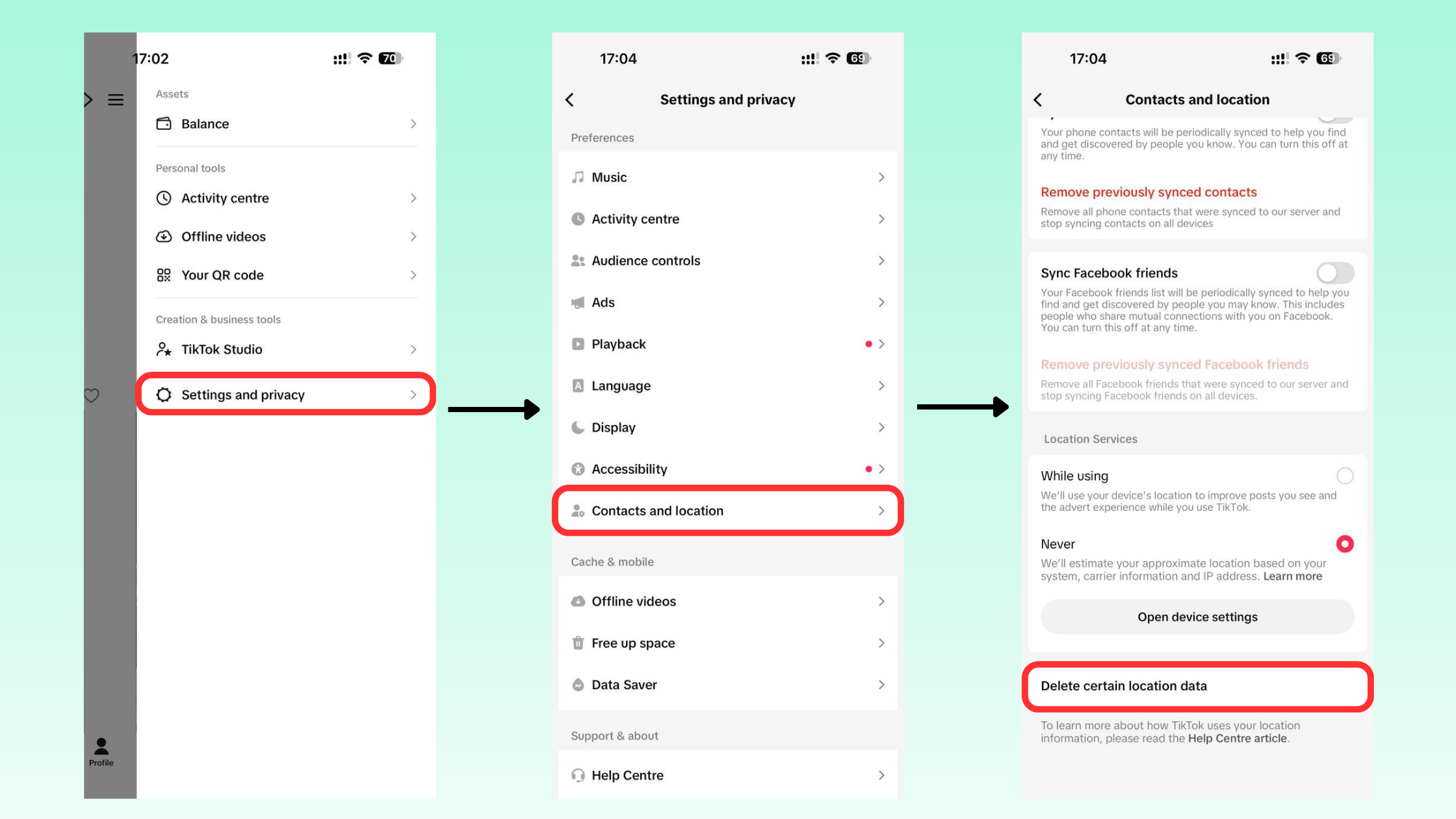
This helps reduce the influence of your old location on future recommendations.
Step 3: Use an IP address from your target country
Even with GPS disabled, TikTok can still see your IP address, and it’s one of the most important location signals the platform uses.
If your device language points to one country but your IP belongs to another, TikTok gets conflicting data and may ignore the other changes you’ve made. For a stable TikTok location change, you need an IP address that matches your target country.
The most reliable way to do this is with a mobile proxy. It routes your traffic through real devices in your target country, making your connection look completely natural to TikTok.
Important: Always be connected to your target-country proxy before opening TikTok. If you open the app without it, even once, your location signal may reset.
Get a real IP from 190+ countries and change your TikTok location reliably — 750MB trial traffic for $3.50
Step 4: Change the TikTok app language
- Open “Settings and Privacy”
- Tap “Preferences” (or “Content Preferences”)
- Select “Language”
- Choose the language associated with your target country
The app language should match the country you’re targeting.
Step 5: Update your device region and language
In addition to TikTok’s in-app settings, update your operating system.
On iPhone:
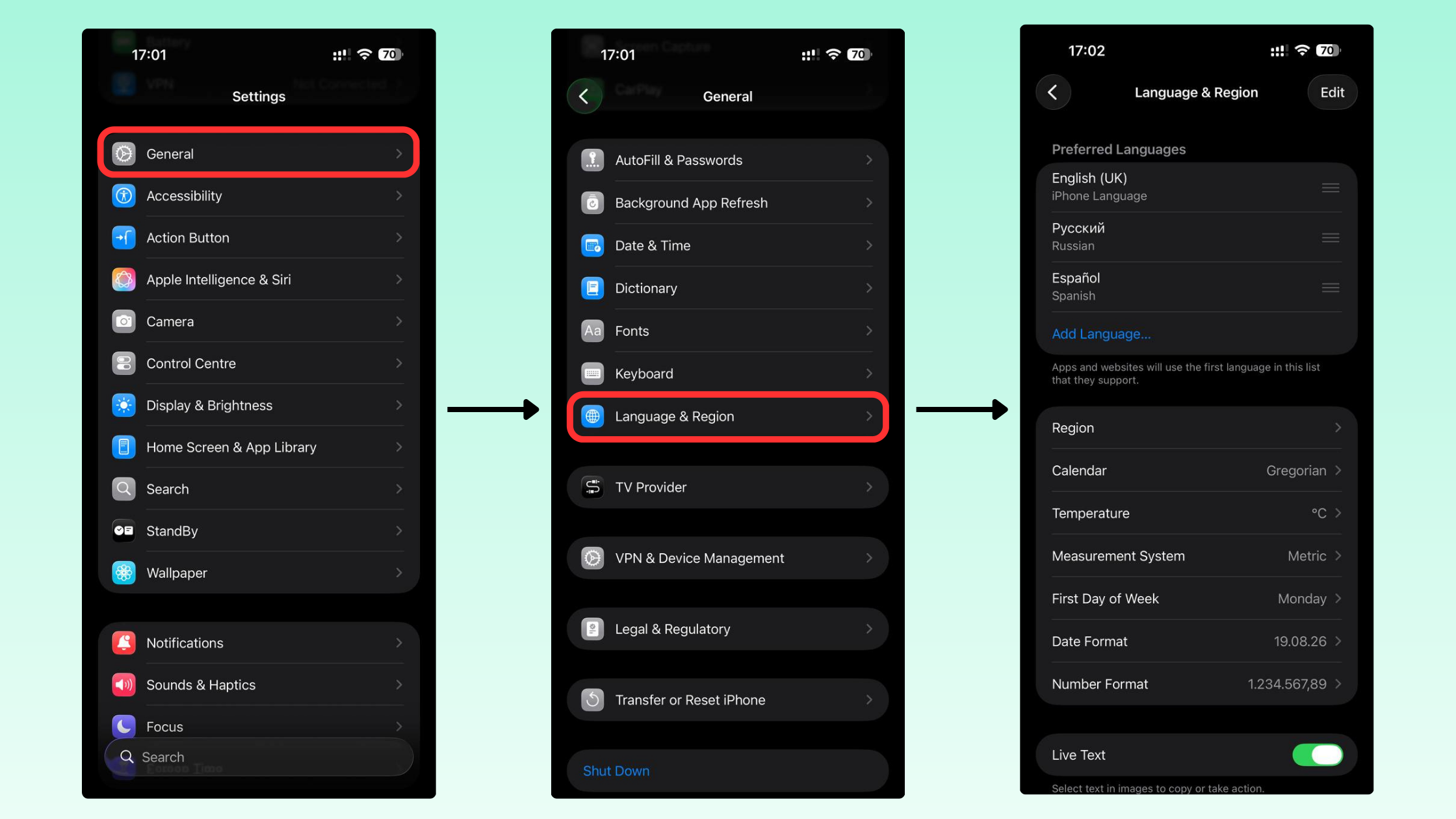
- Go to Settings → General → Language & Region
- Tap Region
- Select your target country
On Android:
- Open “Settings”
- Go to “System or General Management”
- Tap “Language and Input” or “Language and Region”
- Select your target country and language
If you use mobile data, keep in mind that your SIM card region is also a signal. For full consistency, a SIM from your target country strengthens the effect.
Step 6: Clear Cache and Restart
- In TikTok, go to “Settings and Privacy”
- Tap “Free Up Space”
- Tap “Clear Cache”
- Fully close the app
- Restart your device
Step 7: Train the algorithm
Your TikTok location won’t flip overnight. Even after updating all settings, the algorithm still factors in your existing watch history and engagement patterns.
Over the next several days:
- Watch content from your target country’s “For You” Page
- Engage with creators, hashtags, and trends from that location
- Post content in the language of your target market
The more consistent signals TikTok receives from one location, the faster it recalibrates your account.
How to change your TikTok location to Canada
Canada is one of the most popular TikTok location targets — and for good reason.
Why creators choose Canada:
- English-speaking audience with high engagement rates, similar to the US market
- Access to TikTok monetization features, including the “Creator Rewards Program”
- Lower competition than the US, making it easier to gain traction and reach new viewers
- Strong e-commerce potential through TikTok Shop
- Feature parity, most new TikTok tools launch in Canada alongside the US and UK
For affiliate marketers and brand accounts, Canada offers a practical middle ground: a large, English-speaking audience with monetization support, but without the extreme saturation of the US market.
To change your TikTok location to Canada, follow the full step-by-step guide above and target Canada at each step:
- Set your device region to Canada
- Set your app language to English (Canada) or simply English
- Use a Canadian residential IP address
- Engage with Canadian TikTok content during the transition period
Switch your TikTok location to the US, Canada, or any market with residential proxies — 750MB trial for $3.50
How to check your current TikTok location
TikTok doesn’t display your current account country in settings — there’s no field that simply says “your region is X.”
Where to look:
Go to Profile → Settings and Privacy to review your app language, location permissions, and content preferences.
How to tell where TikTok thinks you are:
- The primary language of your “For You” Page content
- Local trends and trending hashtags
- Recommended creators and their locations
- Ads being served to you
- Music trending in your feed
If your FYP is showing primarily US content and American trends, TikTok likely associates your account with the US market. If you’re seeing Canadian creators, Canadian hashtags, and locally relevant ads after making your changes, that’s a strong sign the location shift is taking effect.
Which TikTok location is best for your goals?
If you’re growing an account or running a business on TikTok, the location you target matters. Different markets offer different advantages.
| Location | Content Discovery | Growth Potential | Monetization |
| United States | ⭐⭐⭐⭐⭐ | ⭐⭐⭐⭐⭐ | ⭐⭐⭐⭐⭐ |
| United Kingdom | ⭐⭐⭐⭐ | ⭐⭐⭐⭐⭐ | ⭐⭐⭐⭐⭐ |
| Canada | ⭐⭐⭐⭐ | ⭐⭐⭐⭐ | ⭐⭐⭐⭐ |
| Germany | ⭐⭐⭐⭐ | ⭐⭐⭐⭐ | ⭐⭐⭐⭐ |
| Australia | ⭐⭐⭐⭐ | ⭐⭐⭐⭐ | ⭐⭐⭐⭐ |
- United States
The largest English-speaking TikTok market. Highest advertiser demand, broadest monetization options, and the most robust Creator Rewards Program. Also the most competitive.
- United Kingdom
Strong English-speaking audience with slightly less competition than the US. Most TikTok monetization tools are available.
- Canada
A strong alternative to the US. Anglophone audience, full monetization access, and a lower barrier to organic reach. Popular for affiliate marketers and creators testing new content.
- Germany
Best for European e-commerce and local business promotion. German audiences are highly engaged with localized content.
- Australia
Good for English-speaking market reach, with most features launching simultaneously with the US and UK.
Why your TikTok location is not changing
If you’ve updated your settings but your FYP still looks the same, you’re not alone. Here’s what’s usually causing it:
Changes take time. TikTok doesn’t update your location the moment you change a setting. The algorithm needs to process consistent new signals over days, sometimes longer.
Your history is still active. If your account has months of watch history tied to one country, TikTok will continue serving similar content for a while. The older and more active your account, the longer this takes to shift.
You have conflicting signals. This is the most common reason TikTok location changes fail. Your device says one country, your IP says another, and your SIM points to a third. TikTok sees mixed data and defaults to what it already knows.
Checklist to verify all signals are aligned:
- Device language and region match target country
- TikTok app language matches target country
- GPS / location access is disabled or set to target country
- IP address is from target country (proxy enabled before opening TikTok)
- Cache cleared after changes
- Actively engaging with content from target country
Should you change your existing account or create a new one?
This is one of the most common questions when targeting a new market.
| Option | Pros | Cons |
| Change location on existing account | Keep followers, content history, and analytics | Algorithm may take longer to adapt due to existing signals |
| Create a new TikTok account | Clean slate — correct location signals from day one | Start from zero followers and engagement |
If your account already has an audience, content history, and analytics you want to preserve, it’s worth trying to change the location first.
If you’re entering a new market from scratch, a fresh account is often more predictable. TikTok will classify it correctly from the start, without having to override years of existing data.
NodeMaven: lock in your TikTok location with a residential proxy
One factor most guides overlook: your IP address. Even if you’ve adjusted every setting on your device, TikTok can still see where your internet connection originates, and that single signal can override everything else.
If your IP doesn’t match your target country, your location change will stall or never fully take effect.
NodeMaven gives you access to 30+ million residential and mobile IPs across 190+ countries. These are IPs tied to real devices and real users.
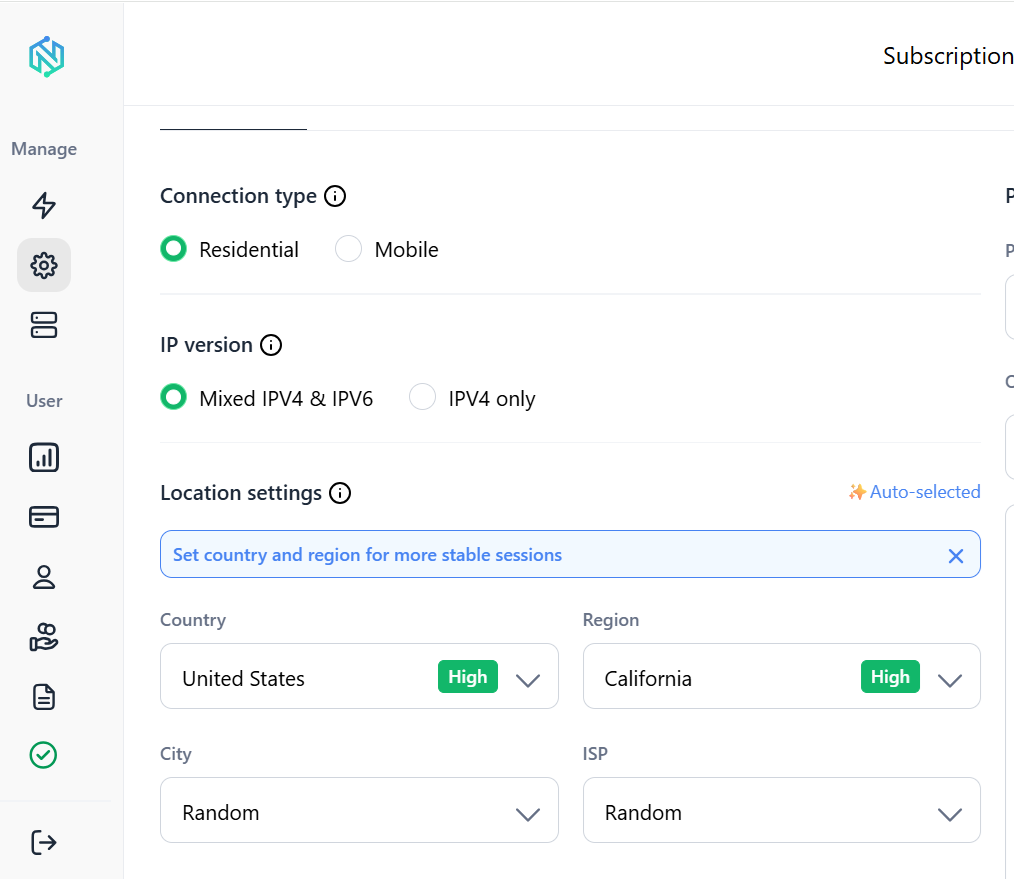
Setting it up takes minutes: select your target country, generate a proxy connection, and you’re ready. From that point forward, TikTok sees a real IP from your chosen location every time you open the app.
NodeMaven is especially useful if you’re:
- Viewing another country’s “For You” Page to research trends and competitor content
- Running TikTok Shop research in a specific market
- Building affiliate marketing campaigns targeting international audiences
- Doing market research before launching content in a new country
- Testing how localized content performs with a specific audience
- Managing multiple accounts across different TikTok locations simultaneously
- Growing an international audience from a single device


