
9 Best IP Trackers for Security and IP Testing in 2026




The IP address you think you are showing and the IP address a website actually sees are often two different things. Go and check, and a second problem appears: two IP lookup tools will happily give you two different answers about the same address.
Paste one address into five different checkers and you can get four different postal codes back. We tried it. Every vendor keeps a different database and updates it on a different schedule, then runs its own detection logic on top.
We took one residential IP address and ran it through all nine tools below in a single session. Every tool agreed on the network. Four of them disagreed on the postal code. One spotted that the address was a proxy while eight missed it, and one vendor admitted in writing that its risk score was not about the address at all. Full results are further down. The short version: never act on one checker alone.
Quick comparison
| Tool | Best for | Free | Bulk / batch | API | Fraud score | Proxy/VPN flags |
|---|---|---|---|---|---|---|
| NodeMaven IP Tracker | Fast full-picture checks | Yes, no signup | Up to 100 IPs | No | Abuse risk score | Yes |
| IPinfo.io | Developer integration | Limited tier | Yes | Yes | No | Paid add-on |
| MaxMind GeoIP2 | Enterprise geolocation accuracy | Lite database | Local database | Yes | No | Limited |
| DB-IP | Self-hosted lookups | Lite database | Yes | Yes | Threat level | Basic |
| IP2Location | Offline database work | Limited demo | Yes | Yes | Yes | Yes |
| ip-api.com | Quick scripted lookups | Non-commercial | Yes, 100 per call | Yes | No | Basic |
| WhatIsMyIPAddress | Casual one-off checks | Yes | No | No | Blacklist only | Unreliable |
| AbuseIPDB | Abuse history | Yes | Yes | Yes | Abuse confidence | No |
| Scamalytics | A second opinion on risk | Yes | No | Yes | Yes | Yes |
What an IP lookup tool actually shows you
An IP address lookup returns the public information registered against an IPv4 or IPv6 address. Every tool on this list works from some subset of the same fields:
- Location: country, region, city, postal area. Approximate, never an exact street address.
- ISP and organization: which provider owns the connection, and which entity the network is registered to.
- ASN: the Autonomous System Number identifying the network that announces the address on the internet.
- Reverse DNS: the PTR record, if one exists. 1.1.1.1 returns one.one.one.one.
- Usage type: residential, mobile, hosting, business, education.
- Detection flags: whether the address is associated with proxy, VPN, Tor, hosting or mobile traffic.
- Threat or fraud score: a composite risk rating derived from reputation data and detection signals.
The first four fields come from registry data and stay fairly stable across providers. The last three are where tools diverge, because every vendor builds its own detection model on its own data. Most of the disagreement you will run into lives in those three rows.
IP and geolocation tracking tools
These are the tools you reach for when you have an address and want to know where it is, who owns it, and what kind of network it sits on.
1. NodeMaven IP Lookup
Best for: getting the full picture (location, network, detection flags) in one screen, for one IP or a hundred.
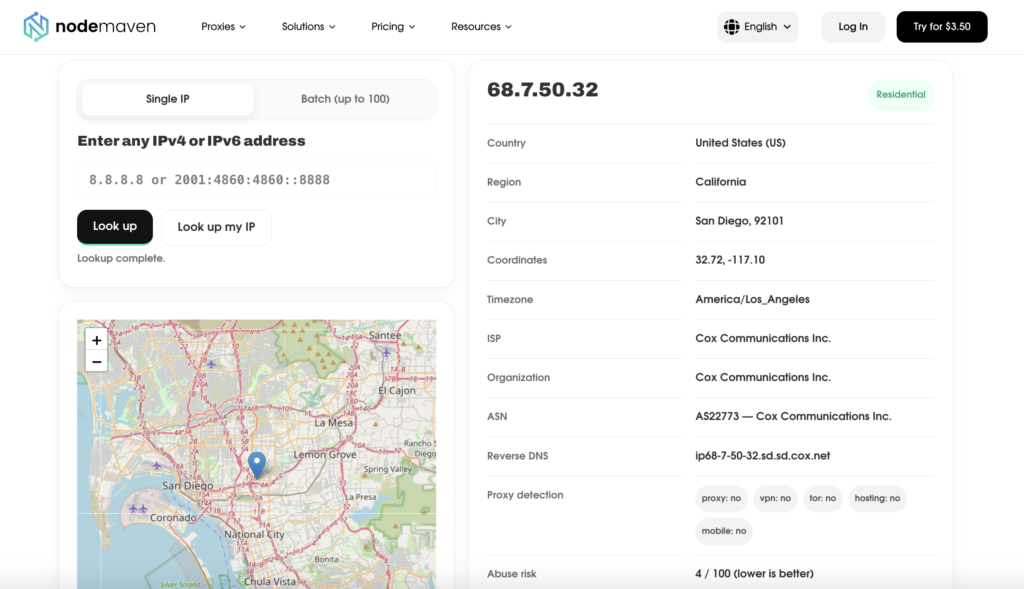
NodeMaven’s free IP lookup tool returns location, timezone, ISP, organization, ASN, reverse DNS, proxy/VPN/Tor/hosting/mobile flags and an abuse risk score for any IPv4 or IPv6 address. It will also detect your own current public IP if you want to see what websites see from your connection.
What separates it from most free lookup tools is batch mode: up to 100 addresses in a single run. Say you have just bought a proxy list, or you need to verify that fifty rotating IPs really do resolve to the country you paid for. Checking them one at a time is not a workflow. Most free tools make you do exactly that.
Limitations: it is a browser tool with no public API, so it will not slot into an automated pipeline. There is no history either. You see the address as it stands today and nothing about how it looked last month.
2. IPinfo.io
Best for: developers who need IP data inside an application.
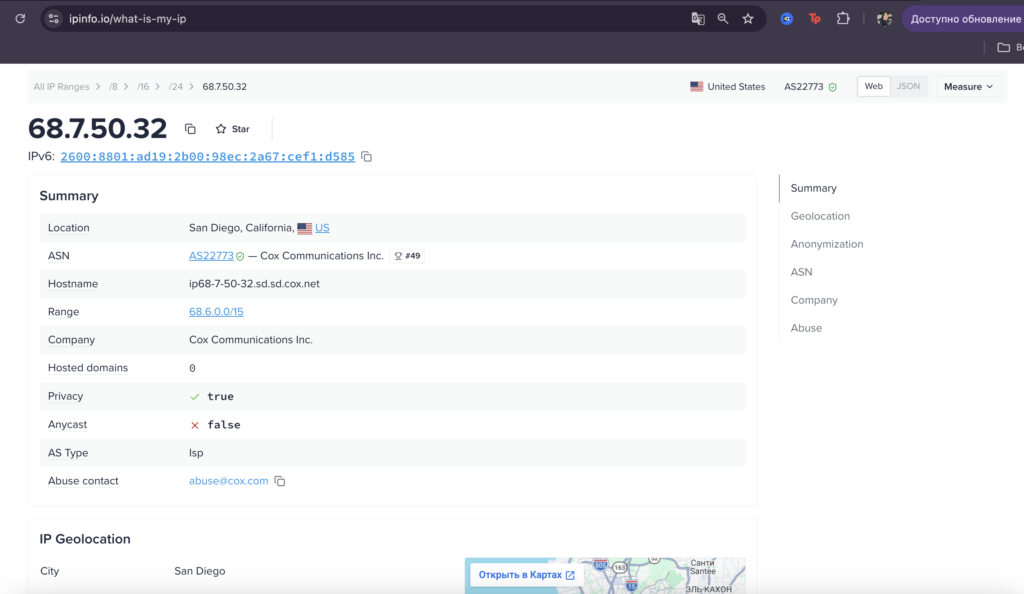
IPinfo is the default choice when geolocation has to be programmatic. The JSON is clean, the endpoints are documented properly, and the data model keeps core geolocation separate from the ASN, company, carrier and privacy-detection datasets. The free tier covers basic geolocation at modest volume.
Limitations: privacy detection, company and carrier data all sit behind paid tiers. Free accounts get geolocation and little else, which will not take you far if you are validating proxies.
3. MaxMind GeoIP2
Best for: organizations that need geolocation accuracy at scale without external API calls.
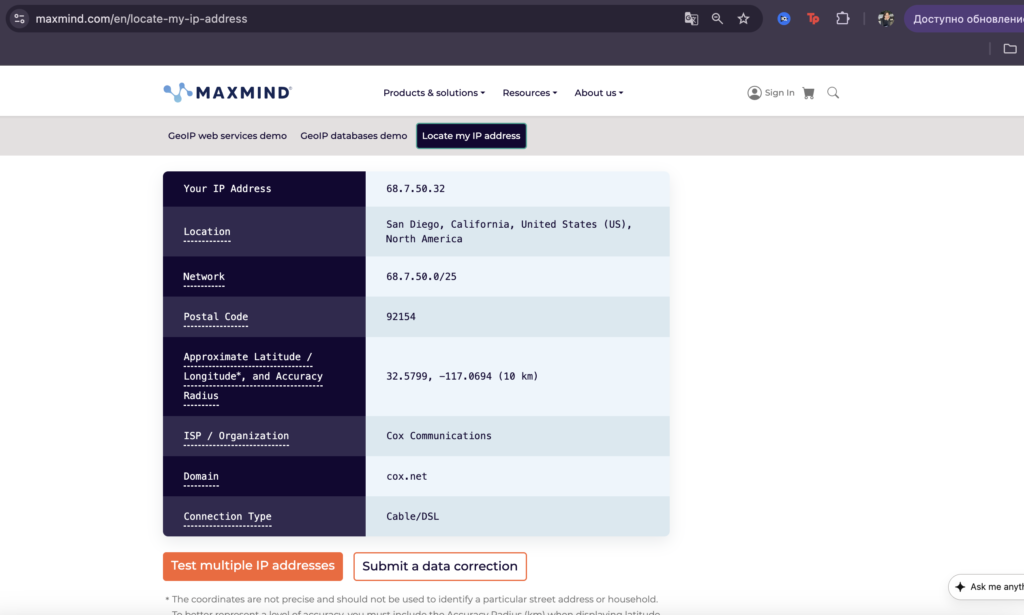
MaxMind has been in IP geolocation for over twenty years and turns up inside fraud systems, ad tech and content licensing stacks. Its distinguishing feature is the downloadable MMDB database. You run lookups locally, so nothing leaves your infrastructure and there is no API latency to budget for. Plenty of security teams cannot use anything else.
Limitations: you cannot just paste an address in and get an answer. MaxMind is a dataset you integrate. Proxy and VPN detection is thin next to dedicated anti-fraud tools, and the free GeoLite databases lose noticeable accuracy at city level.
4. DB-IP
Best for: self-hosted lookups on a budget.
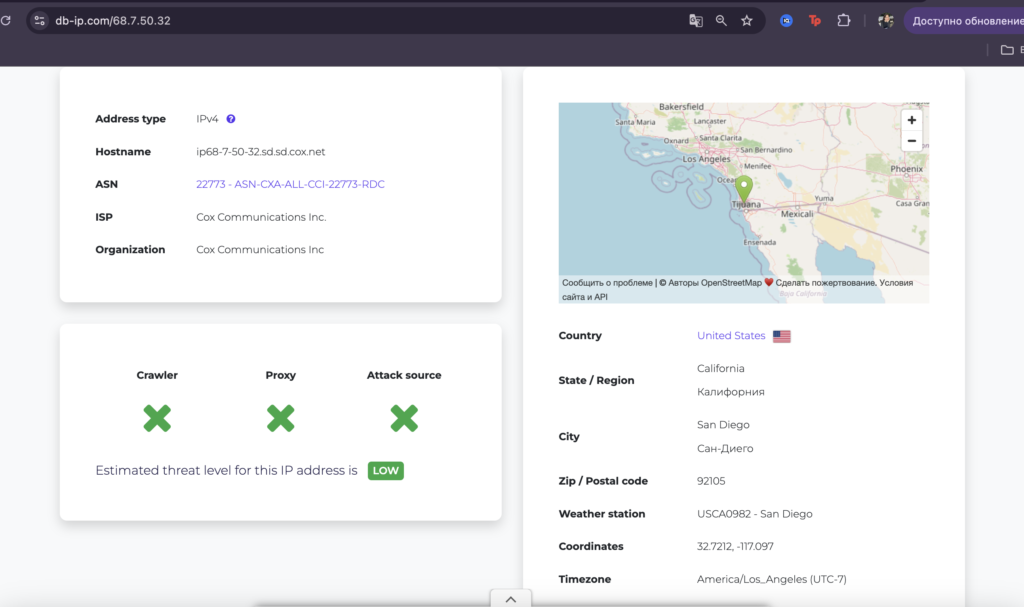
DB-IP follows the MaxMind model: downloadable databases plus a web lookup and an API, with a more generous free Lite tier. It returns country, region, city and ISP or organization, and it supports range and bulk matching, so you can check an entire log file rather than one event at a time.
Limitations: the Lite databases trade accuracy for price, and the risk signals are coarse. You get a threat level of low, medium or high plus three yes/no flags for crawler, proxy and attack source, with no explanation of what produced them.
5. IP2Location
Best for: offline enrichment of large IP datasets.
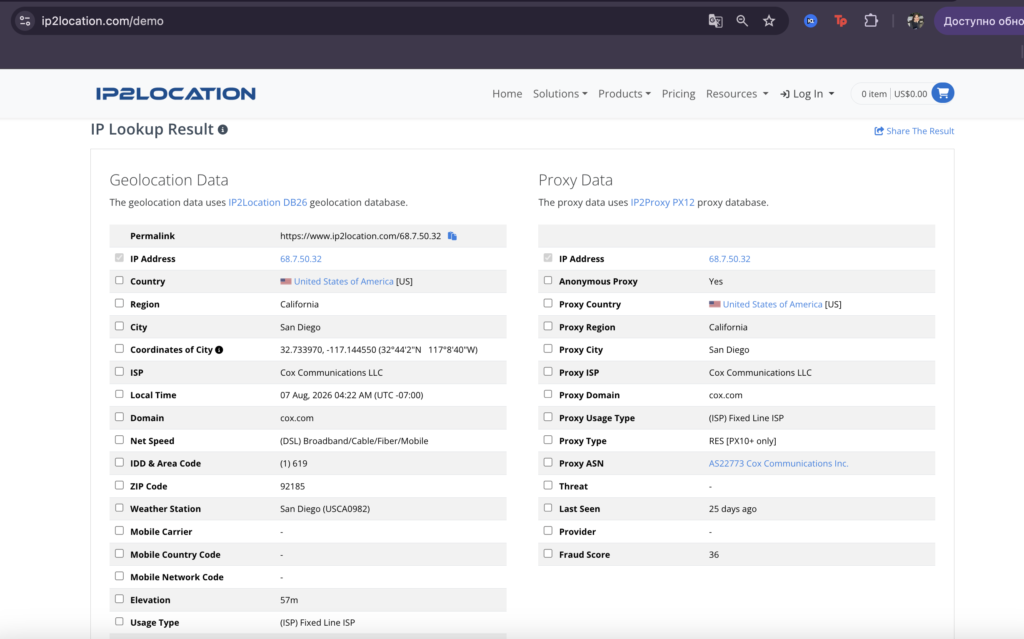
Similar territory to DB-IP: downloadable databases in several precision tiers, plus a web demo and an API. Strong on bulk workflows where you need to turn a column of IP addresses into structured geographic and network fields. It also runs a separate proxy database alongside the geolocation one, which returns an anonymous-proxy flag, a proxy type and a fraud score. In our test it was the only tool of nine that identified the address as a proxy.
Limitations: the free web demo is heavily rate-limited, so real use means buying a database tier.
6. ip-api.com
Best for: quick scripted lookups when you do not want to manage an API key.
No registration, no key. You get JSON or XML responses, batch support for up to 100 addresses per call, and basic proxy and hosting flags. That is usually enough for a throwaway script or a personal project.
Limitations: free use is non-commercial only, and there is a per-minute rate limit that any scraping job will hit almost immediately. HTTPS requires a paid plan, which rules it out for anything privacy-sensitive.
7. WhatIsMyIPAddress
Best for: non-technical one-off checks.
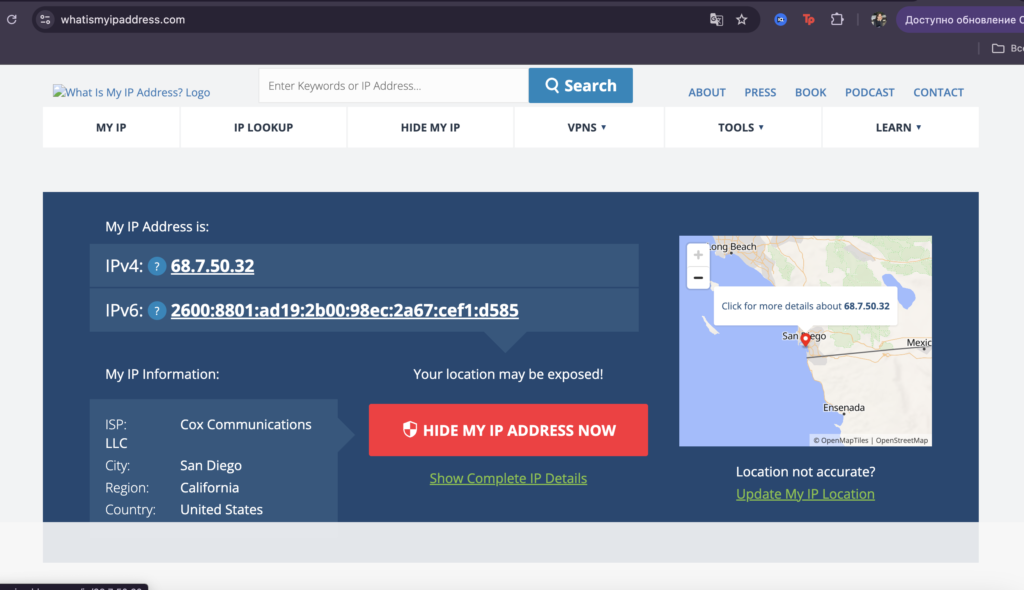
The page shows your public IP immediately, and you can paste in any address to get country, state, city, ISP and a blacklist status check. It is the tool you send to a colleague who does not want to think about ASNs.
Limitations: VPN and proxy detection here is unreliable enough that you should not base a decision on it.
IP reputation and fraud score tools
Geolocation tells you where an address sits. Reputation data covers its history: who has complained about it, and what it has been caught doing. If you keep getting blocked or challenged and cannot work out why, these two answer the question.
8. AbuseIPDB
Best for: finding out whether an address has been reported by other people.
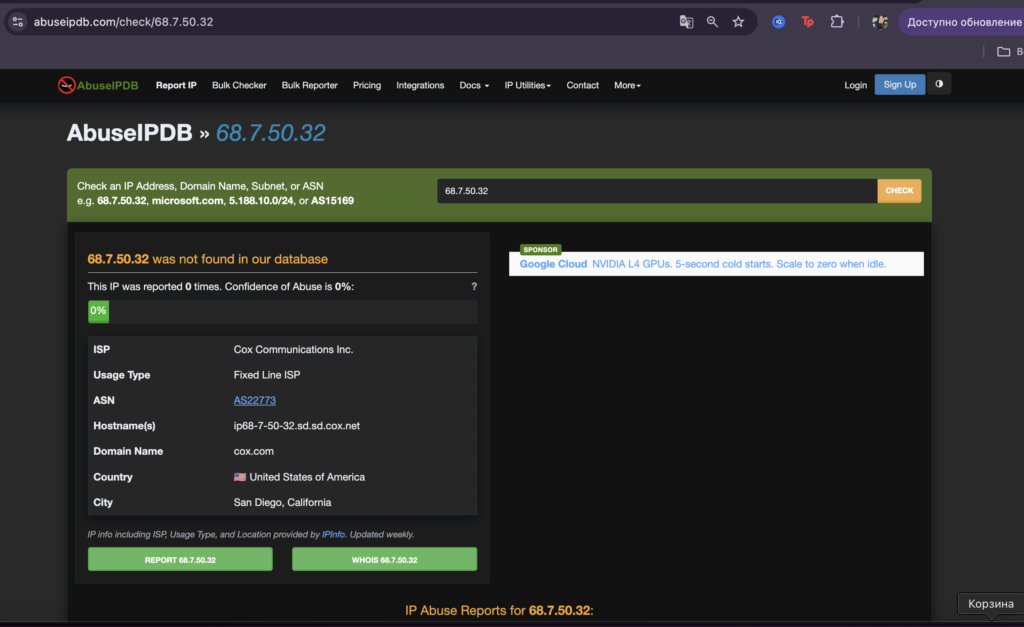
AbuseIPDB is a community abuse database. Each address carries a confidence-of-abuse percentage built from user reports, tagged by category: SSH brute force, spam, web attacks, port scanning. So AbuseIPDB tells you what already happened to an address. Predicting what it will do next is somebody else’s job.
Limitations: report quality varies, and a single vindictive reporter can drag a clean address down. Coverage skews toward server and datacenter IPs; residential addresses are sparsely represented.
9. Scamalytics
Best for: a fast second opinion on a fraud score.
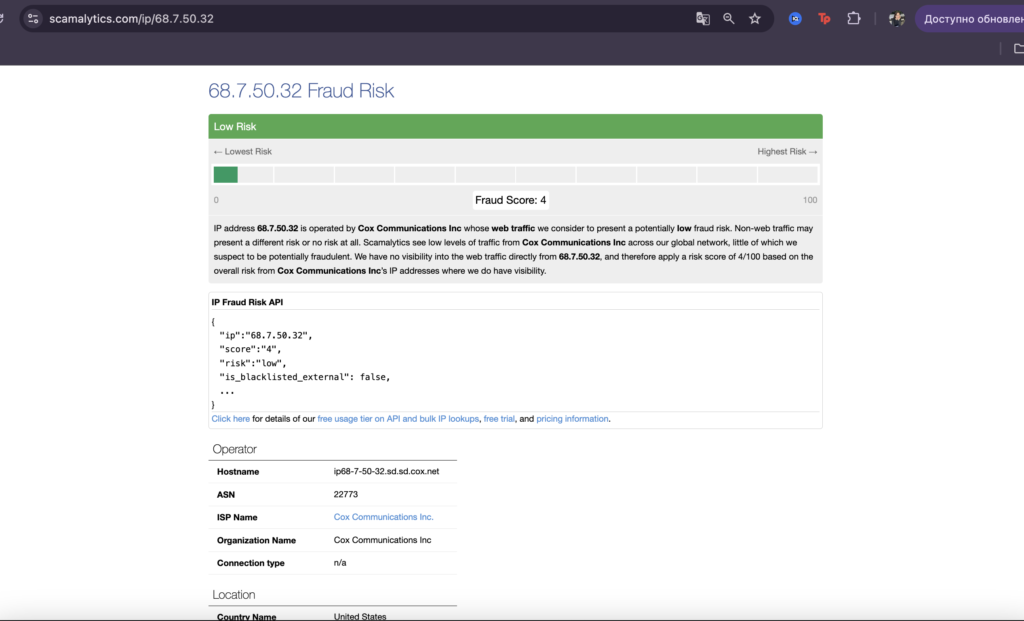
A free web lookup returning a fraud risk rating and basic network context. Its value comes from being a separate vendor with a separate model behind it. When Scamalytics and IP2Location agree on an address, the signal gets much stronger.
Limitations: it explains very little about how the score is derived, so use it to confirm what another tool has already told you.
We ran the same IP through nine lookup tools. Here is where they disagreed
Methodology. On 7 August 2026 we took one residential proxy exit address, 68.7.50.32, and ran it through every tool on this list inside a single session. Same address, same morning, no rotation between checks.
Every tool agreed that the address belongs to Cox Communications on AS22773, in San Diego, California, with reverse DNS ip68-7-50-32.sd.sd.cox.net. Below that layer, almost nothing was unanimous.
Results
| Tool | Postal code | Coordinates | Proxy flag | Risk score |
|---|---|---|---|---|
| NodeMaven IP Lookup | 92101 | 32.72, −117.10 | proxy, vpn, tor, hosting, mobile: all no | Abuse risk 4/100 |
| IPinfo.io | 92101 | 32.7157, −117.1647 | privacy detection is a paid add-on | — |
| MaxMind GeoIP2 | 92154 | 32.5799, −117.0694 (±10 km) | not in the free lookup | — |
| DB-IP | 92105 | 32.7212, −117.0970 | crawler, proxy, attack source: all no | Threat level LOW |
| IP2Location | 92185 | 32.7340, −117.1446 | Anonymous proxy: yes, type RES | Fraud score 36 |
| ip-api.com | 92154 | 32.5799, −117.0694 | proxy: false, hosting: false | — |
| WhatIsMyIPAddress | not shown | not shown | not shown | — |
| AbuseIPDB | not shown | not shown | not offered | 0 reports, 0% confidence |
| Scamalytics | not shown | not shown | not offered | Fraud score 4/100 |
Four postal codes for one address
Six tools returned a postal code and four of them were different: 92101, 92154, 92105 and 92185. All four are real San Diego codes. Between them they stretch from downtown to the Mexican border, and 92185 is a PO-box code with no residential population. If any part of your workflow depends on ZIP-level targeting, this is the row to look at twice.
An 18-kilometre spread on the coordinates
Four tools placed the address in central San Diego, within roughly two kilometres of each other. MaxMind and ip-api put it about 18 km further south, close to the border crossing at San Ysidro. Only MaxMind was upfront about the uncertainty, publishing an accuracy radius of 10 km beside the coordinates. Ten kilometres is wide enough to cross most city boundaries. The others print latitude and longitude to four decimal places and say nothing about confidence.
Nine tools, fewer than nine opinions
MaxMind and ip-api returned identical values. Same postal code, same latitude, same longitude, digit for digit. Checking one against the other produced no new information.
That pair was not alone. AbuseIPDB prints a line under its result panel: the ISP, usage type and location fields it displays come from IPInfo. NodeMaven and DB-IP landed within about 300 metres of each other, closer than any other pair on the map. NodeMaven and Scamalytics returned exactly the same risk number, 4 out of 100. The same thing happened, at 14 and 14, on a second address we spot-checked earlier that day.
Nine tools, then, produced closer to five independent readings. If your cross-check routine is “look it up somewhere else and see if it matches,” read the small print first and find out whose data you are looking at the second time.
One tool out of nine saw the proxy
IP2Location flagged the address as an anonymous proxy of type RES and gave it a fraud score of 36. Its proxy database had last seen the address 25 days earlier.
Nobody else did. NodeMaven, DB-IP and ip-api each explicitly reported no proxy. IPinfo keeps privacy detection behind a paid tier, MaxMind does not offer it in the free lookup, and the remaining three do not attempt the question.
The address was a residential proxy, so IP2Location was right and the rest were wrong. The others still did their job. A general geolocation database is built to answer “where is this address.” A proxy database is built to answer “has this address been seen doing proxy work.” Those are separate products with separate data behind them, and the free tool that answers the first question well will usually tell you nothing about the second.
Three risk scores, three different meanings
The scores look comparable. Put them side by side and they turn out to be measuring three different things.
Scamalytics returned 4 out of 100. Its own result page explains the number: Scamalytics has no visibility into web traffic from this specific address, so it falls back on the overall risk it observes across Cox Communications addresses where it can see traffic. The score describes the ISP. Your address contributes nothing to it.
AbuseIPDB returned 0 reports and 0% confidence, and stated that the address was not found in its database at all. That is a different claim again. That is absence of evidence, printed as a zero. Nobody has filed a complaint, which is a weaker statement than the number looks.
IP2Location returned 36, and that number moved because its proxy database had actually seen the address. Of the three, it is the only one built on something observed about this specific IP.
Three numbers on one screen, and only one of them is about the address. Before you act on any risk score, find out which of the two the tool is describing: your address, or the neighbourhood it sits in.
What this means for your workflow
No single IP checker is authoritative. Registry data stays consistent across tools, because it all comes from the same registries. Everything downstream of that is a vendor’s model, and models disagree.
In practice:
- Check that your two vendors are really two vendors. Of the nine tools here, at least four were reading from two upstream sources between them.
- Ask what a risk score is scored on. A score built from ASN-level averages and a score built from proxy sightings are different measurements wearing the same clothes.
- Use a proxy-specific database when the proxy question matters. Eight of nine general lookup tools had nothing useful to say about it.
- Trust ASN and reverse DNS over city-level geolocation. Every tool agreed on AS22773 and on the Cox hostname. On postal code and coordinates together, no two tools matched except the pair sharing a dataset.
- A clean lookup is not the whole picture. If your browser is leaking your real IP underneath the proxy, no lookup result will show you that.
How to choose the right IP lookup tool
| What you’re trying to do | Reach for |
|---|---|
| See what a website sees from my connection | NodeMaven IP Lookup |
| Verify a proxy list actually matches the country I bought | NodeMaven IP Lookup batch mode, ip-api.com |
| Work out why a platform keeps blocking me | IP2Location, then AbuseIPDB and Scamalytics |
| Check an address against community abuse reports | AbuseIPDB |
| Enrich IP data inside an application | IPinfo.io, ip-api.com |
| Run lookups locally without an external API call | MaxMind GeoIP2, DB-IP, IP2Location |
| Confirm my proxy isn’t leaking my real IP | Not a lookup job. Use a DNS leak test and a WebRTC leak test |
If you are testing proxies rather than individual addresses, our step-by-step guide to testing a proxy covers speed, stability and geo accuracy alongside the reputation checks above.
Start with your own IP
The fastest way to understand what any of this means for your setup is to look at your own address. Run it through the free IP lookup tool and read what comes back. Does the location match where you expect to appear? Does the ISP look like a consumer provider or a hosting company?
If the answers do not match what your workflow needs, the checker is doing its job. Look at the addresses. NodeMaven’s residential, mobile and ISP proxies are filtered before they reach you, which is why they tend to come back clean across independent reputation tools. The only way to know is to check.


