Bing scraping with Python: a complete guide to scraping Bing search results



Bing scraping means pulling structured data out of Bing’s search result pages with code instead of copying it by hand. Developers scrape Bing to track rankings, monitor competitors, build research datasets, or feed content pipelines with fresh search data.
Bing is also a lot friendlier to work with than Google. Its HTML is more predictable, its anti-bot systems are less aggressive, and its pagination is dead simple. That makes it a great place to learn scraping fundamentals before tackling harder targets.
By the end of this guide you will have a working Python scraper that sends requests, parses results, walks through multiple pages, handles errors, and exports clean data to CSV or JSON. We will also cover how proxies fit into a serious scraping setup once you move past a handful of test queries.

Scale your Bing scraper with clean residential and mobile proxies. Start with NodeMaven from $3.50 and get 750 MB included
What is Bing scraping?
Every time you search on Bing, the server returns a full HTML page. That page is called a SERP, short for search engine results page. Scraping Bing means sending that same kind of request programmatically and pulling structured data out of the raw HTML.
There are two ways to get that data:
- HTML scraping
Request the page yourself, parse the markup, extract what you need.
- APIs
Use a service that returns structured JSON instead of HTML, so you skip the parsing step entirely.
This guide focuses on HTML scraping since it gives you full control and costs nothing but your own infrastructure. Here is the basic flow:
Typical use cases include rank tracking, SEO competitor research, market intelligence, news monitoring, SERP scraping and building training data for NLP projects.
Why scrape Bing instead of Google?
Google gets all the attention, but Bing is often the more practical target for scraping projects. It still holds a meaningful share of search traffic, and its result pages are much easier to work with.
| Factor | Bing | |
| HTML structure | Simple and consistent class names | Frequently obfuscated and minified class names |
| Anti bot protection | Moderate protection with rate limiting | Aggressive protection with JavaScript challenges and CAPTCHAs |
| SERP stability | Layout changes infrequently | Layout changes often and can break selectors |
| Shopping results | Accessible in standard HTML | Often requires a dedicated API or additional rendering |
| Image results | Easy to parse from HTML responses | Frequently loaded dynamically with JavaScript |
| News results | Available in standard page markup | Often embedded inside dynamic widgets |
None of this means Bing is unprotected. It still rate limits aggressive traffic and blocks obvious bot patterns. But the barrier to entry is lower, which makes it a better starting point for most projects.
What data can you scrape from Bing?
A standard Bing SERP contains more than just blue links. Depending on the query, you can extract:
- Titles of organic results
- URLs pointing to the source page
- Snippets, the short description under each result
- Images from image search or inline image carousels
- Shopping products, including price and merchant when present
- News articles, with source and timestamp
- Related searches, useful for keyword expansion
Not every field appears on every SERP. A local business query pulls different data than a product query, so your parser should handle missing fields gracefully rather than throwing an error.
This is also why scraping data from Bing searches works well for competitive research. A single query can return organic results, related searches, and sometimes shopping or news all at once.
Is Bing scraping legal?
This comes up in almost every scraping project, and the honest answer is that it depends on how you do it.
Scraping publicly available pages, the kind anyone can view without logging in, is generally treated as legal in most jurisdictions. Laws vary by country, and this article is not legal advice. You can receive more information on this topic in our blog about scraping legality.
A few things to keep in mind:
- Check robots.txt. It signals what the site owner prefers, even if it is not legally binding everywhere.
- Respect rate limits. Hammering a server with requests can cross into abuse regardless of what you’re collecting.
- Read the terms of service. Bing’s terms restrict certain automated access, so commercial use at scale should be handled carefully.
- Scrape responsibly. Add delays, avoid overloading servers, and never scrape personal or gated data.
If your project scrapes at any real scale or feeds a commercial product, talk to a lawyer familiar with data collection law in your region.
Requirements
You only need a handful of libraries to get a working scraper running.
- requests for sending HTTP requests
- beautifulsoup4 for parsing HTML
- pandas for structuring and exporting data
- lxml as a faster parser backend for BeautifulSoup
- Optional: selenium if you ever need to render JavaScript-heavy pages
That’s it for the core setup. We’ll add proxy support later once we get into scaling.
Avoid CAPTCHAs and IP blocks while scraping Bing. Use premium residential and mobile proxies from NodeMaven starting at $3.50
How to scrape Bing search results with Python
Here is the full workflow we’re building toward: create a session, send a request with proper headers, parse the results, walk through pages, and export everything to a file. Each piece builds on the last one.
Create a requests session
A session object reuses the underlying TCP connection across requests, which is faster and more realistic than firing off isolated requests.get() calls every time.
Setting a realistic User-Agent and Accept-Language header matters. Requests without them look obviously automated and get flagged faster.
Send the request
Wrap every request in a timeout and exception handling. Production scrapers fail on network errors constantly, and your code needs to survive that.
Notice the exponential backoff between retries. A fixed delay is fine for testing, but scaling this up needs the delay to grow with each failed attempt.
Parse search results
Bing organizes each organic result inside a predictable container element, which makes selecting title, URL, and snippet straightforward with BeautifulSoup.
Always guard against missing elements. Bing occasionally renders results without a snippet, and a script that assumes every field exists will crash on the first edge case.
Handle pagination
Bing paginates through a query parameter called first. The first page has no parameter at all, page two starts at 11, page three at 21, and so on in steps of 10.
The two-empty-page rule matters here. Bing occasionally returns a thin or empty page in the middle of a result set, and stopping on the first empty page alone will cut your data short.
Collect Bing search results reliably with premium rotating residential and mobile proxies. Get started from just $3.50
Export results to CSV
Once you have a list of dictionaries, pandas turns it into a clean file in one line.
Deduplicating by URL is worth doing here, since overlapping pages sometimes return the same result twice.
Advanced Bing scraping techniques
A scraper that works for ten queries in testing often falls apart at a thousand queries in production. These techniques close that gap.
- Retry logic
Already built into fetch_page above, but tune retry counts based on how critical each query is.
- Exponential backoff
Doubling or tripling the delay after each failure keeps you from hammering a server that’s already rate limiting you.
- Rotating User Agents
Cycling through a pool of realistic browser strings makes traffic look less uniform.
- Persistent sessions
Reuse one requests.Session() per worker instead of creating new connections constantly.
- Random delays
A fixed delay between requests is a fingerprint in itself. Randomize it within a range.
- Structured logging
Log every failure with enough context to debug later without re-running the whole job.
None of these tricks work forever on their own. Once you’re running hundreds or thousands of queries a day, the real bottleneck becomes your IP address, not your code.
Bing search API vs HTML scraping
Microsoft used to offer an official Bing Search API, though its availability and pricing have shifted over time, so it’s worth checking current terms before relying on it for a production project.
| Factor | Official API | HTML Scraping |
| Data format | Clean JSON responses | Raw HTML that requires parsing |
| Cost | Per request pricing | Only infrastructure costs such as proxies and servers |
| Reliability | Stable API contract | Can break when Bing changes its markup |
| Data depth | Limited to documented fields | Access to anything visible on the page |
| Rate limits | Defined by your API plan | Determined by Bing’s bot detection systems |
| Setup time | Fast, simply call the endpoint | Slower because you need to build and maintain a parser |
Use the official API when you need a small, predictable volume of queries and don’t want to maintain parsing code. Use HTML scraping when you need data fields the API doesn’t expose, or when you’re scraping at a volume where API costs add up fast.
Most teams searching for a Bing search scraping API end up trying both at some point. The API is faster to set up, and HTML scraping wins once you need fields the API doesn’t cover or you’re running a high query volume where per-request pricing gets expensive.
Build production-ready Bing scrapers with high-quality residential and mobile proxies. Start your NodeMaven trial for $3.50 with 750 MB included
Common challenges
Every Bing scraper runs into the same handful of problems eventually.
- 403 Forbidden
Usually means your request headers look automated, or your IP has been flagged already.
- 429 too many requests
You’re sending requests faster than Bing’s rate limit allows for that IP.
- CAPTCHAs
Bing shows these when it’s confident a request is automated. Slowing down and rotating IPs reduces how often you see them.
- IP bans
Repeated aggressive requests from one IP can get it blocked for hours or longer.
- Geo restrictions
Some SERP features, like local results or region-specific news, only show up when the request originates from that region.
- HTML changes
Bing updates its markup periodically. A selector that works today might silently return nothing next month.
Most of these come down to one root cause: too many requests from too few IP addresses, sent too quickly, without enough variation to look human.
Using residential proxies for Bing scraping
Once your scraper needs to run daily, cover multiple regions, or process a large keyword list, a single IP address becomes the bottleneck. This is where proxies come in.
Residential proxies route your requests through real ISP-assigned IP addresses instead of easily flagged datacenter ranges. That matters for scraping because search engines treat datacenter traffic with much more suspicion.
A few concepts worth understanding:
- Rotating proxies assign a new IP for each request, which spreads volume across a large pool automatically.
- Sticky sessions keep the same IP for a set period, useful when you need pagination requests to stay consistent within one search session.
- Geo targeting lets you request IPs from a specific country or city, so you can scrape region-specific SERPs accurately.
- IP reputation affects how often you hit CAPTCHAs. Clean residential IPs generally get flagged far less than reused datacenter IPs.
This is where a service like NodeMaven fits into the workflow. NodeMaven provides residential proxies with sticky sessions and city-level geo targeting, which covers the two things that matter most for search engine scraping: looking like real traffic, and controlling exactly where that traffic appears to come from.
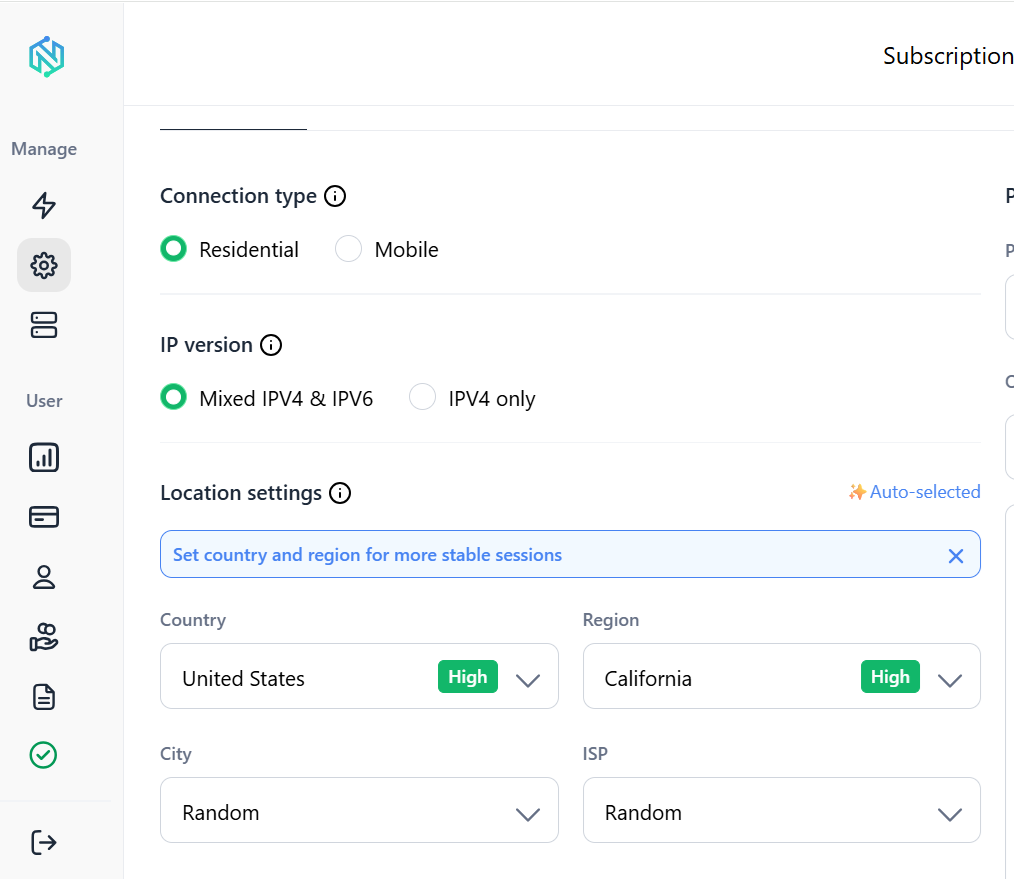
Here’s how proxy support plugs into the scraper we already built:
Best practices
- A quick checklist before you take a Bing scraper into production:
- Set a realistic User-Agent and Accept-Language on every request
- Always use a timeout, never let a request hang indefinitely
- Add retry logic with exponential backoff
- Randomize delays between requests instead of using a fixed sleep
- Rotate User Agents across a small, realistic pool
- Use residential proxies once volume goes past a handful of daily queries
- Deduplicate results by URL before exporting
- Log failures with enough detail to debug without re-running the job
- Check robots.txt and stay within reasonable rate limits
- Handle missing fields gracefully instead of assuming every result is uniform
Scrape Bing at scale without rate limits. Premium residential and mobile proxies from NodeMaven start at just $3.50 with 750 MB included
Frequently asked questions
Conclusion
Scraping Bing search results with Python comes down to a few core pieces: a properly configured session, careful parsing of the result markup, reliable pagination, and solid error handling around all of it. Bing’s predictable structure makes it a forgiving place to build these skills.
The code in this guide is a solid foundation for a working scraper, not just a toy example. As your query volume grows, the main constraint shifts from your parsing logic to your IP reputation, which is exactly where residential proxies and sensible rate limiting start to matter most.