
9 лучших браузеров для скрапинга в 2026 году



Скрейпинг-браузер это браузер, который работает на чужих серверах. Провайдер управляет самим браузером, его отпечатком, прокси, через которые идет трафик, и прохождением антибот-проверок. Вы отправляете инструкции и получаете обратно данные.
В этом руководстве разобраны девять из них. Они расставлены по задаче, с которой каждый справляется лучше всего, а не по общей оценке, потому что главное различие между ними не в функциях. Оно в том, за что именно с вас берут деньги.
Раскрытие информации: браузер для скрапинга NodeMaven это наш собственный продукт, и он стоит первым в этом списке. Мы прямо указали, в какой задаче он выигрывает, и назвали ограничения, где он проигрывает, чтобы вы могли проверить логику.
Все написанное здесь исходит из того, что вы собираете общедоступные данные, в рамках закона и условий использования сайта. Ни один инструмент этого не меняет.
Скрейпинговый браузер
Скрейпинг-браузер это размещенный в облаке браузер, где четыре вещи предоставляются как единый сервис: сам браузер, его отпечаток пальца, прокси-слой и прохождение антибот-проверок. Провайдер обеспечивает его работу. Вы управляете им удаленно.
Именно этот набор и определяет категорию. Она определяется не тем, как вы к нему подключаетесь. Самый распространенный способ это подключение по Chrome DevTools Protocol через Puppeteer или Playwright, и его поддерживают все инструменты из списка. Но некоторые из них принимают и обычные вызовы API, а часть уже понимает инструкции на обычном английском языке и возвращает структурированный JSON. Последний вариант означает, что скрейпинг-браузер может работать внутри AI-агента без единого написанного вручную селектора.
Вот в чем отличие от самостоятельного запуска headless-браузера. С локальным Playwright вы сами отвечаете за парк браузеров, настройку прокси, правку отпечатков и масштабирование. И все четыре пункта вам приходится поддерживать в актуальном состоянии по мере изменения методов детекта. Со скрейпинг-браузером всем этим занимается провайдер, а вы пишете автоматизацию.
Отсюда следуют две вещи, и обе важны еще до сравнения цен. Сессии одноразовые, поэтому каждая начинается с чистого листа, если вы намеренно не сохраните профиль. И браузер работает на оборудовании, которого вы не видите, поэтому то, что именно тарифицирует провайдер, важнее заявленной цены.
Когда стоит выбрать его вместо API для скрапинга или антидетект-браузера
Эти три инструмента постоянно путают, хотя они решают разные задачи.
| Критерии | Скрейпинг браузер | API для скрейпинга | Антидетект-браузер |
|---|---|---|---|
| Что вы получаете | Управляемая удалённая сессия браузера | На входе URL, на выходе данные | Локальное приложение с сохранёнными профилями |
| Как этим управлять | Код, вызов API или запрос обычным текстом | Запрос с параметрами | Вручную, в окне браузера |
| Создан для | Сайты, где нужно реальное взаимодействие | Массовый сбор данных с множества URL | Мультиаккаунтинг, проверка рекламы |
| Кто это запускает | Провайдер | Провайдер | Вы, на своём компьютере |
Выбирайте скрейпинг-браузер, когда данные появляются только после какого-то действия: входа в аккаунт, бесконечной прокрутки, фильтра, по которому нужно кликнуть. Выбирайте скрейпинг-API, когда у вас тысячи URL и каждый отдает нужное вам уже с первого запроса. Выбирайте антидетект-браузер когда за клавиатурой должен сидеть человек.
9 лучших скрейпинг-браузеров: краткий обзор
| Инструмент | Лучшее для | За что вы платите | Стартовая цена |
|---|---|---|---|
| браузер для скрапинга NodeMaven | Командам, которые уже покупают резидентные прокси | Только трафик ротируемых прокси | Браузер бесплатно, трафик от $2.20/GB |
| Anchor Browser | Authenticated AI-agent workflows | Browser time, session creation, proxy traffic, and AI steps | Free credits, then $50/month plus usage |
| Bright Data Scraping Browser | Очень крупные проекты | Трафик | From $8.40/GB |
| Zyte API | Сложные скриптовые взаимодействия | Использованные запросы и функции | Custom |
| ZenRows Scraping Browser | Самая быстрая интеграция | Подписка плюс время сессии | $69/мес плюс $0,09/час |
| Scrapeless | цели с обилием CAPTCHA | длительность сеанса | $49/mo |
| Browserbase | AI-агенты, которым нужен повтор сессий | Часы работы браузера плюс GB прокси-трафика | Бесплатно, далее $20/мес |
| Hyperbrowser | Краулинг с высокой параллельностью | Кредиты за час работы браузера | На основе кредитов |
| Browserless | Самостоятельный хостинг или оплата по юнитам | Юниты времени работы браузера | Бесплатно, далее $25/мес |
| Steel.dev | Полностью самостоятельное развертывание | Ваши собственные серверы | Бесплатно, с открытым исходным кодом |
Управляемые браузеры со встроенной прокси-инфраструктурой
1. NodeMaven Scraping Browser: лучший вариант, если вы уже покупаете резидентные прокси
Здесь можно автоматизировать сайт с помощью AI-промпта, шаблона или кода. Именно вариант с промптом отличает его от большинства решений в этом списке, и на практике это менее абстрактно, чем кажется.
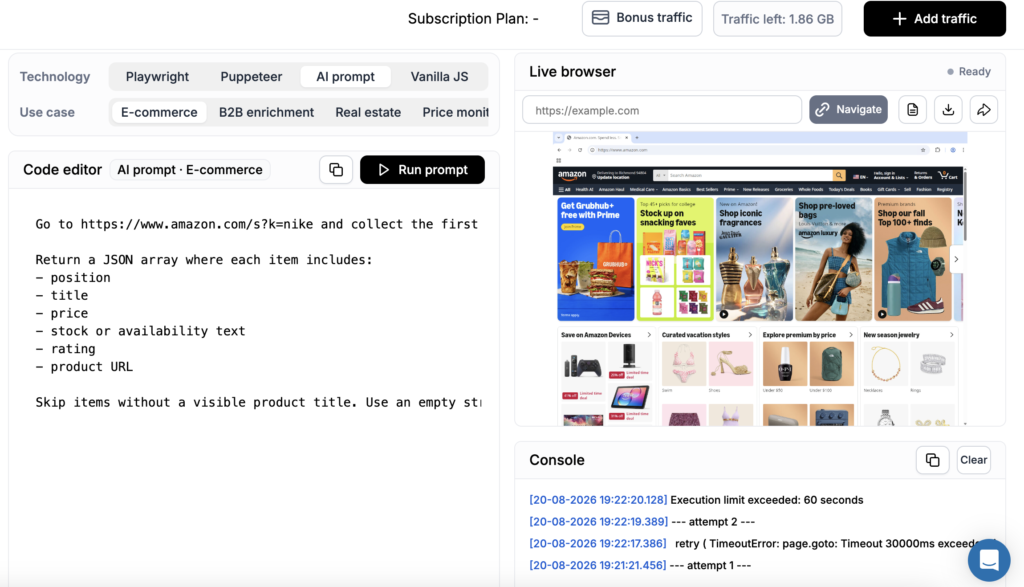
Под капотом это готовый к продакшену облачный браузер для скрейпинга и автоматизации сайтов, построенный на десятилетнем опыте NodeMaven в области прокси и антидетект-технологий. Он перемещается по сайтам, кликает по элементам страниц, заполняет формы и извлекает структурированные данные. NodeMaven берёт на себя прокси, антидетект и КАПЧА.
Он на первом месте по одной причине: браузер бесплатный. Подходящие пользователи NodeMaven платят только за трафик ротируемых прокси , который передают их сессии, а его цена начинается от $2.20 за GB. Работа браузера, Live browser, AI-запросы, решение CAPTCHA и записи сессий не добавляют к счёту ничего.
Browserbase, напротив, берёт от $0.10 до $0.12 за час работы браузера сверх включённого лимита. Browserless считает время браузера отрезками по 30 секунд и списывает 10 таких единиц за каждую CAPTCHA. ZenRows начисляет почасовое время сессий поверх подписки.
Для начала работы не требуется никакой локальной установки. В панели управления есть четыре вкладки Technology: Playwright, Puppeteer, AI-промпти Vanilla JS, а также четыре готовых сценария использования: e-commerce, обогащение данных B2B, недвижимость и мониторинг цен. Выберите комбинацию, и загрузится рабочий пример, который можно редактировать.
Дальше вы задаёте окружение: тип прокси, версию IP, локацию, ISP, ZIP-код и режим ротации. Настройте параметры браузера или выберите готовый профиль для повторного использования. Автоматическое решение CAPTCHA встроено в каждую сессию, а таргетинг работает как с IPv4, так и с IPv6, с закреплёнными, ротирующимися или неротирующимися сессиями и с применённым фильтром качества IP от NodeMaven applied.
Вы наблюдаете за автоматизацией прямо во время её выполнения. В Playground редактор кода расположен с одной стороны, а Live browser с другой, поэтому вы в реальном времени видите, как страница реагирует на каждый шаг. Консоль ниже логирует всё, включая повторные попытки: тайм-аут на page.goto отображается как неудачная попытка, и браузер сам пробует снова, а не прерывает выполнение.
Это значит, что вы отслеживаете каждый шаг, читаете вывод консоли, просматриваете результаты и исправляете ошибки перед повторным запуском, не покидая страницу. Всё остальное собрано на странице Sessions: активные и завершённые сессии, статус, ручное завершение, детали сессии и записи для отладки запусков, которые закончились несколько часов назад.
Профили браузера сохраняют состояние между сессиями. Cookies, локальное хранилище, кэш, история браузера и состояние авторизации сохраняются, поэтому рабочий процесс остаётся авторизованным до тех пор, пока действует сессия самого сайта.
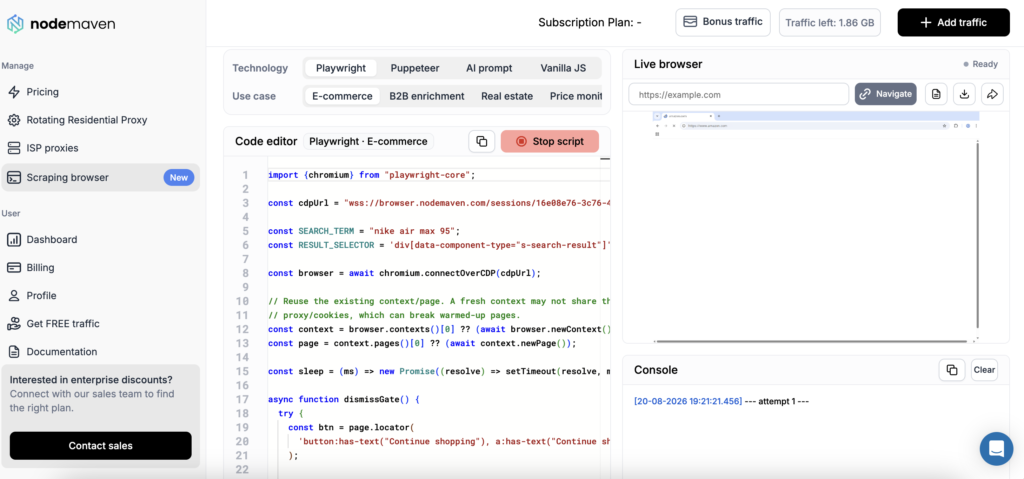
Продолжайте запускать автоматизации из панели управления или используйте Scraping Browser API, чтобы подключить их к своему приложению. Playwright и Puppeteer подключаются к запущенному браузеру через CDP, по эндпоинту сессии wss://browser.nodemaven.com, с помощью connectOverCDP. Аналитика по трафику и доменам идёт в комплекте.
Если вам нужны тысячи параллельных браузеров или рабочие процессы длительностью более получаса, этот инструмент не подойдёт без предварительного обращения в поддержку по поводу повышенных лимитов.
2. Bright Data Scraping Browser: лучший вариант для очень крупных проектов
Он работает через Puppeteer, Selenium или Playwright, обрабатывает рендеринг JavaScript и фингерпринтинг, включает решатель CAPTCHA и подключается к прокси-сети Bright Data. Есть playground с живым редактором кода и примерами скриптов.
Цена составляет около $8.40 за GB по модели pay-as-you-go или $499 в месяц за 69 GB, в 195+ локациях. Премиум-домены оплачиваются отдельно.
Однако при небольших объёмах это дорого. При небольших объёмах сначала посчитайте затраты для варианта с комплексным тарифом.
3. Zyte API: лучший вариант для сложных скриптовых взаимодействий
Главная особенность Zyte — TypeScript API, доступный через облачную среду VS Code. Вы пишете скрипты, которые имитируют реальные движения мыши и набор текста. Сервис также автоматически подбирает геолокацию под целевой сайт, что убирает один шаг настройки.
Тарификация основана на потреблении а ставка меняется в зависимости от сложности сайта и включённых функций. Zyte публикует калькулятор оценки. Proxyway отмечает что включение рендеринга JavaScript существенно повышает стоимость.
Плавающую ставку сложнее заложить в бюджет, чем фиксированную цену за GB. Прогоните калькулятор на своих реальных целевых сайтах.
4. ZenRows Scraping Browser: лучший вариант для самой быстрой интеграции
Сессии эмулируют ввод с мыши и клавиатуры и проходят через резидентный пул ZenRows более чем в 190 локациях.
Это стоит $69 в месяц плюс $0.09 за час сессии, с 14-дневным пробным периодом и лимитом 100 MB. Почасовая плата действует и во время пробного периода. Подписка также покрывает другие инструменты ZenRows.
Пользователи сообщают, что ему не хватает более продвинутого решения CAPTCHA. На хорошо защищённых сайтах именно это вас и остановит.
5. Scrapeless: лучший вариант для целей с обилием CAPTCHA
Его CDP API справляется с четырьмя типами проверок: reCAPTCHA, Cloudflare Turnstile, 5-секундная проверка Cloudflare и AWS WAF. Вы можете наблюдать за процессом решения и настраивать поведение решателя. Сервис также распознаёт динамический контент и по ходу корректирует настройки. Интеграция выполняется через Puppeteer или Playwright более чем в 195 локациях.
Начинается от $49 в месяц, с оплатой по длительности сессии, а не по трафику.
Облачные браузерные API для AI-агентов
Они создавались для AI-агентов, управляющих браузерами, а не для классического скрапинга.
6. Anchor Browser: best for AI agents working behind logins
Anchor Browser runs cloud browsers for agents that need to sign in, complete MFA, fill forms, and return to the same account later. Credentials are injected at typing time and remain hidden from the model and session logs.
Playwright and Puppeteer scripts connect through CDP, while MCP gives compatible agents direct access to browser tools. Its Action Index records successful workflows and replays them as code instead of asking a model to reason through every familiar step. In Anchor’s 300-task benchmark, this setup matched the reported success rate of a larger model while reducing cost per task by roughly 98 times.
The free plan includes $5 in monthly credits. Starter costs $50 per month, with separate charges for browser time, session creation, proxy traffic, and AI actions.
7. Browserbase: best for AI agents that need session replay
Удалённые браузеры, к которым вы подключаетесь через Playwright, Puppeteer или Selenium, а также через Stagehand, их open-source фреймворк для написания автоматизации на обычном английском языке.
Их страница с ценами перечисляет четыре тарифа. Free даёт 3 одновременных браузера, 1 браузерный час и сессии по 15 минут. Developer стоит $20 в месяц: 25 одновременных браузеров, 100 браузерных часов, далее $0.12 за час, и 1 GB прокси, далее $12 за GB.
Startup стоит $99: 100 одновременных браузеров, 500 браузерных часов, далее $0.10 за час, и 5 GB прокси, далее $10 за GB. Enterprise рассчитан на 250 и более одновременных браузеров. Автоматическое решение CAPTCHA включено в платные тарифы.
Следите за стоимостью прокси. При $10-$12 за GB это самый дорогой трафик из представленных здесь, а страницы, отрисованные в браузере, расходуют его очень много. При тяжёлом скрапинге прокси обходятся дороже, чем сами браузеры.
8. Hyperbrowser: best for high-concurrency crawls
Тарификация по кредитам, с решением CAPTCHA и stealth-режимом, включёнными по умолчанию. Заявлено отсутствие лимита на параллельность в платных тарифах.
Кредиты сложнее прогнозировать, чем фиксированную ставку, потому что одна и та же нагрузка стоит по-разному в зависимости от того, что именно она делает. Проверьте актуальный курс кредитов на странице цен самого Hyperbrowser, прежде чем строить на этом планы. Это также самая молодая платформа здесь, с более коротким послужным списком, чем у остальных.
9. Browserless: best for unit-based billing or self-hosting
Ключевое отличие - BrowserQL, GraphQL API, который заменяет значительную часть императивного кода на Playwright. Browserless также можно развернуть у себя, что важно, когда есть требования кместу хранения данных.
Его страница с ценами тарифицирует по юнитам, где юнит - это до 30 секунд времени подключения к браузеру. Переподключение начинает новый юнит. Free даёт 1 000 юнитов в месяц и 2 одновременных браузера. Prototyping стоит $25 в месяц за 20 000 юнитов и 10 одновременных браузеров. Starter - $140 за 180 000 юнитов и 40 одновременных. Scale - $350 за 500 000 юнитов и 100 одновременных, всё при годовой оплате.
Всё остальное тоже переводится в юниты. Трафик резидентных прокси стоит 6 юнитов за MB, датацентровых - 2 юнита за MB, а успешное решение CAPTCHA стоит 10 юнитов.
При ставке за перерасход $0.0017 на тарифе Starter 6 юнитов за MB дают примерно $10 за GB резидентного трафика, что находится в том же диапазоне, что и у Browserbase.
10. Steel.dev: best if you’d rather own the infrastructure
Бесплатный и с открытым исходным кодом. Вы разворачиваете его сами и платите только за свои серверы и за те прокси, которые к нему подключаете. Он не привязан к конкретному фреймворку и изначально рассчитан на self-hosting, с открытыми SDK.
Взамен вы берёте на себя эксплуатацию. Масштабирование парка браузеров, обновление версий, подключение прокси и поддержание актуальной защиты от антибот-систем - всё это становится вашей задачей. Это честный обмен, если у вас есть DevOps-команда и большие счета, и плохой - если их нет.
Open-source альтернативы, которые можно развернуть у себя
Camoufox, Patchright и nodriver закрывают слой фингерпринтинга вообще без какого-либо хостинг-сервиса. Это библиотеки, а не браузеры-как-сервис, поэтому инфраструктуру и прокси предоставляете вы, и вы же контролируете каждый уровень. Мы разобрали их и ещё одиннадцать в нашем руководстве по инструменты веб-скрапинга с открытым исходным кодом на GitHub.
Цены на скрейпинг-браузеры: за что берет деньги каждый провайдер
Заявленные цены здесь несопоставимы, потому что эти девять сервисов измеряют четыре разные вещи. Поэтому вот одна задача, посчитанная по тому, за что каждый провайдер реально выставляет счёт.
Задача: 10 000 страниц, требующих рендеринга, примерно по 2 MB каждая, около 12 секунд на каждую. Это порядка 20 GB трафика и 33 часа работы браузера. Ваши цифры будут другими. Важна сама структура счёта.
| Поставщик | Что расходует эта задача | Примерная стоимость |
|---|---|---|
| NodeMaven | ~20 GB трафика ротационных прокси | ~$44 по $2.20/GB, без платы за браузер |
| Bright Data | ~20 GB трафика | ~$168 at $8.40/GB |
| Browserbase Startup | 33 из 500 браузерных часов, 20 GB прокси (5 включены) | $99 + ~$150 на прокси ≈ $249 |
| Browserbase Developer | 33 из 100 браузерных часов, 20 GB прокси (1 включён) | $20 + ~$228 на прокси ≈ $248 |
| Browserless Starter | ~4 000 единиц браузерного времени, ~123 000 единиц прокси-трафика | Укладывается в план на 180 000 единиц за $140 |
| ZenRows | Подписка $69 + 33 часа сессий по $0.09 | ~$72 |
| Scrapeless | Подписка $49, оплата по длительности | $49 base |
| Hyperbrowser | ~33 браузерных часа в кредитах | Курс кредитов varies — плюс прокси |
| Steel.dev | Ваши серверы плюс ваши прокси | Без комиссии поставщика |
На большинстве платформ трафик обходится дороже, чем сам браузер. Посмотрите на Browserbase: 33 часа работы браузера покрываются тарифом, но 20 GB прокси-трафика добавляют сверху от $150 до $228. У Browserless та же история в других единицах: на прокси-трафик приходится примерно 97% того, что потребляет эта задача. Браузер редко бывает дорогой частью.
Оплата по времени означает, что вы платите за ожидание. Значительная часть любой браузерной сессии уходит на ожидание ответа сервера. При тарификации за час и за единицу это ожидание тоже оплачивается.
А значит, счёт определяет ставка за GB. В этой задаче разница между $2,20 и $12 за гигабайт превращается в $44 против $240 за идентичный результат. На этом фоне то, бесплатен ли сам браузер, почти не имеет значения.
Отрендеренная страница с изображениями и CSS весит от 1 до 3 MB. Те же данные, взятые с JSON-эндпоинта за ней, весят ближе к 50 KB. Найти этот эндпоинт значит сократить основную статью расходов на порядок, чьим бы браузером вы ни пользовались.
Чтобы получить свою реальную цифру вместо нашей оценки, проверка пропускной способности измеряет, во сколько обходятся ваши страницы. Это бесплатно и занимает пару минут.
Как выбрать подходящий инструмент под вашу задачу
Пройдите по этому списку и остановитесь на первом совпадении.
Уже покупаете резидентные прокси? Начните с NodeMaven Scraping Browser. Браузер не стоит ничего сверх трафика, за который вы и так платите.
Нужны тысячи одновременных сессий или сессии дольше 30 минут? Browserbase Enterprise или Bright Data. Лимиты параллельных сессий решат вопрос раньше, чем функциональность.
Строите AI-агента, а не скрапер? Browserbase ради Stagehand и записи сессий или Hyperbrowser ради параллельности.
Данные должны оставаться в вашей инфраструктуре? Browserless в self-hosted-варианте или Steel.dev.


