Как обнаружить и предотвратить утечки IP: полное руководство 2026



Большинство людей считают, что включение VPN или подключение к прокси мгновенно скрывает их личность в интернете. На самом деле это лишь часть картины. Ваш браузер, операционная система или сетевая конфигурация всё равно могут раскрывать информацию, которую сайты используют для идентификации вашего реального соединения.
Это называется утечкой IP.
Утечка IP происходит, когда ваш настоящий IP-адрес становится видимым, даже несмотря на то, что вы используете VPN, прокси или другой инструмент конфиденциальности. Одна утечка может раскрыть ваше местоположение, связать несколько аккаунтов между собой или снизить эффективность вашей настройки конфиденциальности.
Одна из самых распространённых причин — утечка WebRTC. Современные браузеры используют WebRTC для поддержки функций связи в реальном времени, таких как голосовые и видеозвонки.
Хорошая новость в том, что проверка вашей настройки занимает всего несколько секунд. Бесплатный сервис NodeMaven Тест утечки WebRTC помогает вам точно увидеть, что раскрывает ваш браузер. Он определяет публичные IP-адреса, локальные IP-адреса, поведение WebRTC и то, раскрывает ли ваш браузер информацию, которую сайты могут использовать для вашей идентификации.
Прежде чем заниматься скрапингом сайтов, управлять несколькими аккаунтами, запускать инструменты автоматизации или просто анонимно просматривать сайты, стоит потратить минуту на проверку того, что ваш браузер не раскрывает ваш настоящий IP.

Предотвратите утечки IP до того, как они произойдут. Начните с NodeMaven всего за $3.50 и получите 750 MB премиального трафика резидентных и мобильных прокси
Что такое утечка IP?
Утечка IP происходит, когда ваше устройство раскрывает IP-адрес, который должен оставаться скрытым.
Чтобы понять, почему это происходит, полезно знать разницу между типами IP-адресов, которые использует ваше устройство.
| Тип IP | Цель | Виден сайтам? |
| Публичный IP | Идентифицирует ваше интернет-соединение | Да |
| Частный IP | Используется внутри вашей локальной сети | Обычно нет |
Ваш публичный IP-адрес назначается вашим интернет-провайдером. Каждый сайт, который вы посещаете, видит этот адрес, если только вы не используете VPN или прокси.
Ваш частный IP-адрес используется только внутри вашей домашней или офисной сети. Как правило, сайтам никогда не должен требоваться доступ к нему.
Зачем сайтам нужен ваш IP-адрес
Всякий раз, когда вы посещаете сайт, ваш браузер отправляет запросы на сервер. Эти запросы включают ваш IP-адрес, чтобы сервер знал, куда отправить ответ.
Сайты также используют IP-адреса, чтобы:
- Определять ваше местоположение
- Предоставлять локализованный контент
- Обнаруживать подозрительную активность
- Предотвращать злоупотребления
- Применять ограничения по количеству запросов
- Определять повторных посетителей
Видеть IP-адрес совершенно нормально. Проблема начинается тогда, когда сайты видят не тот адрес.
Видимый IP против утёкшего IP
Видимый IP — это адрес, который вы намеренно показываете сайтам.
Например:
- Вы подключаетесь через резидентный прокси
- Сайт видит IP прокси
- Ваш настоящий домашний IP остаётся скрытым
Это ожидаемое поведение.
Утёкший IP — это другое дело.
Предположим, вы подключаетесь через VPN, расположенный в Германии. Сначала всё выглядит правильно. Затем ваш браузер отправляет WebRTC-запрос, который раскрывает ваш настоящий домашний IP в Австрии.
Теперь у сайта есть два IP-адреса:
Ваш VPN IP
Ваш реальный IP от интернет-провайдера
Эта неожиданная информация называется утечкой IP-адреса.
Практический пример
Представьте, что вы управляете несколькими аккаунтами на маркетплейсе.
Каждый аккаунт использует:
- Отдельный профиль браузера
- Отдельный прокси
- Отдельные cookies
Всё выглядит изолированным.
Однако один профиль браузера раскрывает ваш реальный IP через WebRTC.
Теперь платформа обнаруживает, что все аккаунты подключаются с одного и того же домашнего интернет-соединения.
Вместо отдельных пользователей она видит одну личность, управляющую несколькими аккаунтами. Это повышает вероятность ограничений аккаунта или дополнительной проверки.
Именно поэтому проверка на утечку IP перед использованием нового профиля браузера — это важная привычка.
Почему утечки IP имеют значение
Утечка IP — это не только вопрос конфиденциальности. Она может повлиять почти на любую активность, которая зависит от точной сетевой идентичности.
Вот несколько распространённых примеров.
Конфиденциальность
Ваш публичный IP часто раскрывает:
- Примерное местоположение
- Интернет-провайдера
- Страна
- Город
- Тип соединения
Даже если он не идентифицирует вас напрямую, он помогает сайтам составить профиль вашей активности в браузере.
Управление несколькими учётными записями
Многие платформы сравнивают IP-адреса разных аккаунтов.
Если несколько аккаунтов неожиданно используют один и тот же реальный IP, они могут быть связаны между собой.
Это особенно важно для:
- Продавцы в сфере eCommerce
- Партнерские маркетологи
- Менеджеры социальных сетей
- Команд поддержки клиентов
Веб-скрейпинг
Скраперы полагаются на ротацию IP для распределения запросов.
Если ваш браузер раскрывает ваш реальный IP, сайты могут проигнорировать прокси и вместо этого определить исходное соединение.
Это может привести к следующему:
- Более быстрая блокировка
- Больше CAPTCHA (узнайте, как обходить CAPTCHA в нашем руководстве)
- Более низкий процент успешного скрапинга
Автоматизация
Автоматизация фреймворки часто используют экземпляры браузера с разными прокси.
Если один браузер раскрывает информацию через WebRTC, среду автоматизации становится гораздо проще идентифицировать по цифровому отпечатку.
Реклама
Рекламные платформы отслеживают согласованность сети.
Предположим, ваш аккаунт входит в систему через прокси в Лондоне, тогда как WebRTC сообщает IP из Испании.
Такое несоответствие может спровоцировать дополнительную проверку или проверки на мошенничество.
Социальные сети
Платформы вроде Instagram, Facebook, LinkedIn и X отслеживают необычные схемы входа в аккаунт.
Если ваш браузер раскрывает неожиданный IP-адрес, они могут:
- Запросить подтверждение личности
- Потребовать двухфакторную аутентификацию
- Временно ограничить активность аккаунта
Обнаружение мошенничества
Современные системы обнаружения объединяют десятки сигналов.
Они сравнивают:
- Отпечаток браузера
- Файлы cookie
- Информацию об устройстве
- Часовой пояс
- IP-адрес
- Данные WebRTC
Даже один несогласованный сигнал может снизить уровень доверия, присвоенный вашей сессии.
Распространённые типы утечек IP
Не каждая утечка происходит по одной и той же причине. Некоторые возникают в вашем браузере. Другие исходят из сетевых настроек или конфигурации VPN.
Понимание этих различий значительно упрощает выявление проблемы.
1. Утечка WebRTC
Утечка WebRTC сегодня одна из самых распространённых утечек в браузере.
WebRTC расшифровывается как Web Real-Time Communication. Это браузерная технология, которая позволяет сайтам поддерживать такие функции, как видеозвонки, прямые трансляции и т. д.
Чтобы установить эти прямые соединения, браузеры обмениваются данными через STUN-серверы. STUN-сервер помогает вашему браузеру определить, какие IP-адреса доступны для связи.
Обычно этот процесс происходит незаметно, в фоновом режиме.
Проблема в том, что некоторые сайты могут получить доступ к этой информации через JavaScript.
В результате они могут узнать:
- Ваш публичный IP
- Ваш локальный IP
- Дополнительную информацию о сети
Для пользователей, полагающихся на прокси или VPN, это полностью сводит на нет саму цель сокрытия своей личности.
Как проверить наличие утечки WebRTC
Самый простой способ — использовать бесплатный тест на утечки WebRTC от NodeMaven перед началом любой сессии просмотра.
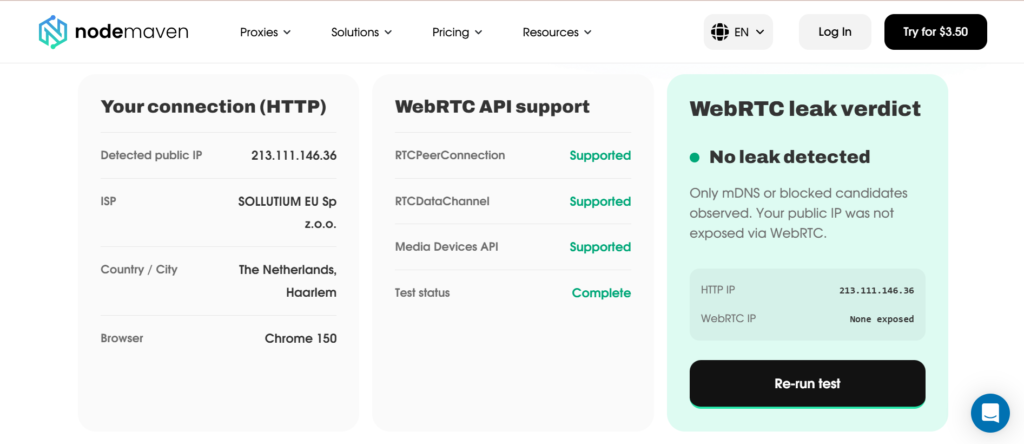
Тест выполняется прямо в вашем браузере и завершается всего за несколько секунд.
Он проверяет такую информацию, как:
- Публичный IP, обнаруженный через WebRTC
- Раскрытие локального или частного IP
- Поведение WebRTC в браузере
- Совпадает ли обнаруженный IP с вашим прокси или VPN
- Информация о браузере, к которой сайты могут получить доступ через WebRTC
Если сообщённый IP совпадает с вашим прокси или VPN, ваша конфигурация работает правильно.
Запуск этого теста каждый раз, когда вы создаёте новый профиль браузера, меняете прокси, подключаетесь к другому VPN, обновляете браузер или запускаете новую среду автоматизации, поможет сэкономить часы на устранение неполадок в будущем.
2. Утечка DNS
Не каждая утечка IP связана с WebRTC. Иногда браузер отправляет DNS-запросы за пределы защищённого туннеля, созданного вашим VPN или прокси.
Система доменных имён (DNS) преобразует понятные человеку доменные имена в IP-адреса. Например, когда вы заходите на example.com, ваше устройство сначала спрашивает у DNS-сервера, какой IP-адрес принадлежит этому домену.
В идеале эти DNS-запросы должны проходить через то же VPN- или прокси-соединение, что и остальной трафик. Если это не так, у вас DNS-утечка.
Как проверить наличие DNS-утечки
Самый простой способ проверить вашу конфигурацию — запустить бесплатный тест на DNS-утечки от NodeMaven.
Браузерный инструмент выполняется за секунды и показывает, какие именно DNS-резолверы отвечают на ваши запросы. Вы можете запустить как стандартный тест из 6 запросов для быстрой проверки конфиденциальности, так и расширенный тест из 18 запросов для более детального анализа.
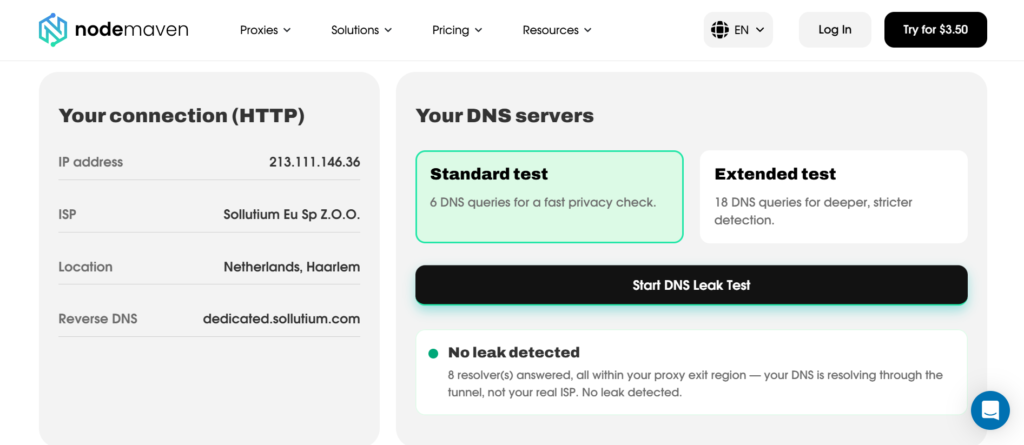
Результаты включают:
- IP-адреса DNS-резолверов
- Провайдер резолвера
- АСН
- Страна
- Тип резолвера
3. Утечка IPv6
Большая часть интернет-трафика по-прежнему использует IPv4, но распространение IPv6 продолжает расти во всём мире. Многие интернет-провайдеры теперь назначают оба типа адресов одному и тому же соединению.
Это создает проблему, если ваш VPN или прокси маршрутизирует только IPv4-трафик.
Ваш IPv4-адрес может быть корректно скрыт, тогда как IPv6-адрес остается раскрытым.
IPv4 против IPv6
| IPv4 | IPv6 |
| Более старый стандарт адресации | Более новый стандарт адресации |
| 32-битные адреса | 128-битные адреса |
| Большинство прокси его поддерживают | Некоторые прокси и VPN требуют дополнительной настройки |
| Пример: 192.168.1.10 | Пример: 2001:db8::1 |
Хотя утек только один адрес, ваше реальное местоположение больше не скрыто.
Именно поэтому многие специалисты отключают IPv6, если их VPN или прокси не поддерживает его корректно.
4. Неправильная настройка прокси или VPN
Не каждая утечка IP прокси вызвана браузерными технологиями. Иногда сама настройка выполнена неправильно.
Вот наиболее распространенные ошибки конфигурации.
Раздельное туннелирование
Раздельное туннелирование позволяет отдельным приложениям обходить VPN. Хотя в некоторых ситуациях это полезно, оно может случайно раскрыть ваш реальный IP.
Только расширение для браузера
Многие пользователи устанавливают только прокси-расширение.
Расширение маршрутизирует трафик браузера, но не каждую его функцию.
Некоторые запросы всё же могут обходить расширение. Для конфиденциальной работы используйте системные настройки прокси или программное обеспечение, предназначенное для полной маршрутизации трафика.
Отключившийся прокси
Иногда прокси отключается без явного уведомления браузером пользователя. Трафик тут же переходит на локальное интернет-соединение.
Без регулярной проверки вы можете несколько минут продолжать сёрфинг с вашим реальным IP, прежде чем заметите это.
Неправильная настройка прокси
Небольшая ошибка может раскрыть ваше реальное соединение.
Распространённые примеры включают:
- Неправильный протокол прокси
- Неправильная аутентификация
- Неподдерживаемые настройки браузера
- Приложения, обходящие настроенный прокси
- Устаревшие профили браузера
Это одна из причин, по которой опытные пользователи проверяют каждую новую настройку, прежде чем использовать её для важных задач.
Ваша конфиденциальность начинается с качественных прокси. Попробуйте NodeMaven от $3.50 и получите 750 MB трафика резидентных и мобильных прокси
Как проверить наличие утечки IP
Тестирование браузера занимает меньше минуты.
Гораздо проще обнаружить проблему до входа в важные аккаунты, чем после того, как они уже были связаны.
Выполните эти четыре шага.
Шаг 1. Найдите свой реальный IP
Прежде чем включать какие-либо инструменты конфиденциальности, запишите свой актуальный публичный IP-адрес. Это даст вам точку отсчёта.
Позже вы сможете сравнить его с IP, который раскрывает ваш браузер.
Если после подключения к VPN или прокси отображается тот же адрес, значит что-то работает неправильно.
Шаг 2. Включите VPN или прокси
Подключитесь с помощью предпочитаемой конфигурации.
Это может быть:
- A резидентский прокси
- A мобильный прокси
- Ан ISP прокси
- A VPN
- Антидетект-браузер с настроенным прокси
Прежде чем запускать тест, дождитесь полного установления соединения.
Шаг 3. Запустите бесплатный тест на утечку WebRTC от NodeMaven
Это самый важный шаг.
Бесплатный от NodeMaven Тест утечки WebRTC проверяет, раскрывает ли ваш браузер через WebRTC информацию, к которой могут получить доступ сайты.
В отличие от простого сервиса проверки IP, он фокусируется на одной из самых распространённых причин утечки идентичности браузера.
Одно из главных преимуществ инструмента NodeMaven — его простота. Тест выполняется прямо в вашем браузере и обычно завершается всего за несколько секунд.
Шаг 4. Проверьте DNS и IPv6
WebRTC — лишь одна из возможных утечек.
Также следует убедиться, что:
- DNS-запросы маршрутизируются правильно
- Трафик IPv6 защищён
- Ваш браузер сообщает ожидаемое местоположение
- Не появляются дополнительные IP-адреса
В совокупности эти проверки дают гораздо более полную картину вашей конфигурации приватности.
Как выглядит хороший тест на утечку IP
| Проверить | Ожидаемый результат |
| Публичный IP | Совпадает с VPN или прокси |
| Страна | Правильное местоположение |
| Тест утечки | Нет неожиданного публичного IP |
| Частный IP | Минимальное раскрытие или его отсутствие, где это возможно |
| Информация о браузере | Нет подозрительных несоответствий |
Как предотвратить утечки IP
Нет единственной настройки, которая предотвращала бы все типы утечек. Вместо этого сочетайте несколько полезных практик.
Используйте качественные резидентные прокси
Надёжные резидентные прокси реже создают проблемы с маршрутизацией, и им доверяет больше веб-сайтов.
Правильно настройте VPN
Убедитесь, что ваш VPN:
- Направляет весь трафик
- Защищает DNS-запросы
- Поддерживает IPv6 или безопасно отключает его
- Автоматически переподключается после разрывов
Безопасная конфигурация VPN снижает вероятность того, что непредвиденный трафик выйдет за пределы зашифрованного туннеля.
Управляйте WebRTC осторожно
WebRTC полезен для многих веб-приложений. Полностью отключать его не всегда практично.
Вместо:
- Используйте браузеры с хорошими средствами контроля конфиденциальности
- Проверьте настройки браузера
- Проверяйте поведение после обновлений
- Регулярно проводите тесты WebRTC
Настройте DNS правильно
Используйте доверенные DNS-серверы, предоставляемые вашим VPN или другим надёжным провайдером.
Некорректная маршрутизация DNS может раскрыть вашу активность в сети, даже когда ваш IP-адрес выглядит защищённым.
Проверьте настройки IPv6
Если ваш VPN или прокси полностью поддерживает IPv6, оставьте его включённым.
Если нет, отключение IPv6 может обеспечить лучшую защиту, пока не появится полноценная поддержка.
Тестируй регулярно
Это самая простая рекомендация, о которой чаще всего забывают.
Тестирование занимает меньше минуты.
Устранение блокировки аккаунта или восстановление среды для скрапинга может занять несколько дней.
Почему стоит проверять перед каждой сессией
Многие пользователи тестируют свою конфигурацию один раз и больше никогда не проверяют её. К сожалению, поведение браузера со временем меняется. Конфигурация, которая идеально работала в прошлом месяце, сегодня может выдавать информацию.
Общие причины включают:
- Обновления браузера
- Новые расширения браузера
- Изменения прокси
- Обновления операционной системы
- Обновления фреймворков автоматизации
- Изменённые профили браузера
Запуск бесплатного теста на утечку WebRTC от NodeMaven бесплатный тест на утечку WebRTC перед важной сессией занимает меньше минуты.
Эта небольшая инвестиция может предотвратить блокировки аккаунтов, сбои в задачах скрапинга, лишние CAPTCHA и часы, потраченные на устранение неполадок.
Не полагайтесь на бесплатные прокси, которые могут раскрыть ваш реальный IP. Начните работу с NodeMaven за $3.50 и получите 750 MB трафика резидентных и мобильных прокси
Заключение
Понимание того, что такое утечка IP, помогает защитить вашу личность в интернете. Даже доверенные VPN, прокси и антидетект-браузеры могут раскрыть ваш реальный IP через WebRTC, DNS, IPv6 или из-за ошибок конфигурации.
Перед скрапингом, управление аккаунтами, или анонимным просмотром сайтов запустите бесплатный тест на утечки WebRTC.
Достаточно нескольких секунд, чтобы убедиться, что ваш браузер не раскрывает реальный IP и что ваш прокси или VPN работает корректно.