
Best Proxy Browsers: 5 Browser and Proxy Setups Tested



Websites can identify a session through far more than its IP address. A 2026 report from Fingerprint analyzed 23.4 billion identification events across 7.3 billion browsers and devices. The company found that browser tampering had nearly doubled year over year and appeared in 4.4% of desktop identifications.
That helps explain why changing an IP in Chrome often falls short for multi-accounting. The website can still compare cookies, canvas, WebGL, language, timezone, screen size, and other signals exposed by the browser.
I tested five popular proxy browsers with NodeMaven ISP, residential, and mobile proxies. I wanted to see how easy each browser was to configure, whether the proxy and fingerprint settings stayed consistent, how profiles behaved after a restart, and what happened when I added automation.
After testing all five, I kept coming back to Multilogin for the most comfortable and error-free workflow. Dolphin Anty felt quicker for everyday social account work. AdsPower and Octo Browser gave me more automation options, while GoLogin took the least effort to set up.
What is a proxy browser?
A proxy browser is a browser that can send its traffic through a proxy server. The websites you open see the proxy IP and location instead of the connection used by your computer.
The term covers several different tools. A regular browser can use a proxy through system settings or an extension, for example, in Chrome browser. A web proxy loads a website through another page. An antidetect browser goes further by creating separate browser profiles, each with its own cookies, storage, fingerprint settings, and proxy.
This guide focuses on the third type. These are the proxy browsers built for multi-accounting and automation.
If you want a broader comparison before looking at individual proxy pairings, read our guide to the best antidetect browsers.
How proxy browsers separate accounts
Each profile in an antidetect browser behaves like a separate browser installation. Logging into one account does not automatically share its cookies or local storage with the next profile.
The proxy handles the network side. Assigning a different proxy session to every profile prevents all of them from appearing behind the same public IP.
Both parts matter. Google Research describes browser fingerprinting as a way to identify and track browsers without cookies by collecting attributes from the device. Its 2025 research included 12,461 participants. An earlier large-scale study collected 2,067,942 browser fingerprints and found that 33.6% were unique.
A separate IP does not hide a repeated fingerprint, and an isolated profile does not help much when ten accounts share one low-quality or overused proxy.
MoreLogin’s proxy browser guide explains why IP changes alone are not enough and when isolated browser profiles are a better fit.
How I tested the best proxy browsers
I kept the test fairly practical. I was less interested in how many fingerprint settings each company listed on its website and more interested in whether I could build a profile, connect a proxy, reopen it later without errors, and automate it without fixing the setup every few minutes.
For every browser, I checked:
- Proxy entry and bulk import
- HTTP and SOCKS5 support
- IP and location detection
- WebRTC and DNS behavior
- Timezone and language consistency
- Profile recovery after closing the browser
- Cookie and session persistence
- Built-in automation or API access
- Resource use with several profiles open
I used a separate NodeMaven session for every profile. Long-term account profiles, like for Telegram, received an ISP proxy or a sticky residential session. Mobile proxies were reserved for mobile-first social workflows, while rotating residential sessions were used for short research and automation tests.
I also compared my experience with a Reddit discussion about antidetect browser and proxy pairings. One observation in that thread matched my testing particularly well: a setup can look fine during a quick trial and become awkward once cookies accumulate, sessions age, and automation runs for longer.

Pair each profile with a stable ISP, residential, or mobile proxy from NodeMaven. Start with 750MB for $3.50.
5 best proxy browsers and the setups I tested
| Proxy browser | Tested proxy setup | Best for | Free access | Starting price | G2 rating |
| Multilogin | NodeMaven ISP and sticky residential | Stable accounts, social media management | No free plan; 3-day trial for $2 | $9/month | 4.8/5, 98 reviews |
| Dolphin Anty | NodeMaven mobile and sticky residential | Social media account workflows | Yes, 5 profiles | $10/month | 4.4/5, 8 reviews |
| AdsPower | NodeMaven sticky residential | No-code RPA and bulk profile management | Yes, 2 profiles | $9/month | 4.7/5, 29 reviews |
| GoLogin | NodeMaven ISP | Beginners and cloud profile launches | Yes, 3 profiles | $49 monthly or $24/month annually | 4.7/5, 78 reviews |
| Octo Browser | NodeMaven SOCKS5 residential | Playwright, Puppeteer, Selenium, and CDP automation | No free desktop plan | €10/month for 3 profiles | 4.8/5, 66 reviews |
1. Multilogin: best proxy browser for long-term profiles
Multilogin was the easiest to set up and the most error-free proxy browser I tested, which is exactly what I wanted for profiles that need to keep accounts stable and be easy to manage. I created a profile, added the proxy, checked the location, and reopened it later without rebuilding the session.
There is a documented setup path for NodeMaven. Multilogin’s official NodeMaven guide supports HTTP, HTTPS, and SOCKS5 credentials, checks the proxy automatically, and accepts proxy lists for quick profiles.
For demanding Claude and Reddit accounts, I paired Multilogin with a NodeMaven ISP proxy. The static IP made more sense here than rotation because the profile was meant to return to the same network location. A residential proxy with a long sticky session also worked when I needed a location outside the smaller ISP proxy pool for SEO checks.
The profile settings and IP data were easy to inspect before launch, but I also made a double location check on Whoer IP. This saved time because I could catch a location or credential mistake before opening the target website. Multilogin also felt comfortable when several profiles were active.
The same pairing came first in the Reddit test mentioned above, where the author described NodeMaven sticky residential and ISP sessions as a good match for Multilogin’s browser persistence. That is one user’s experience, but it lines up with the reason I would choose this combination: stable sessions over fast rotation.
For the proxy setup steps, use the dedicated page for NodeMaven proxies with Multilogin.
Best for: agencies, ecommerce teams, client accounts, social media account management, and established profiles that need a repeatable login environment.
Main drawback: proxy browser might take some time to explore and learn all profile configurations, but interface is intuitive and clear.
Pair each profile with a stable ISP, residential, or mobile proxy from NodeMaven. Start with 750MB for $3.50.
2. Dolphin Anty: best for social media workflows
Dolphin Anty felt quicker when I had several profiles to set up. Adding proxies, organizing accounts, and opening multiple sessions took fewer steps than in other proxy browsers.
That approach fits social media management well. I tested NodeMaven mobile proxies for mobile-first platforms and sticky residential proxies when I wanted the session to remain in one location for longer. Dolphin’s proxy documentation covers proxy checks, editing, sharing, and a specific NodeMaven setup.
The mobile pairing was useful for testing mobile-oriented account flows, like managing multiple TikTok accounts, but I set sticky sessions not to rotate an established IP for account every few minutes. NodeMaven includes residential and mobile traffic in the same plan, so I could change the proxy type without moving the workflow to another provider.
Dolphin also has a visual Script Builder for repeated browser actions. It is handy when the task is simple and has a clear sequence. Once the workflow needs detailed error handling or high concurrency, code-based automation gives more control.
The complete setup is available in NodeMaven’s guide to proxies for Dolphin Anty.
Best for: social media teams, affiliate workflows, regional testing, and users who manage many profiles manually.
Main drawback: fast and bulk profile handling can result in careless session rotation or mismatched profile settings.
3. AdsPower: best proxy browser for no-code automation
AdsPower took longer to get familiar with because a lot is happening in the interface. After the first setup, its bulk tools and automation options started to make sense.
The browser supports HTTP, HTTPS, SOCKS5, and SSH proxies according to the official AdsPower proxy guide. I used NodeMaven sticky residential sessions and assigned a separate session ID to each profile. AdsPower checked the connection before saving the profile, which made bulk setup less error-prone.
Its main advantage is RPA. The AdsPower RPA builder lets you arrange repeated actions into a visual process and decide whether a failed step should stop or skip the workflow. That was enough for basic navigation, form checks, and repetitive QA without writing a Playwright script.
Sticky residential proxies suited this test because I could keep each automated profile on the same IP while the process ran. Random rotation would have added another variable every time a step failed or a page changed.
The browser can handle a lot of profiles, but the interface feels busy. Naming profiles, grouping them properly, and documenting which proxy session belongs to which account becomes important once the list grows.
NodeMaven has a separate walkthrough for its AdsPower proxy integration.
Best for: repetitive browser tasks, bulk profile operations, and teams that want visual automation before moving to code.
Main drawback: the number of controls can be overwhelming during the first setup.
4. GoLogin: easiest proxy browser to start with
GoLogin had the shortest learning curve in this group. The profile form is approachable, proxy details are easy to find, and I did not have to adjust every fingerprint field before launching a usable profile.
It supports third-party proxies through manual entry, bulk import, and its Proxy Manager. GoLogin also provides a Cloud Browser API that can connect to Playwright or Puppeteer, so the simpler interface does not rule out automation later.
For account management, I used a NodeMaven ISP proxy instead of a rotating session. GoLogin’s own documentation says its built-in residential proxies rotate and recommends static residential or ISP proxies for long-term accounts. That distinction matters. Rotation is useful for research and short scraping jobs, while a returning account usually benefits from a familiar IP. But I still preferred NodeMaven ISP proxy, cause they do quality filtering for each IP and have an option to swap IP in the dashboard if it is not performing.
I liked that GoLogin kept the common settings out of the way. The tradeoff is that users who want deep control over large team workflows may prefer Multilogin or Octo Browser.
Best for: first-time antidetect browser users, freelancers, smaller teams, and cloud-based profile launches.
Main drawback: the easy defaults still need checking. A convenient built-in proxy is not automatically the right proxy for a long-lived account.
5. Octo Browser: best for Playwright and Puppeteer automation
Octo Browser made the most sense once I approached it as an automation tool rather than a profile manager with a few extra features.
Its official API documentation covers profile creation, proxy editing, team permissions, and launches through Playwright, Puppeteer, Selenium, and CDP. It also supports one-time profiles that disappear after closing, which is useful for tests that do not need stored cookies.
I paired Octo with NodeMaven SOCKS5 residential proxies for automation. SOCKS5 is useful when the workflow needs more than ordinary web requests, and Octo supports HTTP, HTTPS, SOCKS5, and SSH in its proxy documentation.
The API gave me more control over profile creation and launch order than a visual RPA builder. It also made a different bottleneck obvious: once several Chromium profiles run together, CPU and memory can become a bigger problem than proxy speed. A recent Reddit discussion about browser and proxy combinations raised the same point about Playwright and Puppeteer concurrency.
Octo is capable, but it expects the user to understand profiles, proxies, and automation. GoLogin is easier for a first test. Octo gives developers more room once the workflow becomes repeatable.
Best for: developers, scraping teams, automated QA, and workflows built around Playwright, Puppeteer, Selenium, or CDP.
Main drawback: it has a steeper learning curve for users who only need manual profile switching.
Which proxy works best with a proxy browser?
The browser does not decide whether an account needs a static or rotating IP, but you should based on your workflow.
| Workflow | Recommended proxy | Why it fits |
| Established accounts | ISP proxy | Static IP, fast connection, and consistent location |
| General multi-accounting | Residential proxy with a sticky session | Wider location coverage with control over session length |
| Mobile-first social platforms | Mobile proxy | Traffic comes through a mobile carrier network |
| Scraping and regional research | Rotating residential proxy | A larger pool for repeated requests and location changes |
| Development and low-risk testing | Datacenter proxy | Fast and inexpensive, but easier for websites to classify |
NodeMaven’s comparison of mobile, residential, and datacenter proxies goes into the tradeoffs in more detail.
For most multi-accounting setups, I would start with ISP(static residential) proxies for long-lived profiles and residential proxies with sticky sessions when location coverage matters more. Residential IPs come from consumer networks and cover more locations, while ISP proxies combine an ISP-assigned address with stable hosting. Read what a residential proxy is if you want a closer look at sourcing, rotation, and common use cases.
Mobile proxies cost more (but not in NodeMaven) and make the most sense when the target workflow is genuinely mobile-first. Datacenter proxies are fine for development and low-risk pages, but I would not use them as the default for sensitive account sessions.
Proxy quality can outweigh the browser choice. In one Reddit troubleshooting thread, the user saw similar problems in Dolphin Anty, GoLogin, and Multilogin. The common issue was the ISP proxy reputation rather than one browser interface. To solve this problem, NodeMaven checks all proxies for quality before assigning IPs to users.
Pair each profile with a stable ISP, residential, or mobile proxy from NodeMaven. Start with 750MB for $3.50.
How to pair a proxy browser with NodeMaven
The setup is similar across Multilogin, Dolphin Anty, AdsPower, GoLogin, and Octo Browser.
- Choose the proxy type for the job. Use ISP for a persistent account, sticky residential for wider location coverage, or mobile for a mobile-first workflow.
- Create a separate NodeMaven session for each browser profile.
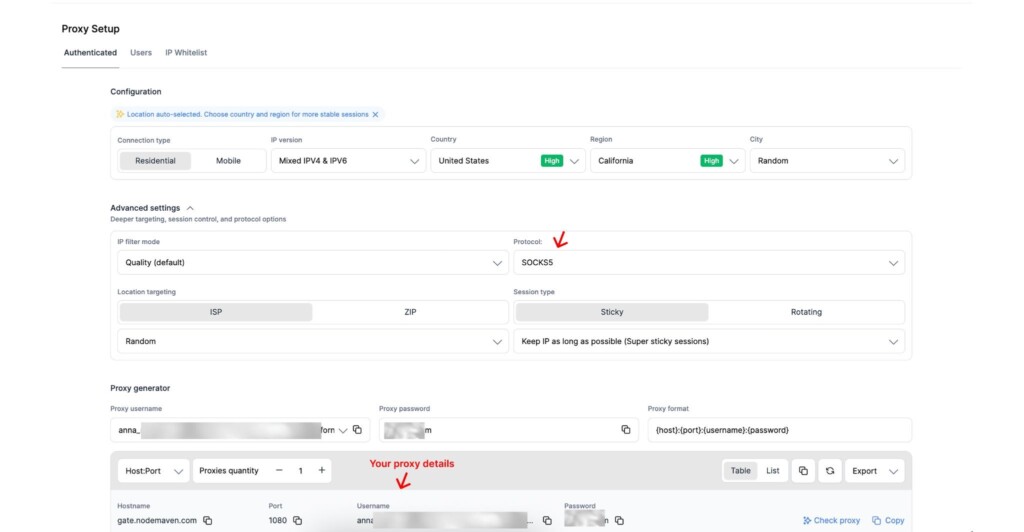
- Add the host, port, username, and password to the profile’s proxy settings.
- Match the profile country, timezone, and language to the proxy location.
- Run the browser’s proxy check before launching the profile. Use tools like Whoer IP and MaxMind.
- Open an IP and WebRTC test inside the profile or use additional websites to test.
- Keep that proxy assigned to the same profile unless the workflow calls for rotation.
For a mobile configuration, NodeMaven’s guide explains how to pair an antidetect browser with a mobile proxy.
What NodeMaven adds to the setup
The browser still handles profile isolation. NodeMaven gives each profile a clean network identity and lets you choose how long that identity should last.
NodeMaven residential proxies are pre-filtered for quality, cover more than 190 countries, and support sticky sessions of up to 24 hours. Residential and mobile plans include HTTP and SOCKS5 access, a quality guarantee, and cashback based on consumed traffic where the program applies. You can start testing 750MB of residential and mobile proxies with $3.50 trial.
For long-term accounts, NodeMaven ISP proxies provide static ISP-assigned IPs with unlimited bandwidth and a quality guarantee. Their location range is smaller than the residential network, but they are faster and easier to keep attached to one profile for daily work.
This is more useful than assigning random addresses simply to make the profiles look different. Every account gets an IP that suits its session length and target platform.
Pair each profile with a stable ISP, residential, or mobile proxy from NodeMaven. Start with 750MB for $3.50.
Mistakes that spoiled otherwise good pairings
The same few setup errors caused most of the avoidable problems:
- Reusing one proxy session across unrelated profiles
- Rotating an established account in the middle of a session
- Setting a browser timezone that does not match the proxy location
- Ignoring WebRTC and DNS checks
- Using free proxies with unknown history
- Launching more automated profiles than the computer can handle
- Changing fingerprint settings after an account has already built a history
The safest routine is boring, but useful: check the profile once, keep the assignment documented, and change only the setting that caused the problem.
Final Thoughts: Which proxy browser should you choose?
Choose Multilogin with a NodeMaven ISP proxy when you need and expect the same profiles to last for months, or with mobile proxies for social media management with their cloud phones feature. Dolphin Anty with mobile or sticky residential proxies fits social media teams that value quick profile handling. AdsPower is the easier route into visual automation, while Octo Browser is better suited to developers working with Playwright or Puppeteer.
GoLogin is a good option for a first proxy browser. Its setup is easy to understand, and external ISP proxies fix the main limitation of rotating built-in traffic for persistent accounts.
There is no reason to buy the most advanced browser if the workflow only needs three manually managed profiles. Start with the number of accounts, session length, target platform, and automation method. Those four details narrow the choice quickly.


