How to manage multiple Facebook Ad accounts without getting restricted



Running one Facebook ad account is straightforward. Running several is a different operation entirely. Agencies need clean separation between client accounts. Affiliate marketers need a backup when one account gets flagged. Ecommerce brands with distinct storefronts need isolated billing and creative environments. Lead gen companies running regional campaigns need accounts that don’t bleed into each other.
The challenge isn’t getting multiple accounts. It’s keeping them alive. Facebook’s trust and compliance systems are aggressive, and they treat shared infrastructure as a red flag. This guide covers how to manage multiple Facebook ad accounts without triggering those systems.

Managing multiple Facebook ad accounts? Keep each account connected through a dedicated residential IP
Can you have multiple Facebook Ad accounts?
Yes, but the structure matters.
Personal ad accounts are tied to your personal Facebook profile. Facebook gives each profile one personal ad account by default. You can’t simply create a second one under the same profile, that gets flagged quickly.
Business Manager accounts (now Meta Business Suite) are the correct path for multi-account operations. Business Manager lets you create and manage multiple ad accounts under one organizational umbrella. You can also grant access to team members and external partners without sharing login credentials.
Agency setups typically involve a combination: the agency’s own Business Manager holds client accounts, or clients share access to their own Business Managers with the agency. Either way, Business Manager is the tool designed for this.
The key distinction: personal ad accounts are one-per-profile. Business Manager scales based on your account standing and Facebook’s trust signals.
How many Facebook Ad accounts can you have?
There’s no single published number. Facebook adjusts limits based on several factors and doesn’t broadcast the formula.
| Account Type | Typical Limit |
| Personal Ad Account | 1 |
| Business Manager | Depends on trust and account history |
| Agency Setup | Multiple (varies by Business Manager standing) |
What actually determines your limit:
- Spending history — accounts with consistent, high-volume spend get higher limits
- Account quality score — policy violations and disapprovals reduce your ceiling
- Account age — newer Business Managers start with fewer accounts by default
- Payment history — missed payments or chargebacks signal risk
New Business Managers typically start with a handful of ad accounts. As you build history and spend, you can request increases. Some agencies with strong track records run dozens of accounts through a single Business Manager. Others need multiple Business Managers to reach the scale they need.
Why businesses run multiple Facebook Ad accounts
The reasons are operational, not just preference.
- Client separation
The most common driver for agencies. Running client campaigns under separate ad accounts keeps billing clean, prevents one client’s policy issue from affecting another, and makes reporting straightforward.
- Brand separation
It matters for ecommerce companies with distinct storefronts or product lines. A beauty brand and a supplement brand shouldn’t share the same ad account. Their targeting, creative libraries, and compliance requirements are different.
- Regional campaigns
They sometimes require separate accounts when operating in markets with different regulatory requirements or localized payment methods.
- Backup accounts
They are standard practice in affiliate marketing and lead generation. If an account gets restricted during a campaign, a warm backup means you’re down for hours, not days.
- Team management
It is cleaner with separate accounts. You can give media buyers access to specific accounts without exposing your entire operation.
Running multiple Facebook ad accounts? Use residential proxies to maintain consistent login environments
How Facebook links multiple Ad accounts together
This is the part most guides skip over. Facebook’s systems don’t look at your account in isolation, they look at signals that connect accounts to the same operator.
- IP addresses
The most common link. If you log into five different ad accounts from the same IP, Facebook sees that. Same IP across multiple accounts is a strong signal of shared operation.
- Browser fingerprints
They include your device’s screen resolution, installed fonts, timezone, language settings, and dozens of other parameters. Even without cookies, Facebook can identify your browser across sessions.
- Payment methods
They are a direct link. Shared credit cards or bank accounts across multiple ad accounts tell Facebook those accounts are connected, even if everything else is clean.
- Shared business assets
Using the same Facebook Page, Pixel, or domain across multiple ad accounts creates associations that Facebook tracks.
- User behavior patterns
They include login times, browsing habits, and interaction patterns. These contribute to Facebook’s risk scoring even when other signals look clean.
The issue isn’t that Facebook restricts connected accounts by default. It’s that when one account in a connected cluster gets flagged, the risk spreads. A restricted account that shares signals with your others puts all of them at risk.
The role of proxies in managing multiple Facebook Ad accounts
IP consistency is foundational to multi-account stability. If your accounts need to look like they’re operated by different entities. You need separate, consistent IP addresses assigned to each one.
VPNs don’t work well here. VPN IP ranges are widely known and flagged. They also rotate IPs frequently, which creates location inconsistency, an account that logs in from New York one day and Amsterdam the next raises flags.
Proxies give you static, dedicated IPs that you assign to specific accounts and keep consistent. Each account always connects from the same IP, which looks like normal user behavior.
Residential proxies are the standard choice for Facebook advertising because they use IPs assigned to real home internet connections by actual ISPs. Facebook’s systems treat them as organic users, not infrastructure. NodeMaven is a proxy provider built specifically for use cases like this. Stable IPs, broad geographic coverage, and the connection consistency that keeps accounts in good standing over time.
Best proxy types for Facebook Advertising
| Proxy Type | Detection Risk | Recommended for Facebook |
| Datacenter | High | No |
| ISP | Medium | Good |
| Residential | Low | Best |
Datacenter proxies are cheap and fast, but their IP ranges are well-documented and frequently flagged by platforms like Facebook. They work for some use cases but are a liability for ad account management.
ISP proxies are assigned by internet service providers but hosted in data centers. They’re harder to detect than standard datacenter proxies and work reasonably well. The tradeoff is cost and availability.
Residential proxies use IPs from real home connections, making them the hardest for platforms to detect and block. For Facebook specifically residential is the right call. The cost difference versus datacenter proxies is worth it when your accounts are your revenue.
Reduce the risk of Facebook account restrictions with stable residential proxy connections
How to set up multiple Facebook Ad accounts safely
This is the operational process for doing it correctly.
- Account structure
Map your accounts before you create them. Decide which Business Manager holds which accounts, who needs access to what, and how billing will be separated. Clean structure up front prevents messy fixes later.
- Dedicated browser environments
Each ad account needs its own browser profile with a unique fingerprint. Anti-detect browsers, Multilogin, AdsPower, Dolphin Anty, help create isolated profiles where cookies, fingerprints, and sessions are fully separated. Never access multiple accounts from the same browser profile.
- Proxy assignment
Assign one residential proxy session to each browser profile. The proxy should be in the same country or region where the account was created. Don’t switch proxies between accounts or share proxies across profiles.
- Account warmup
New accounts need warmup before you run ads. Log in daily, interact with the platform, add payment methods, and let the account build normal-use history. Run small campaigns with conservative budgets for the first week or two. Don’t jump straight to high spend.
- Gradual scaling
Spend increases should be incremental. Large budget jumps, especially on new accounts, trigger automated review. Scale budgets 20–30% at a time, and give each increase time to stabilize before the next one.
Can one Facebook page have multiple Ad accounts?
Yes. A single Facebook Page can be connected to multiple ad accounts through Business Manager.
This is common in agency setups where the agency runs ads for a client’s Page from the agency’s ad account, while the client also runs ads from their own account. Both can promote the same Page simultaneously.
Business Manager permissions control who can do what. Page roles and ad account roles are separate. Someone can have access to the Page without having access to the ad account, and vice versa. This matters for agencies that manage Page content and ad spend independently.
One thing to watch: if multiple Ad accounts are all running ads from the same Page with the same Pixel, Facebook can see those connections. That’s not automatically a problem, but it’s a signal they track.
Common mistakes that trigger Facebook restrictions
These are the patterns that get accounts flagged:
- Shared IP addresses across multiple accounts, the most common trigger
- Frequent location changes from logging in via VPN or inconsistent proxies
- Low-quality VPNs with known datacenter IPs that Facebook already flags
- Shared browser profiles, logging into multiple accounts from the same profile or device without isolation
- Aggressive spend increases, doubling or tripling budgets overnight on accounts without history
- Shared payment methods, using the same card across accounts that are supposed to be separate
Most restrictions aren’t random. They’re triggered by specific signals. Audit your setup against this list.
Why Agencies Use Residential Proxies for Facebook Ads
Agencies running 10, 20, or 50 client accounts can’t manage them from a single IP or browser environment. Each account needs its own identity layer that stays consistent over time.
Residential proxies solve the IP half of that equation. They give each account a stable, real-looking IP address that doesn’t change between sessions. Paired with dedicated browser profiles in an anti-detect browser, you’ve created separate operational environments that Facebook treats independently.
NodeMaven’s residential proxy network is a common choice in agency setups for exactly this reason.
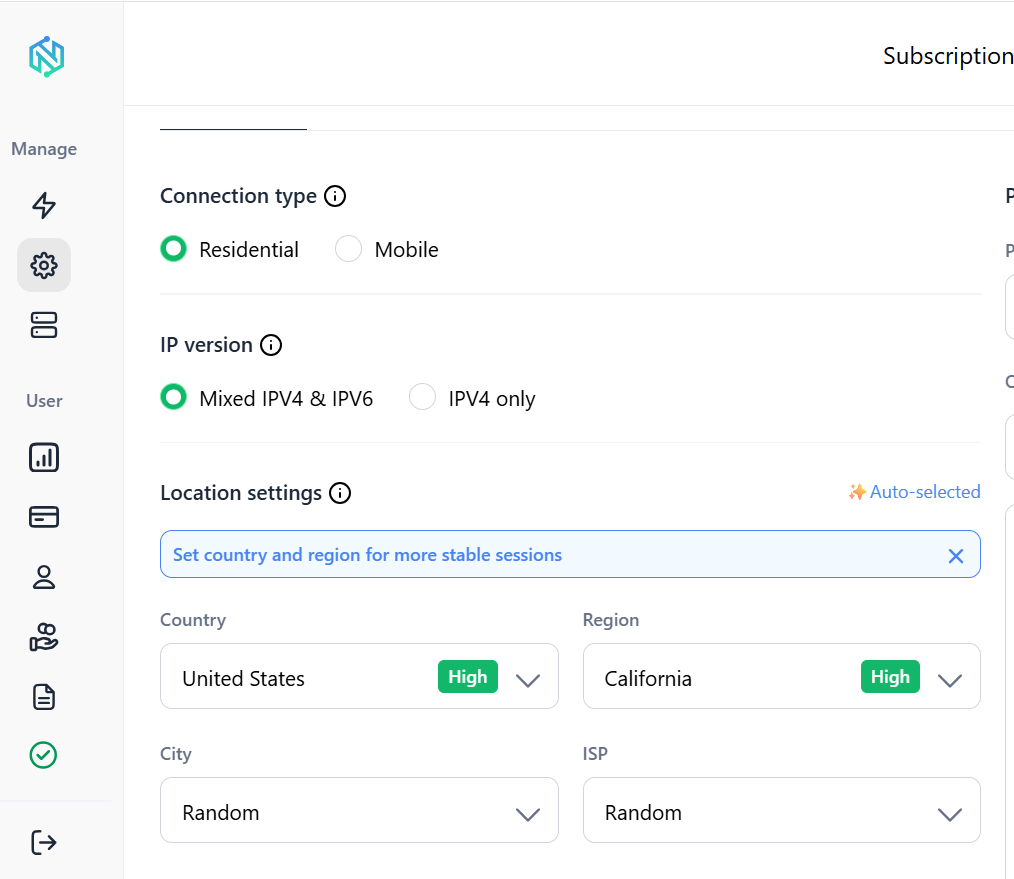
Geographic coverage and connection stability are what matter for Facebook specifically. You need the same IP to appear reliably, not rotate between sessions. Erratic IP behavior is precisely what raises flags.
The goal isn’t to trick Facebook’s systems. It’s to run each account in a way that looks like a normal, independent operation.
Managing multiple Facebook Ad accounts: what actually matters
The accounts that survive long-term aren’t the ones that cut corners. They’re the ones where every account has its own browser environment, its own IP, its own payment method, and its own warmup history.
Start with clean account architecture in Business Manager. Assign dedicated browser profiles to each account. Use residential proxies to give each account a stable, consistent IP. Warm new accounts gradually before scaling spend. Don’t share infrastructure across accounts that need to stay separate.
The question isn’t whether Facebook will eventually detect shared signals. It’s when.
Scale Facebook advertising operations with residential proxies built for long-term account management