How to Change Your Region on TikTok in 2026


On TikTok, your region affects more than just the content you see in your feed. It also shapes your recommendations, the local trends you get, the features available to you, and the audience your videos can reach. That’s why many users look for how to change their region on TikTok, switch their account’s country, or set the app up for a different market.
There’s an important nuance, though. TikTok has no single button that instantly lets you pick any country from a list. The platform determines your region from a whole set of signals: your device language, app settings, geolocation, user activity, and other factors.
In this guide, we’ll break down in detail how the region works on TikTok, whether you can change your account’s country, and how to set it up on iPhone and Android.

u003cpu003eu003cstrongu003eChanging your region on TikTok? Try NodeMaven for $3.50 and get 750 MB of proxy traffic.u003c/strongu003eu003c/pu003e
How TikTok determines your region
TikTok doesn’t determine your account’s country from a single setting. The platform analyzes several signals at once and cross-references them. That’s exactly why changing your language or geolocation alone doesn’t always help.
1. Device language
Your operating system’s language helps TikTok understand what content might interest you. If your device is set to English, German, or another language, that becomes one of the regional signals for the algorithm.
2. TikTok app language
TikTok also takes the app’s interface language into account. When the device and app languages match, it’s easier for the algorithm to determine the account’s target market.
3. Device geolocation
If the app is allowed to access your location, TikTok can use data about your current region and your location history.
4. IP address and network data
Beyond geolocation, TikTok analyzes network signals, including your IP address. From the IP, the platform can determine your approximate connection country and match it against your other account parameters.
If your device language points to the US but your IP belongs to another country, TikTok gets conflicting signals. So for stable performance in a specific market, it’s important to use an IP from the right region. Residential proxies are often used for this, letting you get IP addresses of real users from your chosen country.
5. SIM card and mobile carrier
When using mobile data, TikTok may also consider your carrier’s data and your SIM card’s region. If the SIM was issued in one country while your other settings point to another, this can affect how your region is determined.
6. Watch history and recommendations
The algorithm constantly analyzes user behavior:
- Which videos you watch to the end
- Which content you skip
- Which topics interest you
- Which clips you save
If an account has mostly interacted with local content for a long time, TikTok will keep treating that market as the most relevant even after you change some settings.
7. Follows and interactions
Follows, likes, comments, and reposts help TikTok understand which audience an account belongs to. The more interactions with creators from a given country, the stronger the regional signal.
8. Published content
For creators, the language of posts, hashtags, voiceovers, and video topics play an important role. If your content is regularly aimed at a specific country, the algorithm gradually starts associating the account with that market.
So a TikTok account’s region is shaped holistically. Device language, geolocation, IP address, SIM card, watch history, and content all work together.
u003cpu003eu003cstrongu003eGet an IP from the country you need for TikTok for just $3.50 and get 750 MB of traffic!u003c/strongu003eu003c/pu003e
Can you change your region on TikTok?
The short answer is yes, but with limitations.
If you’re wondering whether you can change your TikTok region through your account settings, you first need to understand how the platform itself works.
In practice, it’s not so much about directly switching countries as about changing the factors TikTok uses to determine your region.
What you can change manually
Some signals are under your control and can be changed yourself.
These include:
- Device language
- TikTok app language
- Geolocation settings
- Watch history and recommendations
- Follows and interactions
- The language of your published content
- An IP address from the region you need (using residential or mobile proxies)
These are the parameters most often changed by users who want to influence their recommendations.
What you can’t change directly
At the same time, there are parameters you can’t switch with a single setting.
For example, TikTok doesn’t provide a separate menu item for choosing your account’s country. The platform determines your region on its own based on a combination of signals.
On top of that, you can’t instantly erase your account’s interest history. The algorithm needs time to re-evaluate new signals and rebuild your recommendations.
Below is a short table of what you can and can’t control directly:
| Signal | Can you change it? |
| Device and app language | ✅ Yes |
| Geolocation | ✅ Yes |
| IP address | ✅ Yes |
| Recommendation history | ⚠️ Partially |
| SIM card | ⚠️ Partially |
| Account region | ❌ No |
Results usually appear gradually, not immediately after changing a single setting.
How to change your region on TikTok
TikTok determines your region from a combination of signals: device language, geolocation, IP address, SIM card, system settings, and in-app activity. So to change your region, it’s important to update several parameters at once.
Step 1. Turn off TikTok’s access to your location
First, stop the app from getting your location data.
On iPhone:
- Open Settings
- Find TikTok
- Select Location
- Set it to “Never”
On Android:
- Open Settings
- Go to Apps → TikTok → Permissions.
- Select Location
- Tap “Don’t allow”
This won’t change your region automatically, but it removes one of the signals TikTok uses to determine a user’s country.
Step 2. Clear your location history
After turning off geolocation, it’s a good idea to delete saved location data if that option is available in your app version.
To do this:
- Open TikTok.
- Go to “Settings and privacy“
- Then select “Privacy” or “Contacts and location“
- Find the location settings.
- Delete precise location data and disable any further collection.
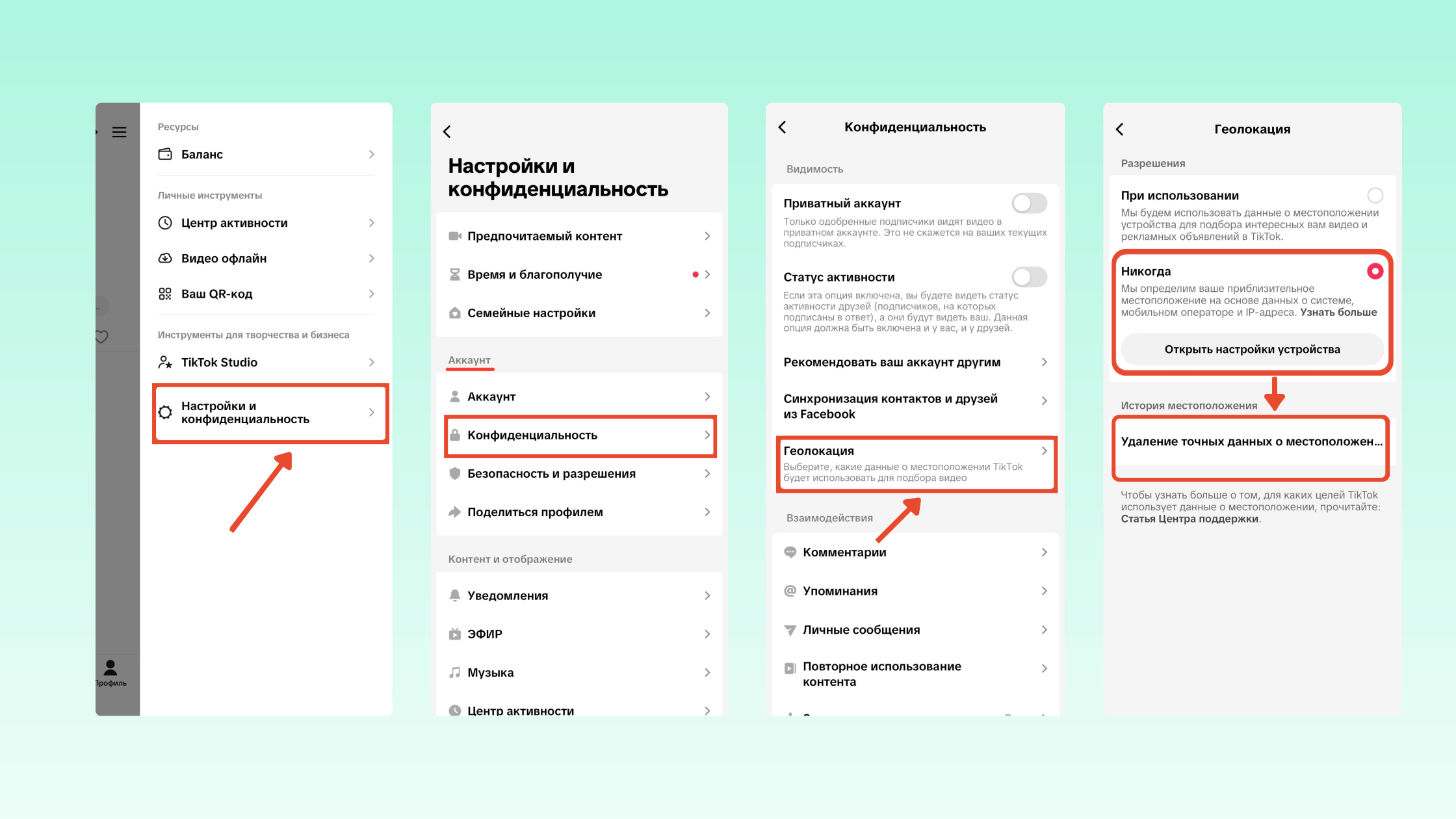
This helps reduce the impact of old regional data on your recommendations.
Step 3. Use an IP from the country you need
Even with geolocation turned off, TikTok still sees your IP address and uses it to determine your region.
If your device language is set to one country but your IP belongs to another, the algorithm gets conflicting signals. So to reliably tie your account to the right market, it’s important to use an IP address from the corresponding region. You should only open TikTok with the proxy enabled, otherwise there’s a chance your region will never change.
Residential proxies are usually used for managing foreign accounts. For example, NodeMaven proxies let you get IP addresses of real devices from the country you need.
u003cpu003eu003cstrongu003eLock in your new TikTok region for $3.50 and get access to premium residential and mobile proxies.u003c/strongu003eu003c/pu003e
Step 4. Change the TikTok app language
- Open “Settings and privacy“
- Go to “Preferences“
- Select “Language“
- Set the language of your target country
The app language should match the region you want to aim your account at.
Step 5. Update your device region
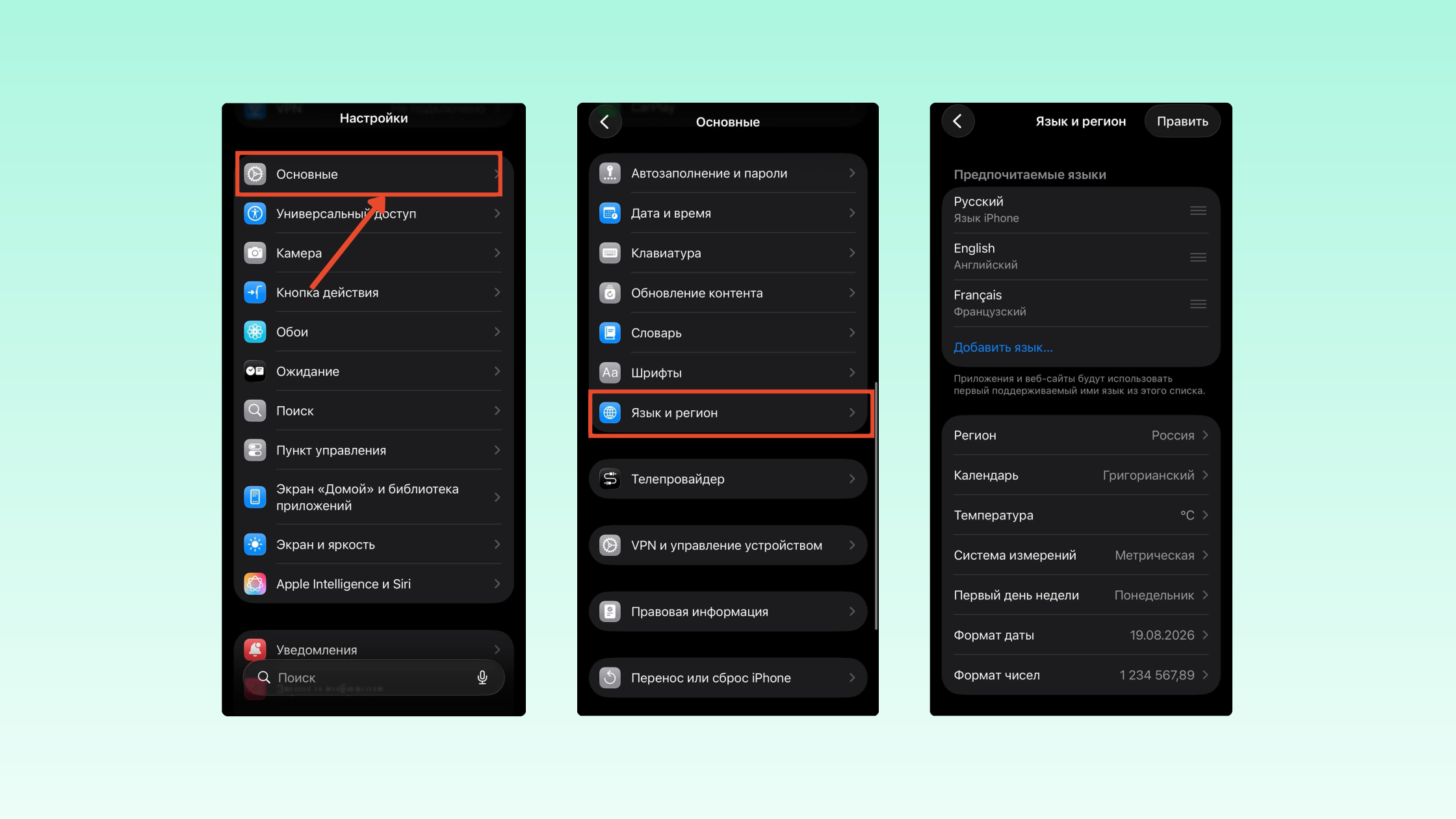
Besides the TikTok settings, it’s recommended to change the region of your operating system itself.
On iPhone:
- Open Settings → General → Language & Region
- Select Region
- Set the country you need
On Android:
- Open Settings
- Go to System or General settings
- Find Language & region
- Choose the country and language you need
If you’re using mobile data, it’s also worth considering your SIM card’s region, since it can act as an additional signal for TikTok.
Step 6. Clear the cache and restart the app
After making your changes:
- Open “Settings and privacy” in TikTok.
- Select “Free up space“
- Tap “Clear cache“
- Fully close the app
- Restart your device
Step 7. Give the algorithm time
Your region on TikTok doesn’t change instantly. Even after you update your settings, the platform keeps taking your watch history, follows, and past interactions into account.
For a few days, it’s recommended to actively engage with content from the region you want. The more signals point to a single country, the faster TikTok will adapt your recommendations and start treating your account as belonging to the new market.
How to check your TikTok account’s region
If you want to find out your region on TikTok, it’s important to understand that it doesn’t show your account’s country explicitly. There’s no separate field for your current region in the settings.
Where to find your account settings
Open:
“Profile” → “Settings and privacy“
Here you can check your app language, geolocation settings, and other parameters that affect how your region is determined.
Why your country may not be displayed
TikTok determines your region on its own based on many signals and doesn’t show it to you directly. So you won’t be able to find a setting with your account’s current country.
What signs indicate your current region
You can usually judge your account’s region by:
- The language of content in your recommendations
- Local trends and hashtags
- Recommended creators
- Regional ads
- Popular music in your feed
For example, if your recommendations are dominated by English-language videos and American trends, it may indicate that TikTok associates your account with a US audience.
Which region to choose for TikTok and where monetization is available
If you plan to grow your account for a specific market, it’s important not only to understand how to change your region on TikTok, but also to choose a country that matches your goals. Some regions are better for watching content, others for promoting a business or joining monetization programs.
| Region | Watching content | Promotion | Monetization |
| United States | ⭐⭐⭐⭐⭐ | ⭐⭐⭐⭐⭐ | ⭐⭐⭐⭐⭐ |
| United Kingdom | ⭐⭐⭐⭐ | ⭐⭐⭐⭐⭐ | ⭐⭐⭐⭐⭐ |
| Germany | ⭐⭐⭐⭐ | ⭐⭐⭐⭐ | ⭐⭐⭐⭐ |
| Canada | ⭐⭐⭐⭐ | ⭐⭐⭐⭐ | ⭐⭐⭐⭐⭐ |
| Australia | ⭐⭐⭐⭐ | ⭐⭐⭐⭐ | ⭐⭐⭐⭐ |
United States
The US remains the most popular option for users looking for the best region for TikTok. It has the largest English-speaking audience, a huge number of advertisers, and the broadest monetization opportunities.
United Kingdom
Good for working with an English-speaking audience and using most of TikTok’s commercial tools. Competition is usually lower than in the US.
Germany
A good option for local businesses, e-commerce, and promotion in the European market. The German audience engages actively with local content.
Canada
Often considered an alternative to the US. An English-speaking audience, access to most TikTok features, and a relatively comfortable level of competition.
Australia
Good for working with the English-speaking market and local projects. Many platform features launch here at the same time as in the US and UK.
u003cpu003eu003cstrongu003eNeed an IP from another country for TikTok? Get 750 MB of traffic and test NodeMaven’s residential and mobile proxies for just $3.50.u003c/strongu003eu003c/pu003e
Which countries support TikTok monetization
If your goal is to earn from your content, when choosing a region you should consider the availability of the Creator Rewards Program monetization program.
| Country | Creator Rewards Program |
| United States | ✅ |
| United Kingdom | ✅ |
| Germany | ✅ |
| France | ✅ |
| Brazil | ✅ |
| Japan | ✅ |
| South Korea | ✅ |
The list of countries and available programs can change, so before creating an account it’s worth checking TikTok’s current terms.
Why your TikTok region won’t change
One of the most common problems is when a user changes their settings but the recommendations stay the same. If TikTok won’t let you change your region, it doesn’t necessarily mean something went wrong. Most often the reason has to do with how the platform’s algorithm works.
Changes don’t take effect immediately
TikTok doesn’t update your account’s region instantly after you change settings. The platform needs time to process the new signals and decide whether they reflect permanent changes or temporary user actions.
In some cases, rebuilding your recommendations takes several days.
Old recommendations persist
Even after you change your region, TikTok keeps taking your accumulated watch history into account.
If an account interacted with a certain country’s content for months, the algorithm will keep showing similar videos for a while. This is especially noticeable on older accounts with a long activity history.
TikTok is getting conflicting signals
This is one of the most common reasons your TikTok region won’t change.
For example:
- Your device language points to one country
- Your IP address belongs to another
- Your SIM card was issued in a third
- Your recommendations were built based on the old region
In this situation, TikTok gets mixed data and may keep showing content from several countries at once.
Nothing changed after switching regions
If your recommendations stayed the same after completing all the steps, check the main signals again:
- Device language
- App language
- Geolocation settings
- IP address
- SIM card region
It’s also worth remembering that TikTok relies not only on your settings but also on your behavior.
Which is better: change your region or create a new account?
If you want to enter a new market, a logical question comes up: should you change your existing account’s region, or is it easier to create a new TikTok account with the right settings from the start?
There’s no universal answer — it all depends on your account’s age, follower count, and promotion goals.
| Option | Pros | Cons |
| Change your existing account’s region | Keep your followers, content, and stats | The algorithm may keep weighing old signals for a while |
| Create a new TikTok account | Set the account up for the target market from the start | You’ll have to build an audience from scratch |
If your account already has followers, views, and a posting history, it usually makes sense to first try changing your TikTok account’s region.
However, for entering a new market from scratch, a new account is often the more predictable option. In that case, TikTok gets the right regional signals from the start and doesn’t rely on an old recommendation history.
NodeMaven: the easiest way to lock in a new TikTok region
Many people overlook one important factor — the IP address. Even if you’ve fully reconfigured your device for another country, TikTok still sees where you’re connecting from. Your recommendations may update slowly or stay tied to your previous region.
Set up your region in a few minutes
With NodeMaven, you can choose your connection country and get a high-quality residential or mobile IP address of a real user. For TikTok, this looks far more natural than using public or overloaded IPs that hundreds of people share at the same time.
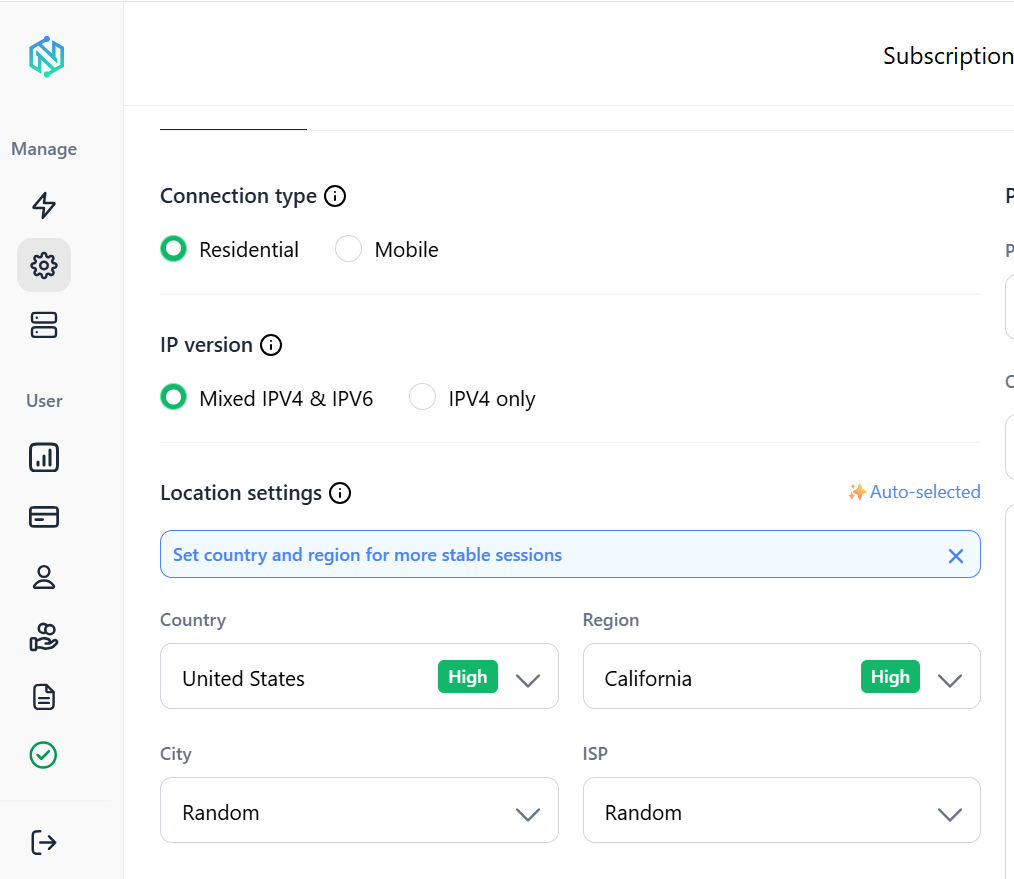
As shown in the screenshot, you just choose a country and create a proxy connection. After that, you can use an IP from the region you need for TikTok and other platforms.
Why users choose NodeMaven
NodeMaven offers access to more than 30 million residential IPs from 190+ countries and regions worldwide. You can choose a specific country for TikTok and use a stable IP without constantly changing settings or hunting for new solutions.
This is especially useful if you:
- Promote your account to a foreign audience
- Want recommendations from another country
- Are creating a new account for a specific market
- Work with several regions at once
If your goal isn’t just to change a couple of settings but to truly anchor your account to the country you need, a high-quality residential proxy becomes one of the most important elements of the entire setup.