What is Janitor AI? How It Works, Janitor AI Proxy Meaning, and Safe Setup




Janitor AI is intuitive and easy to start using. You can open the site, choose a character, and start chatting without much setup.
But if you want better replies, more control, or a more stable setup, the details start to matter. That is where users run into JanitorLLM, API keys, OpenRouter, reverse proxies, proxy URLs, 429 errors, and model settings.
This guide explains what Janitor AI is, how it works, how to use it, what a proxy means in Janitor AI, and when residential, mobile, and ISP proxies can help.
What is Janitor AI?
Janitor AI is an AI character chat platform. People use it to chat with existing characters, create custom bots, write roleplay scenes, test personas, and build story-based conversations.
Instead of talking to a general chatbot, you talk to a character with a name, background, personality, tone, and scenario.
Users can create public or private bots, write opening messages, add example dialogue, and shape how a character should respond. That is why Janitor AI is popular with roleplay users, writers, character creators, and people who want more control than a standard chatbot gives.
What makes Janitor AI unique?
Janitor AI stands out because it gives users more control over characters, chat style, and model setup than many closed chatbot platforms:
- Custom character creation: Users can build their own bots with a name, description, personality, first message, and scenario. This is why Janitor AI is popular for roleplay, storytelling, tutors, fictional characters, and custom chat personas.
- More realistic conversations: Janitor AI can feel more natural when the character prompt is strong. The model does not actually feel emotions, but it can respond to the scene, tone, character rules, and previous messages.
- Immersive chat experience: Some setups support text streaming and longer character-driven scenes, so replies feel closer to a live roleplay or story conversation.
- Flexible model options: Janitor AI can work with JanitorLLM, external APIs, OpenRouter, or reverse proxy setups. This gives users more control, but it also means the model, API key, endpoint, or proxy must be set up correctly.
How does Janitor AI function?
Janitor AI is the place where the chat happens. It stores the character setup, displays the conversation, and gives users settings for persona, model choice, and response behavior.
The actual reply comes from an AI model.
The flow looks like this:
- You send a message
- Janitor AI reads the character settings and chat context
- The selected AI model generates a reply
- Janitor AI shows that reply in the chat
Conversational interface
The interface is where users browse characters, open profiles, start chats, change settings, and create their own bots. This is the part most people see first. It feels simple because the platform hides a lot of the technical setup behind menus and model settings.
Natural language processing and AI model responses
Janitor AI relies on language models to understand the message and generate a reply. This is the NLP part, or natural language processing.
The model looks at the user message, character prompt, scenario, previous chat context, and response settings. Then it writes the next message.
The quality of that reply depends heavily on the selected model. A weak model can make a good character feel flat. A stronger model can make the same character feel more consistent, detailed, or emotionally aware.
Character context and memory
Character setup matters a lot. A bot can use a description, scenario, example dialogue, first message, user persona, and context settings to decide how it should behave. If those parts are vague, the character may drift or reply in a generic way.
This is why many users spend time tuning character prompts instead of only switching models.
Model connection
Janitor AI can work with JanitorLLM or external model providers, depending on the setup available to the user.
This is where users start seeing:
- API key
- model provider
- endpoint
- OpenRouter
- reverse proxy
- proxy URL
- max tokens
- context length
- proxy error 429 Janitor AI
The confusing part is that users often think Janitor AI itself is the model, but the platform is mostly the front end. The response still needs a model connection through JanitorLLM, an API key, OpenRouter, or a reverse proxy.
How to use Janitor AI
The basic setup is simple.
Step 1: Create an account
Go to the official Janitor AI website and create an account. Use an email or supported login method that you can access later.
Step 2: Set your persona
Your persona tells the bot who you are in the conversation.
This can include your name, role, style, or short description. It helps characters respond with better context.
Step 3: Browse characters
After logging in, browse public characters by category, tag, or popularity.
Open a character profile before starting. Check the description, tags, first message, content rating, and scenario so you know what kind of chat you are entering.
Step 4: Start a chat
Pick a character and start a new chat.
Send a simple first message and see how the bot responds. If the reply feels off, the issue may be the character prompt, selected model, context settings, or model provider.
Step 5: Create your own character
To create a character, add a name, image, description, personality, scenario, first message, example dialogue, tags, and visibility setting.
For better results, write the character in plain detail. Do not rely on a vague description like “smart and funny.” Give the bot behavior, tone, boundaries, and examples.
Step 6: Adjust chat settings
If replies feel too short, too random, too repetitive, or too slow, check the model settings.
Common settings include model selection, temperature, max tokens, context length, and API/proxy configuration.
Changing the model in Janitor AI
Changing the model can change the entire experience. A different model may give better roleplay, shorter replies, faster responses, stricter content rules, or lower cost.
JanitorLLM vs external models
JanitorLLM is the platform’s own model option. Janitor AI is free to use when paired with JanitorLLM, however some users say that JanitorLLM is in beta and can have downtime or odd behavior.
External models can be connected through API settings. These may include providers such as OpenAI, Anthropic, OpenRouter, KoboldAI, or other model routes, depending on what Janitor AI supports at the time.
External models may cost money, usually based on tokens, credits, or provider billing rules.
API key setup
A direct API key setup usually works like this:
- Create an account with a model provider.
- Generate an API key.
- Open Janitor AI API settings.
- Paste the API key.
- Choose the provider or model.
- Save and test the chat.
This gives you more control than using a random community reverse proxy, but it also means you are responsible for billing, usage limits, and API key safety.
OpenRouter setup
OpenRouter is often used as a model gateway. It can give access to multiple models through one account and one API key.
A common flow is:
- Create an OpenRouter account.
- Generate an API key.
- Choose a model.
- Copy the model name and endpoint details.
- Add them in Janitor AI API or proxy settings.
- Test the setup.
Common model setup mistakes
A lot of Janitor AI errors come from small setup mistakes.
Common problems include:
- API key copied incorrectly
- wrong endpoint URL
- model not selected after adding the key
- max tokens or context length set too high
- provider balance or quota issue
- free model temporarily unavailable
- reverse proxy overloaded
- (unk) errors caused by model, endpoint, or parsing issues
Some users mention connection problems, (unk) errors, OpenRouter issues, and free models failing until they retry. The advice here is basic but useful: re-paste the API key, check the URL, check model selection, and also remember that the issue may be on the provider side.
What is a proxy on Janitor AI?
A proxy on Janitor AI usually means one of two things:
- The first is a reverse proxy or API proxy. This connects Janitor AI to an AI model provider.
- The second is a normal web proxy, like a residential, mobile, or ISP proxy. This changes the IP address your browser uses to access the Janitor AI website.
These two proxy types are not interchangeable.
Janitor AI reverse proxy
A reverse proxy sits between Janitor AI and the AI model provider.
Janitor AI -> reverse proxy -> AI model/API provider
Users may use a reverse proxy when they need:
- an OpenAI-compatible endpoint
- a model gateway
- shared or community-hosted model access
- a proxy URL inside Janitor AI settings
- a route to an external model without direct setup
A reverse proxy acts as a third-party servers that connect Janitor AI to large language models, often without requiring users to enter their own OpenAI API keys.
Forward proxy for Janitor AI and your browser
A browser proxy works differently.
Your browser -> Forward proxy -> Janitor AI website
This does not route AI model requests. It routes your browser connection through another IP address. Use residential, mobile, and ISP proxies if the problem is access restriction, security, IP quality, VPN instability, or location testing.
Reverse proxy vs normal proxy
| Feature | Janitor AI reverse proxy | NodeMaven residential, mobile, or ISP proxy |
| Main job | Routes AI model requests | Routes browser or network traffic |
| Used inside Janitor AI API settings | Yes | No |
| Helps generate replies | Yes, indirectly | No |
| Changes browser IP/location | Not the main purpose | Yes |
| Helps with network blocks | Usually no | Yes, if the issue is IP or network related |
| Helps with API key errors | Sometimes | No |
| Helps with stable browser sessions | Not the main purpose | Yes |
If Janitor AI asks for a proxy URL inside API settings, it expects an API-compatible endpoint.
Advanced setup: why use proxies with Janitor AI?
Proxy setup depends on the problem.
When to use a reverse proxy
Use a reverse proxy when the issue is model or API routing.
You may need one if:
- Janitor AI asks for a proxy URL
- you need an OpenAI-compatible endpoint
- you are using OpenRouter or another model gateway
- replies fail because of model or endpoint settings
- you do not want to connect directly to one provider
Be careful with random free reverse proxies. Your prompts and chat requests may pass through someone else’s server.
When to use residential (forward) proxies
Use residential or ISP proxies when the issue is browser access.
They can help if:
- Janitor AI does not load on your network or restricted in your location
- the site works on mobile data but not Wi-Fi
- VPN sessions are unstable
- you need access from a specific country or city
- you want a stable browser session
- public proxy IPs keep failing
NodeMaven helps with clean IPs, stable sessions, location control, and consistent performance. But it does not replace a reverse proxy or API key.

Use NodeMaven residential, mobile, and ISP proxies with sticky sessions, geo-targeting, SOCKS5/HTTP support, and clean pre-filtered IPs. Start with 750MB for just $3.50.
Why Janitor AI free proxies are risky
Many users search for Janitor AI free proxy because they want a quick setup.
The risk depends on the proxy type. A free reverse proxy may process your chat requests. A free web proxy may use abused IPs, log traffic, or stop working without notice. Shared free endpoints can also trigger proxy error 429 on Janitor AI because too many users are sending requests through the same route.
Free can be fine for testing, but it is not a great default if privacy, stability, or account access matters.
How to use NodeMaven proxies for Janitor AI browser access
This setup is for browser access only.
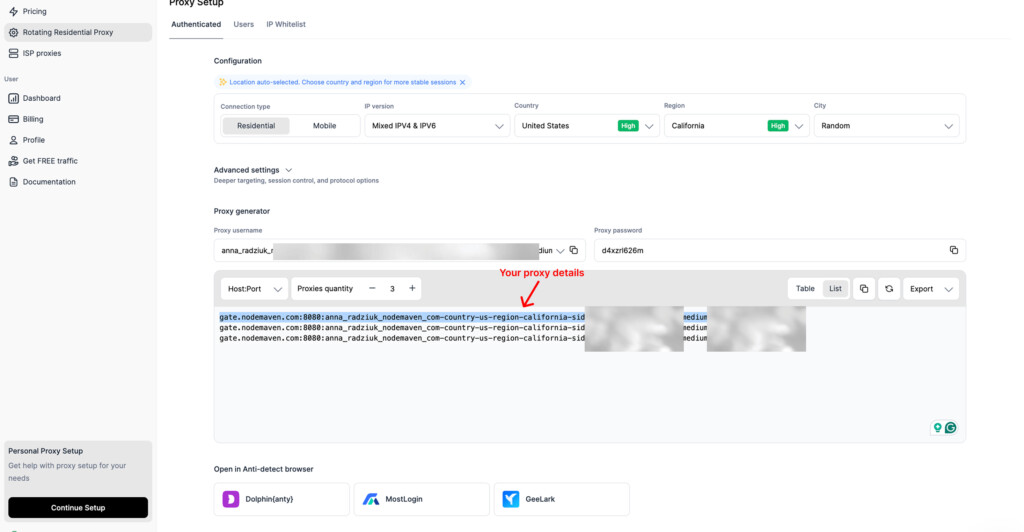
Step 1: Create a proxy in NodeMaven
In the NodeMaven dashboard, choose a residential or ISP proxy.
Select your target location, turn on sticky sessions, choose HTTP or SOCKS5, and copy your username and password.
Step 2: Add the proxy to a browser extension
Use a trusted proxy manager extension, like Simple Proxy Switcher.
Create a new proxy profile and add your copied from the dashboard proxy string.
Step 3: Verify your IP
Before opening Janitor AI, use an IP checker.
Confirm that the visible IP and location match your NodeMaven setup.
Step 4: Open Janitor AI with the same session
Do not keep switching IPs during the same session.
For chat-based or account-based workflows, a stable session usually makes more sense than constant rotation.
Step 5: Troubleshoot
If Janitor AI still does not work, check the proxy username, password, protocol, and port.
If the site loads but replies fail, the problem is probably model or API related, not browser access.
Security and privacy considerations
Does Janitor AI read your chats?
Assume your chats may be processed by the systems involved in the conversation.
That can include Janitor AI, the selected model provider, and any reverse proxy used between them. Do not put passwords, financial information, private documents, or sensitive identity details into AI companion chats.
Reverse proxy privacy risks
A reverse proxy sits between Janitor AI and the model provider.
That means the proxy operator may technically process the request. If you do not know who runs the proxy, you should not treat it as private.
API key safety
Do not share API keys, paste them into random tools, or show them in screenshots.
OpenAI recommends keeping API keys private and avoiding exposure in unsafe places.
Browser proxy privacy
A residential or ISP proxy changes your network route. It does not protect API keys, fix bad model settings, or make sensitive chats safe to share.
Use it for browser access and location control. Keep API security separate.
Pricing: Is Janitor AI free?
Janitor AI is free to start, but the full cost depends on the model setup.
If you connect external models, the cost depends on the provider. OpenAI, Anthropic, OpenRouter, KoboldAI, and other routes may charge based on tokens, credits, subscriptions, or hardware requirements.
Reverse proxies also vary; there are free options, some are shared, and some are unstable.
NodeMaven pricing is separate. You only need NodeMaven if you want residential, mobile, or ISP proxies for browser access stability, location testing, or cleaner IP sessions.
Common use cases for Janitor AI
- Roleplay and entertainment: Janitor AI is often used for character roleplay, fandom bots, fictional partners, and immersive scenes.
- Creative writing and storytelling: Writers use it to test dialogue, brainstorm scenes, or hear how a character might respond in a specific situation.
- Persona testing and simulations: Users can test different tones, user personas, support styles, or role-based conversations.
- Education and practice: Some users build tutor-style bots, language practice bots, or scenario training characters.
- Customer support prototypes: Janitor AI can be used to test conversational flows, but it is not a production customer support system by itself. For business use, it needs proper integrations, security, and compliance controls.
- AI workflow interface: With the right API setup, Janitor AI can act as a conversational layer for other tools. This depends on the model and backend configuration.
Troubleshooting and safety
Janitor AI does not load
Check whether the issue is your network, browser cache, DNS, VPN, proxy IP quality, or Janitor AI itself.
If Janitor AI works on mobile data but not Wi-Fi, a browser proxy can help test whether the problem is network or IP related.
Proxy error 429 Janitor AI
A 429 error usually means rate limiting.
It can come from a shared reverse proxy, model provider quota, API limits, too many retries, or too many users on the same endpoint.
Try waiting, lowering retries, changing the model, checking API credits, or avoiding overloaded free reverse proxies.
(unk) or failed replies
Users on Reddit report (unk) errors with some OpenRouter and free model setups.
Possible causes include a wrong endpoint URL, wrong model name, API key issue, provider outage, parsing problem, or temporary free model failure.
API key errors
Check whether the key is active, copied correctly, connected to the right provider, and allowed to use the selected model.
Also, check billing or credits.
Reverse proxy works one day and fails the next
This is common with free or shared reverse proxies. The endpoint may be overloaded, down, changed, or restricted by the provider.
VPN or a free proxy causes unstable access
Shared VPN IPs and public free proxies are often noisy. If Janitor AI access keeps failing from those IPs, a clean residential or ISP proxy can provide a more stable browser session.
Use NodeMaven residential, mobile, and ISP proxies with sticky sessions, geo-targeting, SOCKS5/HTTP support, and clean pre-filtered IPs. Start with 750MB for just $3.50.
Best practices for safe use
Use official APIs when privacy matters. Avoid random free reverse proxies. Do not share API keys. Avoid sensitive personal data in chats. Use residential proxies for browser access, not model routing. Keep stable sessions instead of switching IPs constantly.
Janitor AI alternatives
| Alternative | Best for | Main difference |
| Character.AI | Casual character chats | Easier to start, less API control |
| SillyTavern | Advanced custom setups | More technical |
| Chai | Mobile character chat | App-focused |
| Replika | Companion-style chats | More guided experience |
| Venus AI | Roleplay communities | Setup depends on model/proxy route |
Final thoughts
Janitor AI is not hard to start, but setup gets confusing because “proxy” means two different things.
Reverse proxies belong to model and API routing. Residential or forward proxies belong to browser access, IP quality, location control, and stable sessions.
Once you separate those two meanings, troubleshooting becomes much easier. If replies fail, check the model, API key, endpoint, or reverse proxy. If the site will not load, your VPN is unstable, or you need access from another location, ISP, or residential proxies are the relevant option.