

Multiaccounting has become a standard practice across digital and affiliate marketing, e-commerce, marketplace operations, SMM, lead generation and even HR. In all of these areas professionals need to operate multiple accounts at the same time.
The issue here is that most platforms are built around the concept of unique users because that’s what their revenue models depend on. On advertising platforms, for instance, revenue comes from impressions and actions generated by distinct individuals: clicks, purchases, subscriptions. When the same person creates and runs multiple accounts, performance data becomes distorted as ads are shown repeatedly to the same operator instead of reaching new audiences. This ultimately reduces campaign efficiency and undermines advertiser trust.
That’s why major platforms (and many smaller ones) enforce a strict “one person, one account” rule in their terms of service. When systems detect that multiple accounts are controlled by the same entity, they usually apply restrictions or bans.
At the same time, relying on a single account creates a different kind of risk as any suspected violation can lead to financial losses, since the account may be frozen during check up. This is exactly why digital professionals use antidetect browsers together with proxies.
In this article we’ll look at Dolphin Anty and NodeMaven to explain how this setup works and why these tools are almost always used together.
What Antidetect Browser and Multiaccounting Are
An antidetect browser is a tool that allows you to create and run multiple independent browser profiles on a single device. Each profile emulates a separate digital space with its own set of parameters. There are many of them, but the core ones include:
- Operating system;
- Browser version;
- Language and time zone;
- Screen, resolution and GPU;
- WebGL, Canvas and audio fingerprinting;
- Cookies and local storage;
- Network settings.
Platforms link accounts launched from the same device by analyzing the combination of these signals known as the browser digital fingerprint. If multiple accounts share identical or highly similar fingerprints and behavioral patterns, systems can infer that they are controlled by the same user.
Antidetect browser addresses this issue by spoofing these parameters. However, it’s not enough to randomly change them as they must remain logically consistent with each other. For example:
- IP address from Germany;
- Browser language set to German;
- Time zone set to CET;
- OS and fonts typical for the region.
This internal consistency is what makes a profile appear realistic. Dolphin Anty is designed so that each profile is generated without contradictions in its fingerprint. At the same time, advanced users can configure parameters manually when needed, providing a high degree of flexibility.
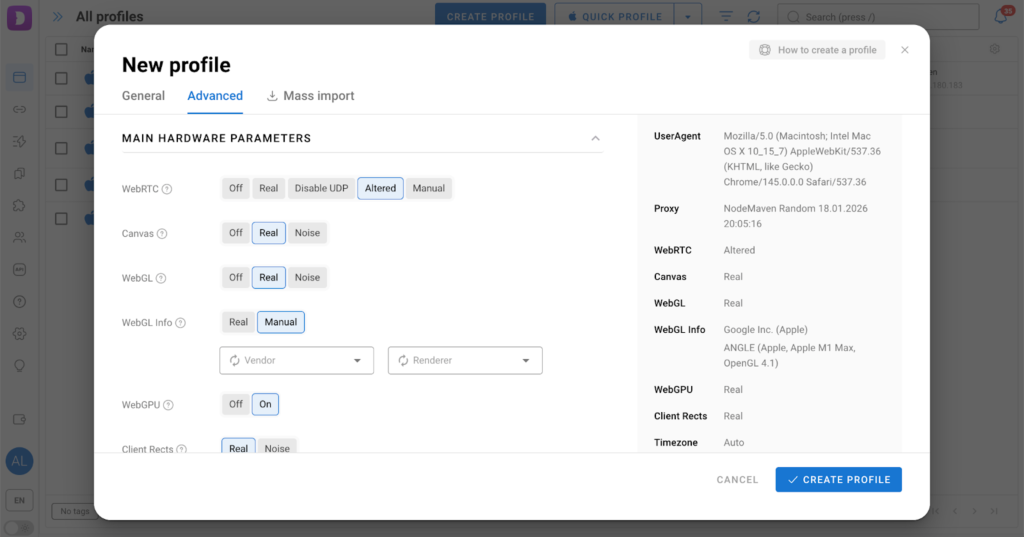
This internal fingerprint consistency is what makes a profile appear realistic and resilient to antifraud systems. And this is exactly where the IP address plays a critical role.
Why Proxies Are Essential
An IP address is one of the primary identifiers of a user online. If multiple accounts log in from the same IP, they are almost certain to be linked. That’s why multiaccounting follows a basic rule: one account = one IP.
But uniqueness alone isn’t enough. The IP must also match the profile:
- IP geography — language, locale, time zone;
- IP type — usage scenario;
- IP stability — account behavior patterns.
For example, if a profile represents a user in the United States but the IP belongs to a data center in another country, the setup appears suspicious. High-quality proxies solve this by providing IPs that closely resemble those of real users.
In professional multiaccounting setups, antidetect browsers and proxies function as a single system. The browser defines the profile’s digital environment, while the proxy provides its network identity. Together they simulate a complete, separate device online which is unique and realistic.
If either component is configured incorrectly, the risk of detection and bans increases sharply.
Dolphin Anty and NodeMaven
In stable multiaccounting proxies must integrate seamlessly with the antidetect browser environment. Let’s look at how this works in Dolphin Anty.
Dolphin Anty users can access NodeMaven traffic directly within the interface. To do this, click the Create profile button and scroll down to the proxy section.
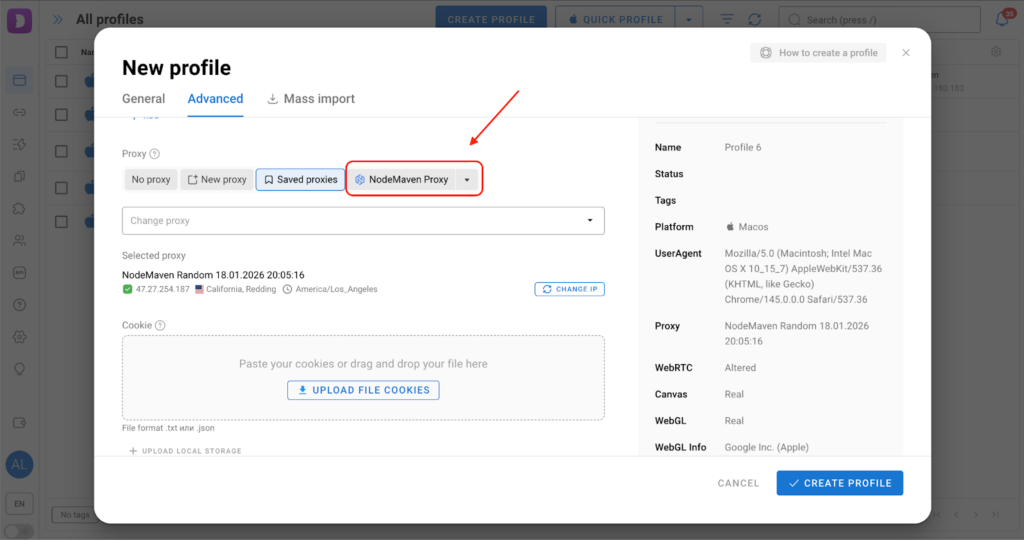
Click the NodeMaven button, select the proxy type, location, protocol and session type, then test the connection and your proxy is ready to use.
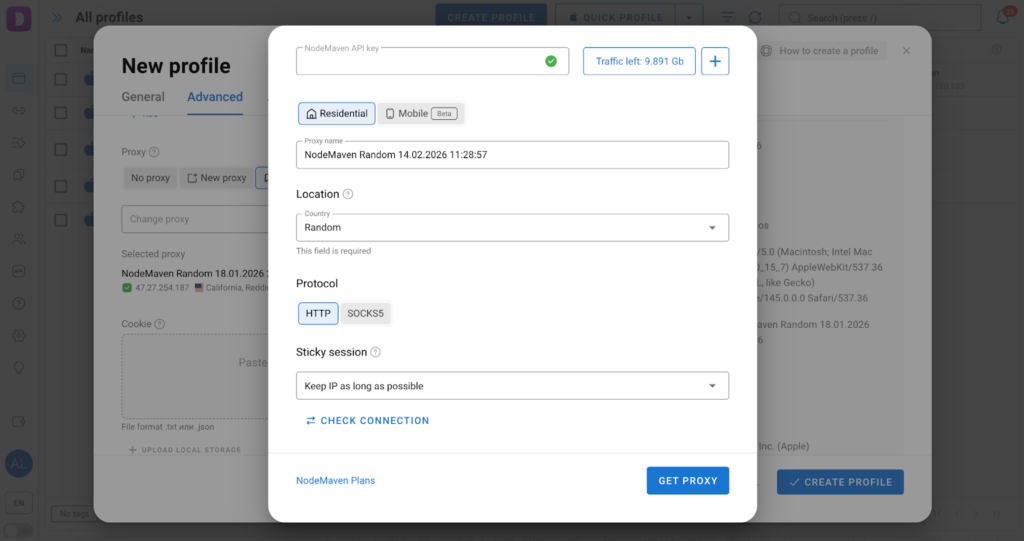
If you want to add proxies purchased directly from the NodeMaven website, there are two ways to do it. Let’s go through them.
Method 1: Add a proxy during profile creation
After purchasing proxies from the provider, you’ll receive the credentials needed to add them to Dolphin Anty. The rest only takes a few steps.
Step 1: Add a proxy to the profile. In the Browser profiles section, click Create profile and locate the proxy settings.
Step 2: New proxy. Select New proxy and enter the credentials provided by NodeMaven: protocol, proxy endpoint (click the exclamation icon in the field to see the supported formats), IP rotation link and proxy name. If you manage a large number of proxies, it’s recommended to fill in all fields to make navigation and identification easier later on.
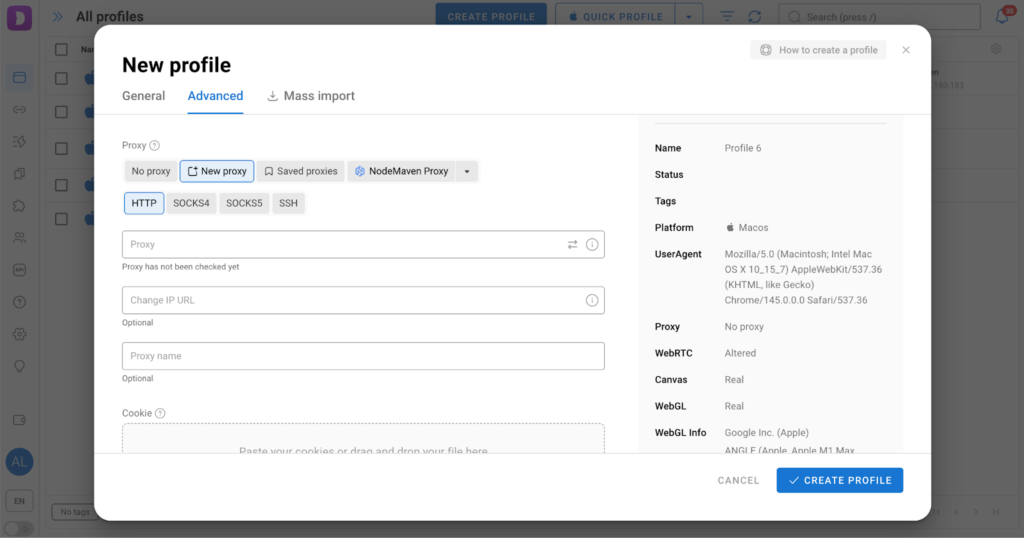
Step 3: Check the proxy. The final step is to verify the connection. Click the two opposing arrows in the Proxy field to test it. If the check is successful, the status indicator will turn green.
Method 2: Add proxies from the dedicated menu
Dolphin Anty also provides a standalone proxy management section located in the left sidebar. The workflow here is just as simple.
Step 1: Add a proxy. Click the Add Proxy button in the proxy section.
Step 2: Fill in the fields. Just like during profile creation, fill the proxy details in the required fields.
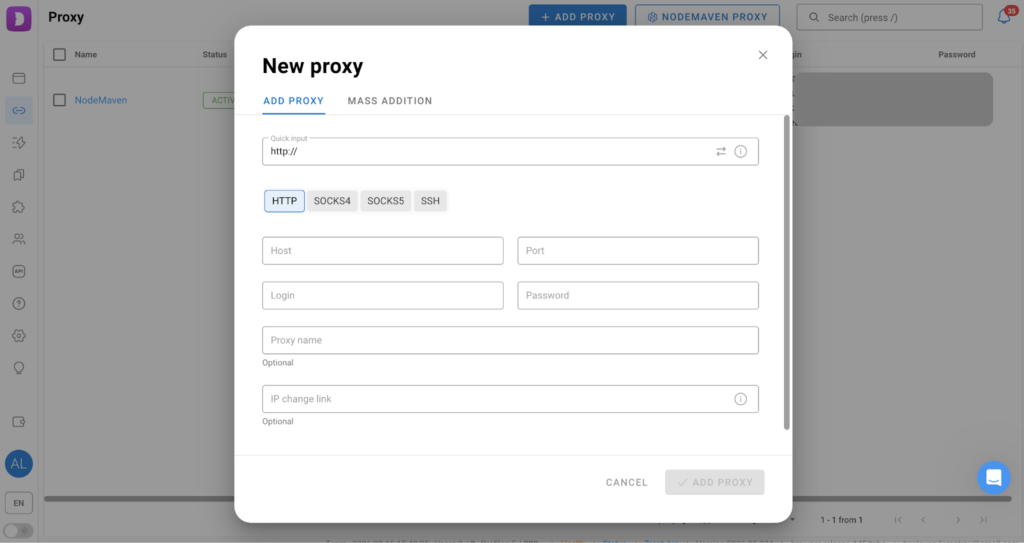
Step 3: Check and add the proxy. Once all fields are filled in, check the proxy and click the Add proxy button. After that you’ll be able to select it from the dropdown list via the Select Proxy button when creating a profile.
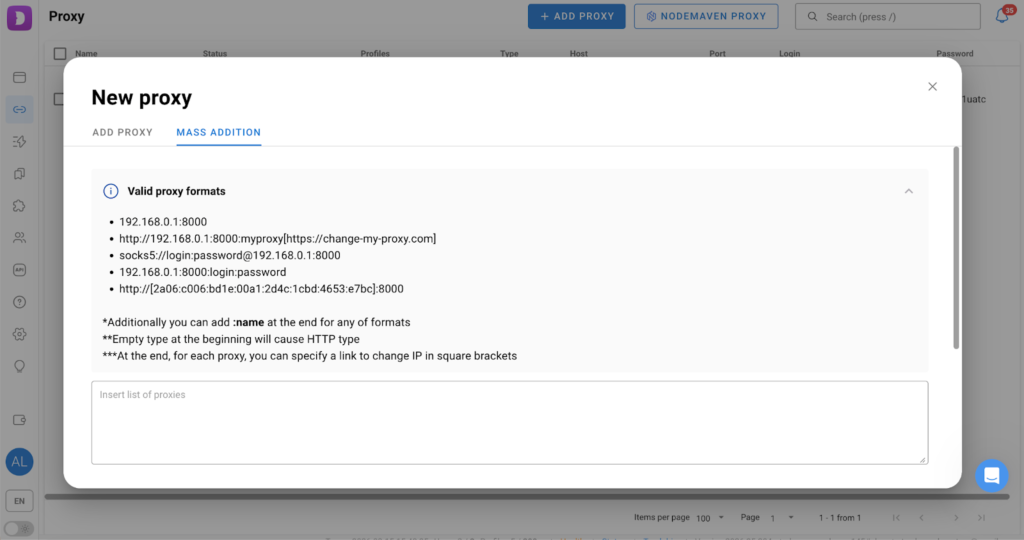
If you manage a large number of proxies, there’s no need to add them one by one. Dolphin Anty supports bulk import. You can find it under Proxies — Add Proxy — Mass Addition, where you’ll also see the supported input formats.
Another useful feature is bulk assignment of proxies to profiles. To do this select the profiles you want to assign proxies to and click Edit Proxy in the bulk actions panel. In the menu that appears, choose how the proxies should be assigned:
- Manually — select proxies yourself;
- Randomly — let the system assign proxies automatically.
Dolphin Anty allows you to manage proxies exactly the way you need while NodeMaven ensures their quality.
Why Experienced Users Choose NodeMaven Proxies
In real environments account bans are rarely caused by using proxies per se. They are usually the result of proxy quality. Many residential and static IPs on the market are simply repurposed server proxies. Antifraud systems can easily detect their origin through traces of previous activity, so even proxies that seem legit at first glance can quickly end up with shadow bans.
NodeMaven proxies, on the other hand, are built on a real residential infrastructure with a large pool of IPs and accurate geo-assignment at the provider and regional level. This allows each account to be assigned a unique provider + region combination without overlap or risk of using burned IPs from narrow city ranges. As a result, the digital fingerprint remains consistent and account behavior appears natural to antifraud algorithms.
Connection speed and stability also play a crucial role. High latency or unstable responses are among the indirect signals of low-quality proxies that platforms consider when assessing risk. NodeMaven’s network is optimized for real user scenarios: IPs demonstrate natural latency and bandwidth characteristics, so they blend seamlessly into normal behavioral patterns.
This is why, when paired with Dolphin Anty, NodeMaven proxies help reduce the risk of bans by maintaining a realistic fingerprint complying with a key principle of sustainable multiaccounting.
Where Multiaccounting Requires Reliable Proxies
Multiaccounting is essential wherever operations scale through accounts. There are many areas, so let’s have a look at the most common ones.
Affiliate Marketing
Launching ad campaigns almost always runs into platform limits and the risk of bans. That’s why affiliate teams operate multiple advertising accounts: they test different creatives and offers, distribute budgets and diversify risks. If one account gets restricted, traffic can continue through others.
E‑commerce and marketplaces
Sellers create multiple stores or accounts to separate niches, brands and regions, as well as to test assortment and pricing. While Amazon allows this under certain conditions, many other platforms are far less tolerant of multiaccounting even though it enables sales scaling and risk distribution. If one store is blocked, the entire business doesn’t stop. Separate accounts also help manage reputation and reviews.
Social media and SMM
Promotion strategies often rely on networks of accounts used for audience warming, posting, commenting, engagement and content distribution. This creates social proof and supports organic growth. A single profile cannot deliver the same reach or interaction dynamics.
Lead generation
Client acquisition frequently requires sending large volumes of personalized outreach. Multiple accounts across social platforms and email services are used to bypass sending limits and maintain deliverability. This allows prospecting to scale without triggering mass restrictions.
Across all of these scenarios, the key requirement is to ensure that accounts cannot be technically linked to each other. This is exactly where fingerprint isolation becomes critical.
Conclusion
An antidetect browser is a foundational tool for multi-accounting. It enables multiple independent profiles to run on a single device while masking the links between them. However, without proxies, antidetect alone does not fully solve the problem, since the IP address remains one of the core components of the browser fingerprint. The integration of NodeMaven and Dolphin Anty simplifies proxy management and reduces configuration errors which is especially important for professionals operating multiple accounts at scale.