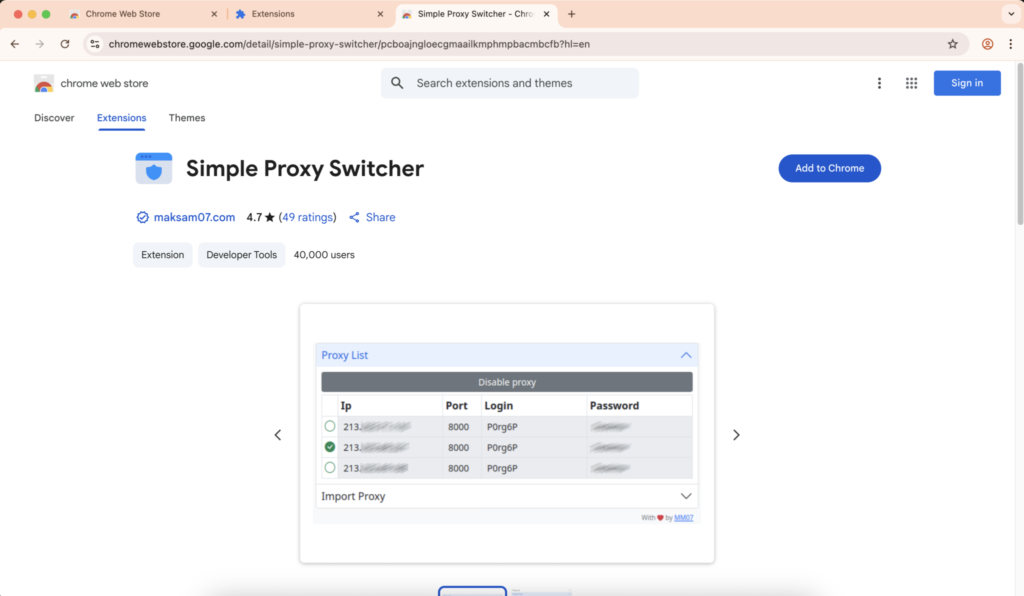
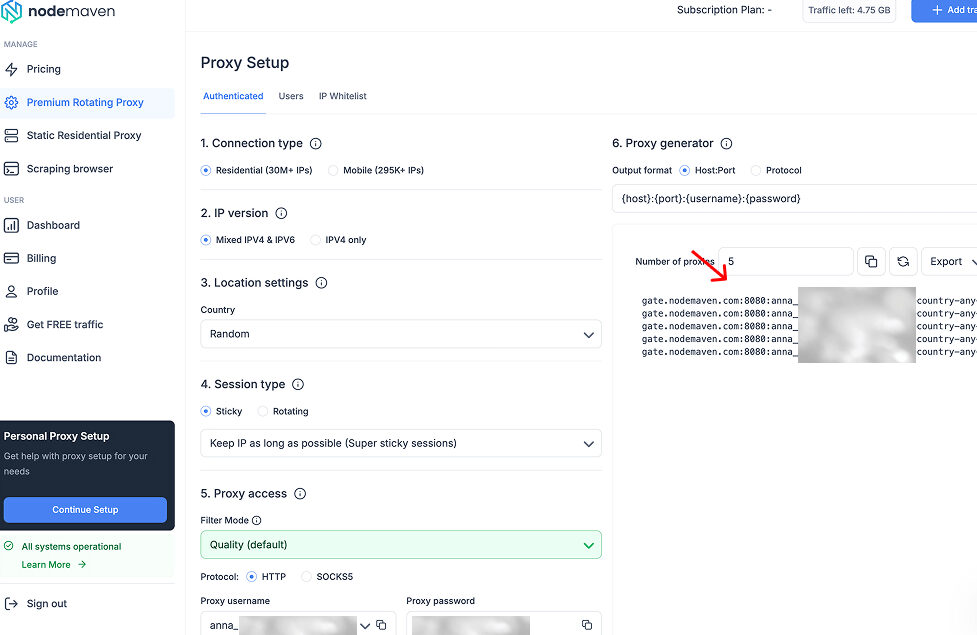
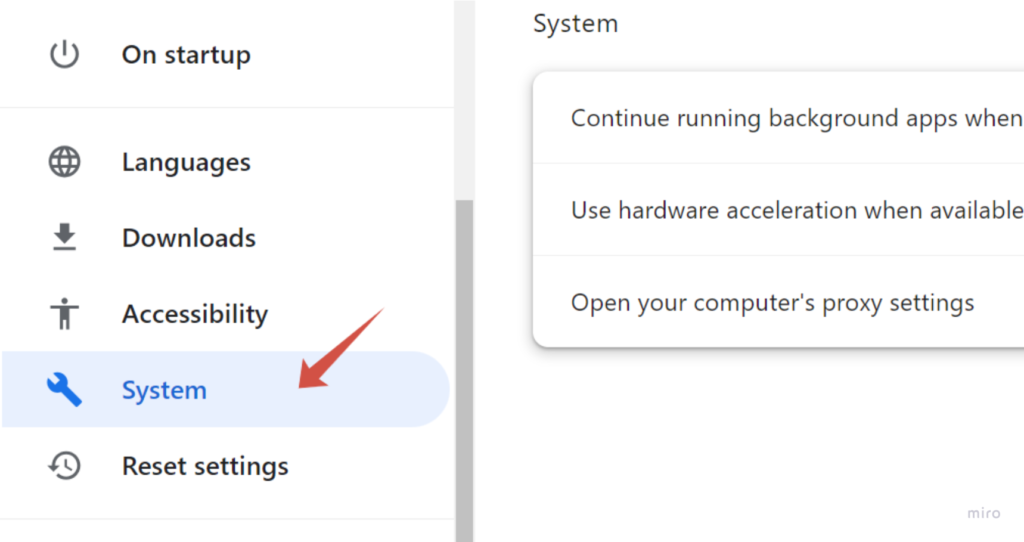
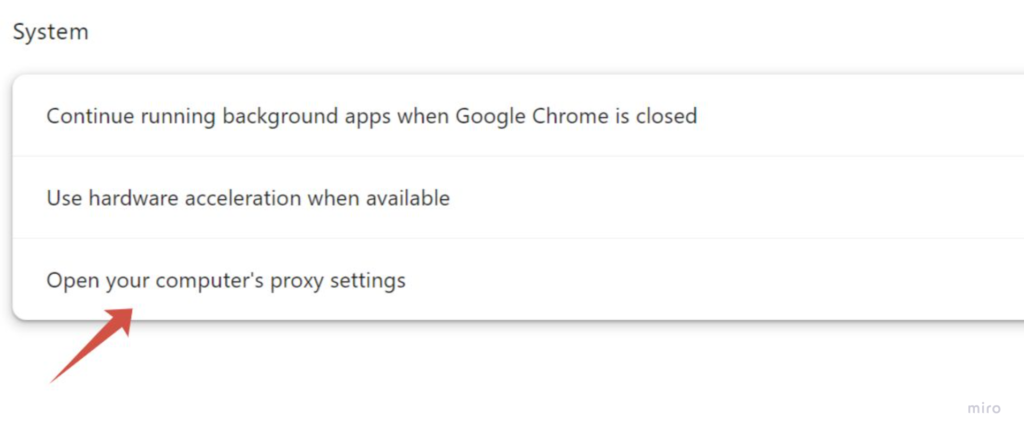
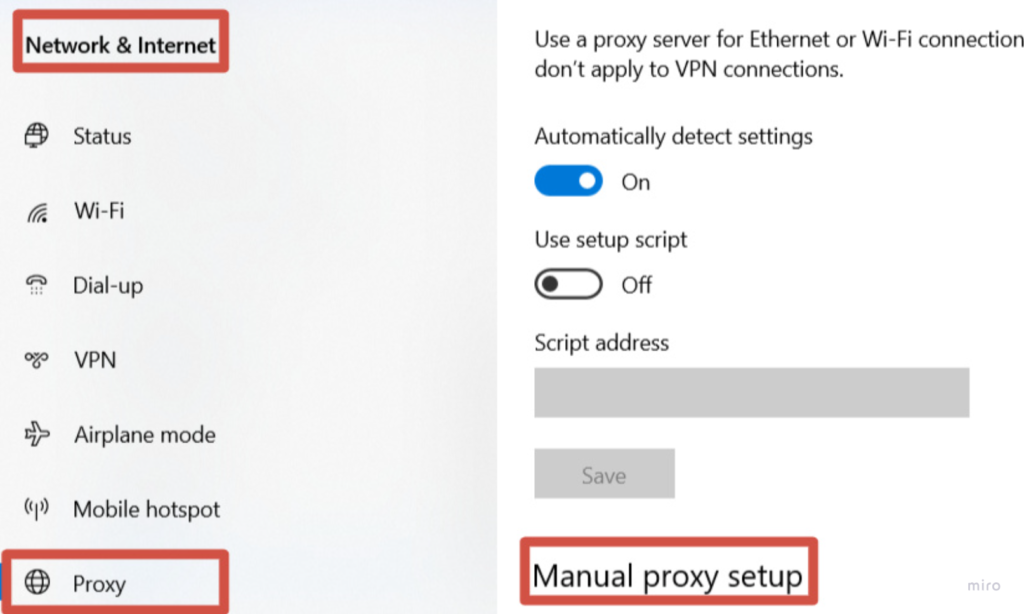
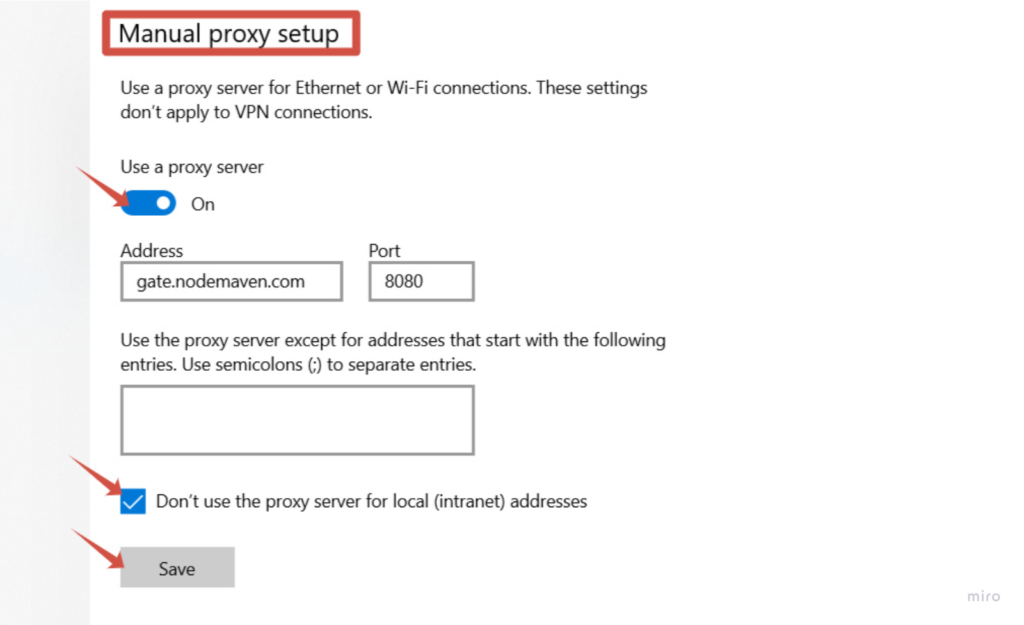
借助 NodeMaven 代理,开始在 Chrome 中使用代理非常简单,因为代理凭据已经在控制面板中生成,而且这些 IP 都经过质量和稳定性筛选。
在 Chrome 中切换代理服务器
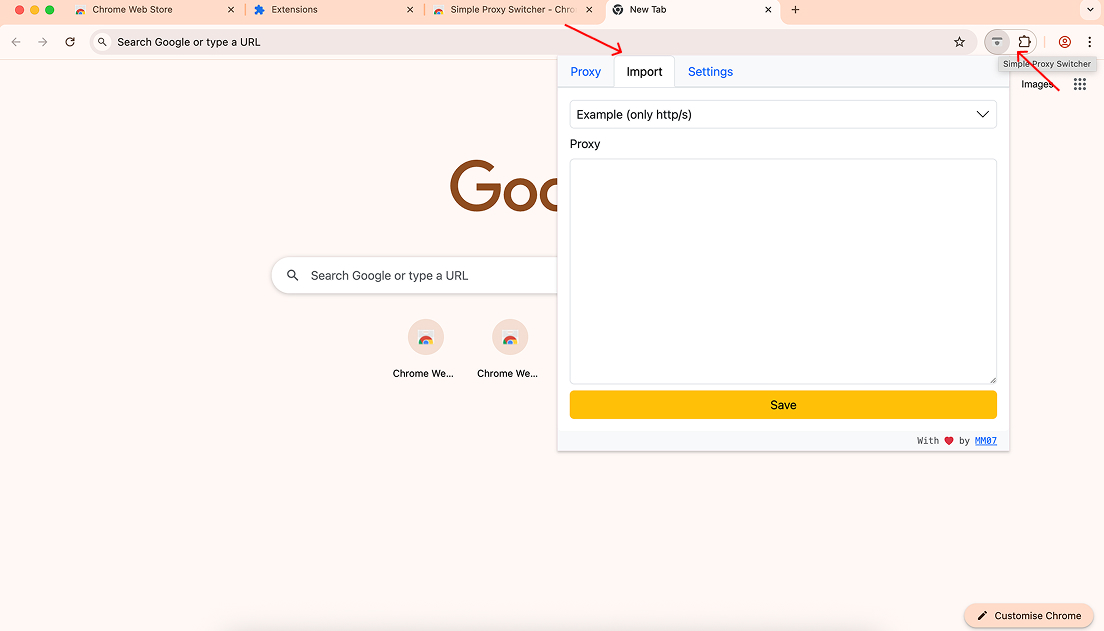
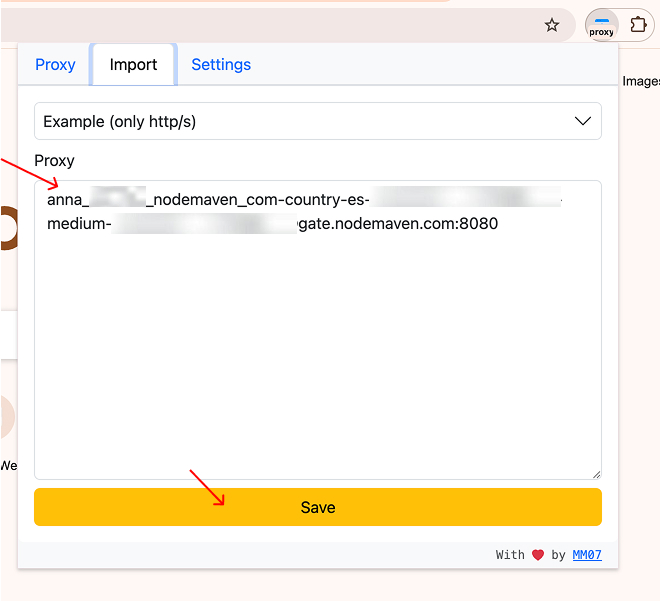
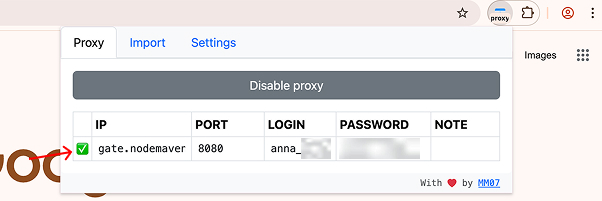
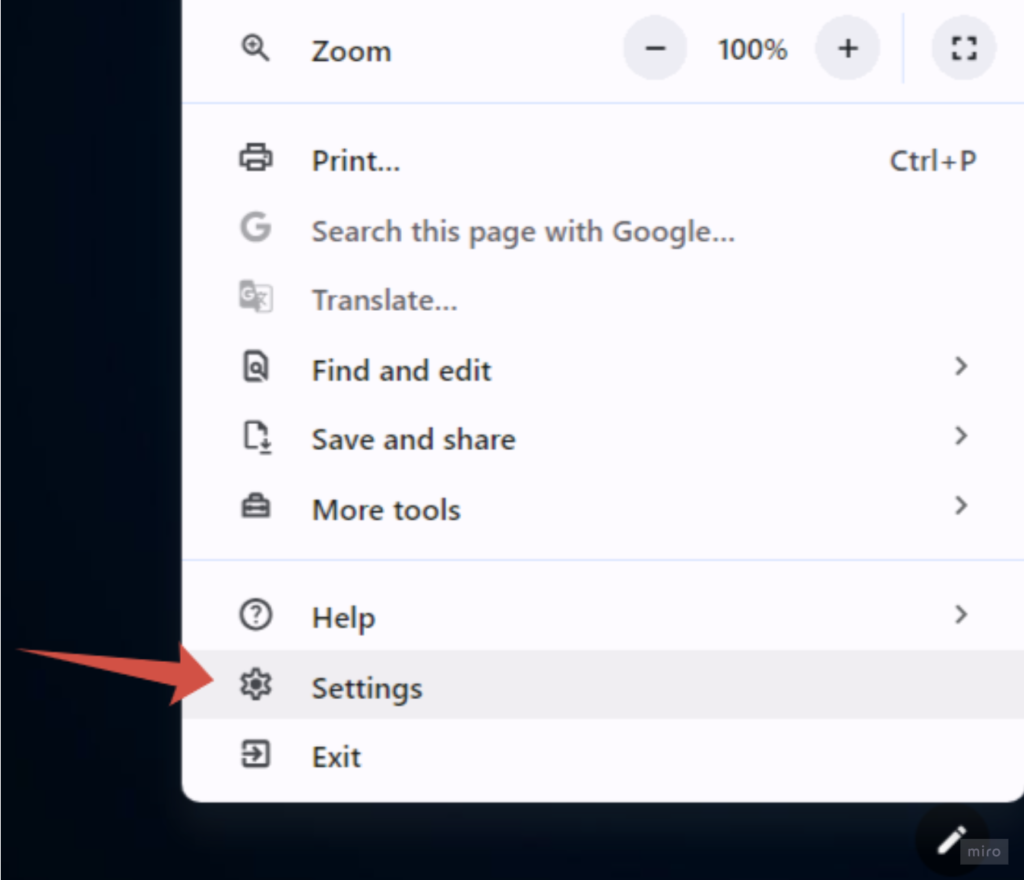
保存代理配置后,你只需点击几下即可更改 Chrome 中的代理设置。
点击 简易代理切换器 图标
打开 代理 标签页
选择你创建的代理配置,或添加新的代理
启用代理
u003cdivntttntttclass=u0022so-widget-rhinocore-addons-rhino-alert-banner so-widget-rhinocore-addons-rhino-alert-banner-default-d75171398898u0022ntttnttu003eu003cdiv class=u0022rhino-widget rhino-widgetu002du002drhinocore-addons-rhino-alert-banner section-alertu0022 style=u0022u002du002dalert-background-color: #E6E6FFu0022nu003en u003cdiv class=u0022section-alert__iconu0022u003en u003cpictureu003eu003csource srcset=u0022https://nodemaven.com/wp-content/uploads/rhino-images/images/2026/05/18/icon-2_64x64_1x_b1e0296b.webp 1x, https://nodemaven.com/wp-content/uploads/rhino-images/images/2026/05/18/icon-2_128x128_2x_b1e0296b.webp 1.3xu0022 type=u0022image/webpu0022u003eu003cimg alt=u0022u0022 loading=u0022lazyu0022 width=u002264u0022 height=u002264u0022 src=u0022https://nodemaven.com/wp-content/uploads/rhino-images/images/2026/05/18/icon-2_64x64_1x_b1e0296b.pngu0022u003eu003c/pictureu003e u003c/divu003en n u003cdiv class=u0022section-alert__mainu0022u003en u003cdiv class=u0022section-alert__titleu0022u003eTipu003c/divu003en n u003cdiv class=u0022section-alert__descriptionu0022u003eu003cpu003eYou can confirm the connection by visiting u003ca href=u0022https://www.maxmind.com/en/locate-my-ip-addressu0022u003ean IP checker pageu003c/au003e and verifying that your browser is using the proxy location.u003c/pu003enu003c/divu003en u003c/divu003en n u003c/divu003enu003c/divu003e
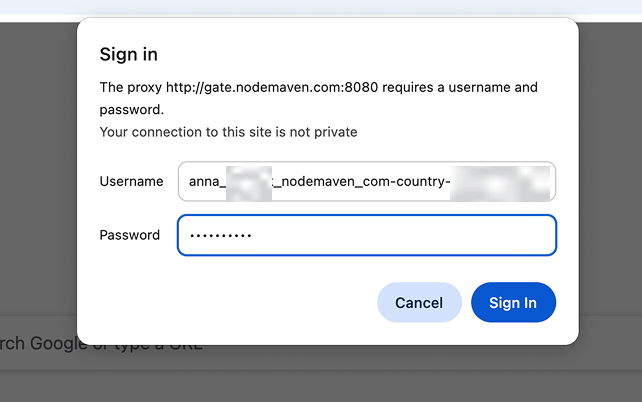
现在 Chrome 会将流量通过所选的代理服务器进行路由。
u003cdivntttntttclass=u0022so-widget-rhinocore-addons-rhino-alert-banner so-widget-rhinocore-addons-rhino-alert-banner-default-d75171398898u0022ntttnttu003eu003cdiv class=u0022rhino-widget rhino-widgetu002du002drhinocore-addons-rhino-alert-banner section-alertu0022 style=u0022u002du002dalert-background-color: #E6E6FFu0022nu003en u003cdiv class=u0022section-alert__iconu0022u003en u003cimg src=u0022https://nodemaven.com/wp-content/uploads/2026/02/icon-4.svgu0022 alt=u0022u0022 loading=u0022lazyu0022 width=u002264u0022 height=u002264u0022u003e u003c/divu003en n u003cdiv class=u0022section-alert__mainu0022u003en n u003cdiv class=u0022section-alert__descriptionu0022u003eu003cpu003eGet 750MB of NodeMaven proxy traffic for $3.50 and start using proxies in Chromeu003c/pu003enu003c/divu003en u003c/divu003en n u003can class=u0022section-alert__button b-btn b-btnu002du002dstatic-xl b-btnu002du002dsecondary-blacku0022n href=u0022https://dashboard.nodemaven.com/accounts/signup/?next=/checkout/pag/trialu0026#038;_gl=1*1um2ioy*_gcl_au*NDk2MjIxNDYuMTc3MzE0MDgwMw..*_ga*NDY4OTU1MjAyLjE3NTc1ODY1MjM.*_ga_33JL89XFQ5*czE3NzQ4Nzg3MjQkbzYwOSRnMSR0MTc3NDg4MDk0OCRqMTIkbDAkaDIxMzU1OTIzODQu0022n u003en Start trial u003c/au003en u003c/divu003enu003c/divu003e
u003cdivntttntttclass=u0022so-widget-rhinocore-addons-rhino-alert-banner so-widget-rhinocore-addons-rhino-alert-banner-default-d75171398898u0022ntttnttu003eu003cdiv class=u0022rhino-widget rhino-widgetu002du002drhinocore-addons-rhino-alert-banner section-alertu0022 style=u0022u002du002dalert-background-color: #E6E6FFu0022nu003en u003cdiv class=u0022section-alert__iconu0022u003en u003cpictureu003eu003csource srcset=u0022https://nodemaven.com/wp-content/uploads/rhino-images/images/2026/05/18/icon-2_64x64_1x_b1e0296b.webp 1x, https://nodemaven.com/wp-content/uploads/rhino-images/images/2026/05/18/icon-2_128x128_2x_b1e0296b.webp 1.3xu0022 type=u0022image/webpu0022u003eu003cimg alt=u0022u0022 loading=u0022lazyu0022 width=u002264u0022 height=u002264u0022 src=u0022https://nodemaven.com/wp-content/uploads/rhino-images/images/2026/05/18/icon-2_64x64_1x_b1e0296b.pngu0022u003eu003c/pictureu003e u003c/divu003en n u003cdiv class=u0022section-alert__mainu0022u003en u003cdiv class=u0022section-alert__titleu0022u003eTipu003c/divu003en n u003cdiv class=u0022section-alert__descriptionu0022u003eu003cpu003eNodeMaven offers 2-in-1 plans: access to both mobile and residential IPs with one subscription, which makes it convenient for workflows across different platforms and tasks.u003c/pu003enu003c/divu003en u003c/divu003en n u003c/divu003enu003c/divu003e
覆盖 190 多个国家/地区的地理定位
NodeMaven 代理支持精准的位置定位,让你可以通过来自以下地区的 IP 地址进行连接: 150 多个国家和数千个地区。这在测试本地化内容、验证广告或在 Chrome 中运行特定区域的浏览会话时非常有用。
长时间粘性会话,实现稳定连接
NodeMaven 代理支持 最长可达 24 小时的粘性会话,让你可以在较长的浏览会话中保持相同的 IP 地址。这有助于在配置 Chrome 代理设置时保持稳定性,尤其适用于需要一致会话的任务,例如账户管理、测试工作流程或浏览器自动化。
u003cdivntttntttclass=u0022so-widget-rhinocore-addons-rhino-alert-banner so-widget-rhinocore-addons-rhino-alert-banner-default-d75171398898u0022ntttnttu003eu003cdiv class=u0022rhino-widget rhino-widgetu002du002drhinocore-addons-rhino-alert-banner section-alertu0022 style=u0022u002du002dalert-background-color: #E6E6FFu0022nu003en u003cdiv class=u0022section-alert__iconu0022u003en u003cimg src=u0022https://nodemaven.com/wp-content/uploads/2026/02/icon-4.svgu0022 alt=u0022u0022 loading=u0022lazyu0022 width=u002264u0022 height=u002264u0022u003e u003c/divu003en n u003cdiv class=u0022section-alert__mainu0022u003en n u003cdiv class=u0022section-alert__descriptionu0022u003eu003cpu003eGet 750MB of NodeMaven proxy traffic for $3.50 and start using proxies in Chromeu003c/pu003enu003c/divu003en u003c/divu003en n u003can class=u0022section-alert__button b-btn b-btnu002du002dstatic-xl b-btnu002du002dsecondary-blacku0022n href=u0022https://dashboard.nodemaven.com/accounts/signup/?next=/checkout/pag/trialu0026#038;_gl=1*1um2ioy*_gcl_au*NDk2MjIxNDYuMTc3MzE0MDgwMw..*_ga*NDY4OTU1MjAyLjE3NTc1ODY1MjM.*_ga_33JL89XFQ5*czE3NzQ4Nzg3MjQkbzYwOSRnMSR0MTc3NDg4MDk0OCRqMTIkbDAkaDIxMzU1OTIzODQu0022n u003en Start trial u003c/au003en u003c/divu003enu003c/divu003e
关于 Chrome 代理设置的常见问题
u003cdivntttntttclass=u0022so-widget-rhinocore-addons-faq so-widget-rhinocore-addons-faq-default-d75171398898u0022ntttnttu003e u003cdiv class=u0022rhino-widget rhino-widgetu002du002drhinocore-addons-faq section-faqu0022u003en u003cdiv class=u0022section-faq__list section-faq__listu002du002dcolumns-1u0022 role=u0022listu0022 aria-label=u0022Frequently Asked Questionsu0022u003en u003cdiv class=u0022section-faq__columnu0022u003en u003cdiv class=u0022section-faq__itemu0022 data-accordion=u0022wrapperu0022 data-accordion-group=u0022faqu0022 role=u0022listitemu0022u003en u003cbutton class=u0022section-faq__triggeru0022 data-accordion=u0022triggeru0022 type=u0022buttonu0022 aria-expanded=u0022falseu0022u003en u003cspan class=u0022section-faq__questionu0022u003eHow do I change proxy settings in Google Chrome?u003c/spanu003en u003csvg width=u002228u0022 height=u002228u0022 viewBox=u00220 0 28 28u0022 fill=u0022noneu0022 xmlns=u0022http://www.w3.org/2000/svgu0022u003en u003cpath d=u0022M7 10.5L14 17.5L21 10.5u0022 stroke=u0022#5D5D5Du0022 stroke-width=u00222u0022 stroke-linecap=u0022roundu0022 stroke-linejoin=u0022roundu0022 /u003en u003c/svgu003en u003c/buttonu003en u003cdiv class=u0022section-faq__contentu0022u003en u003cdiv class=u0022section-faq__answeru0022u003en u003cpu003eTo change proxy settings in Google Chrome, open Chrome and go to Settings → System → Open your computer’s proxy settings. Chrome uses your operating system’s network configuration, so any proxy server you add there will automatically apply to Chrome. You can also manage proxies using a Chrome proxy extension if you want to switch connections quickly. Many users configure their Chrome setup with NodeMaven proxies, which provide clean residential, mobile, and ISP IPs designed to work reliably with Chrome.u003c/pu003en u003c/divu003en u003c/divu003en u003c/divu003en u003cdiv class=u0022section-faq__itemu0022 data-accordion=u0022wrapperu0022 data-accordion-group=u0022faqu0022 role=u0022listitemu0022u003en u003cbutton class=u0022section-faq__triggeru0022 data-accordion=u0022triggeru0022 type=u0022buttonu0022 aria-expanded=u0022falseu0022u003en u003cspan class=u0022section-faq__questionu0022u003eHow do I set a proxy server in Chrome?u003c/spanu003en u003csvg width=u002228u0022 height=u002228u0022 viewBox=u00220 0 28 28u0022 fill=u0022noneu0022 xmlns=u0022http://www.w3.org/2000/svgu0022u003en u003cpath d=u0022M7 10.5L14 17.5L21 10.5u0022 stroke=u0022#5D5D5Du0022 stroke-width=u00222u0022 stroke-linecap=u0022roundu0022 stroke-linejoin=u0022roundu0022 /u003en u003c/svgu003en u003c/buttonu003en u003cdiv class=u0022section-faq__contentu0022u003en u003cdiv class=u0022section-faq__answeru0022u003en u003cdiv class=u0022faq-item activeu0022u003enu003cdiv class=u0022faq-answeru0022u003eTo set a proxy in Chrome, open your Chrome proxy settings through the system network configuration panel. Enter the proxy server address, port, and authentication details if required. Once the settings are saved, Chrome will route browser traffic through that proxy server in Chrome. If you are using NodeMaven proxies, you can simply copy the proxy credentials from the dashboard and add them to your Chrome configuration or proxy extension.u003c/divu003enu003c/divu003enu003cdiv class=u0022faq-itemu0022u003e u003c/divu003en u003c/divu003en u003c/divu003en u003c/divu003en u003cdiv class=u0022section-faq__itemu0022 data-accordion=u0022wrapperu0022 data-accordion-group=u0022faqu0022 role=u0022listitemu0022u003en u003cbutton class=u0022section-faq__triggeru0022 data-accordion=u0022triggeru0022 type=u0022buttonu0022 aria-expanded=u0022falseu0022u003en u003cspan class=u0022section-faq__questionu0022u003eCan I use a proxy extension instead of manual Chrome proxy settings?u003c/spanu003en u003csvg width=u002228u0022 height=u002228u0022 viewBox=u00220 0 28 28u0022 fill=u0022noneu0022 xmlns=u0022http://www.w3.org/2000/svgu0022u003en u003cpath d=u0022M7 10.5L14 17.5L21 10.5u0022 stroke=u0022#5D5D5Du0022 stroke-width=u00222u0022 stroke-linecap=u0022roundu0022 stroke-linejoin=u0022roundu0022 /u003en u003c/svgu003en u003c/buttonu003en u003cdiv class=u0022section-faq__contentu0022u003en u003cdiv class=u0022section-faq__answeru0022u003en u003cpu003eYes. A Chrome proxy extension is often the easiest way to manage proxies in the browser. Tools like Chrome Simple Proxy Switcher allow you to add proxy profiles and switch between them without changing system settings. This approach works well with NodeMaven proxies, since the platform provides ready-to-use proxy strings that can be quickly added to Chrome proxy extensions.u003c/pu003en u003c/divu003en u003c/divu003en u003c/divu003en u003cdiv class=u0022section-faq__itemu0022 data-accordion=u0022wrapperu0022 data-accordion-group=u0022faqu0022 role=u0022listitemu0022u003en u003cbutton class=u0022section-faq__triggeru0022 data-accordion=u0022triggeru0022 type=u0022buttonu0022 aria-expanded=u0022falseu0022u003en u003cspan class=u0022section-faq__questionu0022u003eWhere are proxy settings located in Chrome?u003c/spanu003en u003csvg width=u002228u0022 height=u002228u0022 viewBox=u00220 0 28 28u0022 fill=u0022noneu0022 xmlns=u0022http://www.w3.org/2000/svgu0022u003en u003cpath d=u0022M7 10.5L14 17.5L21 10.5u0022 stroke=u0022#5D5D5Du0022 stroke-width=u00222u0022 stroke-linecap=u0022roundu0022 stroke-linejoin=u0022roundu0022 /u003en u003c/svgu003en u003c/buttonu003en u003cdiv class=u0022section-faq__contentu0022u003en u003cdiv class=u0022section-faq__answeru0022u003en u003cdiv class=u0022faq-item activeu0022u003enu003cdiv class=u0022faq-answeru0022u003eProxy settings in Chrome are located in the system network settings of your operating system. In Chrome, go to Settings → System → Open your computer’s proxy settings to access the configuration panel. From there you can add or update a proxy server for Google Chrome. Many users connect Chrome to NodeMaven residential or mobile proxies to maintain stable connections and reliable browsing sessions.u003c/divu003enu003c/divu003enu003cdiv class=u0022faq-itemu0022u003e u003c/divu003en u003c/divu003en u003c/divu003en u003c/divu003en u003cdiv class=u0022section-faq__itemu0022 data-accordion=u0022wrapperu0022 data-accordion-group=u0022faqu0022 role=u0022listitemu0022u003en u003cbutton class=u0022section-faq__triggeru0022 data-accordion=u0022triggeru0022 type=u0022buttonu0022 aria-expanded=u0022falseu0022u003en u003cspan class=u0022section-faq__questionu0022u003eWhy do people use proxies in Chrome?u003c/spanu003en u003csvg width=u002228u0022 height=u002228u0022 viewBox=u00220 0 28 28u0022 fill=u0022noneu0022 xmlns=u0022http://www.w3.org/2000/svgu0022u003en u003cpath d=u0022M7 10.5L14 17.5L21 10.5u0022 stroke=u0022#5D5D5Du0022 stroke-width=u00222u0022 stroke-linecap=u0022roundu0022 stroke-linejoin=u0022roundu0022 /u003en u003c/svgu003en u003c/buttonu003en u003cdiv class=u0022section-faq__contentu0022u003en u003cdiv class=u0022section-faq__answeru0022u003en u003cpu003eMany users configure Chrome proxy settings for tasks such as testing websites from different locations, running automation tools, managing multiple browser sessions, or verifying localized content. Using a proxy in Chrome browser allows the browser to connect through a different IP address. Services like NodeMaven provide residential, mobile, and ISP proxies that help keep these workflows stable while using Chrome.u003c/pu003en u003c/divu003en u003c/divu003en u003c/divu003en u003cdiv class=u0022section-faq__itemu0022 data-accordion=u0022wrapperu0022 data-accordion-group=u0022faqu0022 role=u0022listitemu0022u003en u003cbutton class=u0022section-faq__triggeru0022 data-accordion=u0022triggeru0022 type=u0022buttonu0022 aria-expanded=u0022falseu0022u003en u003cspan class=u0022section-faq__questionu0022u003eWhat is the best proxy for Google Chrome?u003c/spanu003en u003csvg width=u002228u0022 height=u002228u0022 viewBox=u00220 0 28 28u0022 fill=u0022noneu0022 xmlns=u0022http://www.w3.org/2000/svgu0022u003en u003cpath d=u0022M7 10.5L14 17.5L21 10.5u0022 stroke=u0022#5D5D5Du0022 stroke-width=u00222u0022 stroke-linecap=u0022roundu0022 stroke-linejoin=u0022roundu0022 /u003en u003c/svgu003en u003c/buttonu003en u003cdiv class=u0022section-faq__contentu0022u003en u003cdiv class=u0022section-faq__answeru0022u003en u003cdiv class=u0022faq-item activeu0022u003enu003cdiv class=u0022faq-answeru0022u003eThe best proxy for Chrome usually depends on the task. Many users choose residential, mobile, or ISP proxies because they provide more trusted IP addresses than public proxy lists. NodeMaven proxies are commonly used with Chrome because the IP pool is filtered for quality and supports stable sessions, which helps improve reliability when running browser workflows.u003c/divu003enu003c/divu003enu003cdiv class=u0022faq-itemu0022u003e u003c/divu003en u003c/divu003en u003c/divu003en u003c/divu003en u003cdiv class=u0022section-faq__itemu0022 data-accordion=u0022wrapperu0022 data-accordion-group=u0022faqu0022 role=u0022listitemu0022u003en u003cbutton class=u0022section-faq__triggeru0022 data-accordion=u0022triggeru0022 type=u0022buttonu0022 aria-expanded=u0022falseu0022u003en u003cspan class=u0022section-faq__questionu0022u003eHow do I check if my Chrome proxy is working?u003c/spanu003en u003csvg width=u002228u0022 height=u002228u0022 viewBox=u00220 0 28 28u0022 fill=u0022noneu0022 xmlns=u0022http://www.w3.org/2000/svgu0022u003en u003cpath d=u0022M7 10.5L14 17.5L21 10.5u0022 stroke=u0022#5D5D5Du0022 stroke-width=u00222u0022 stroke-linecap=u0022roundu0022 stroke-linejoin=u0022roundu0022 /u003en u003c/svgu003en u003c/buttonu003en u003cdiv class=u0022section-faq__contentu0022u003en u003cdiv class=u0022section-faq__answeru0022u003en u003cpu003eAfter configuring a proxy, open a new Chrome tab and visit an IP checking website. If the setup is correct, the displayed IP address will match the proxy location configured in Chrome. When using NodeMaven proxies, you can easily confirm the connection by checking the IP and region assigned through the NodeMaven dashboard.u003c/pu003en u003c/divu003en u003c/divu003en u003c/divu003en u003cdiv class=u0022section-faq__itemu0022 data-accordion=u0022wrapperu0022 data-accordion-group=u0022faqu0022 role=u0022listitemu0022u003en u003cbutton class=u0022section-faq__triggeru0022 data-accordion=u0022triggeru0022 type=u0022buttonu0022 aria-expanded=u0022falseu0022u003en u003cspan class=u0022section-faq__questionu0022u003eCan I use different proxies in Chrome for different tasks?u003c/spanu003en u003csvg width=u002228u0022 height=u002228u0022 viewBox=u00220 0 28 28u0022 fill=u0022noneu0022 xmlns=u0022http://www.w3.org/2000/svgu0022u003en u003cpath d=u0022M7 10.5L14 17.5L21 10.5u0022 stroke=u0022#5D5D5Du0022 stroke-width=u00222u0022 stroke-linecap=u0022roundu0022 stroke-linejoin=u0022roundu0022 /u003en u003c/svgu003en u003c/buttonu003en u003cdiv class=u0022section-faq__contentu0022u003en u003cdiv class=u0022section-faq__answeru0022u003en u003cpu003eYes. With a Chrome proxy extension, you can switch between different proxy servers depending on the task. This is useful when testing websites from different locations or managing multiple browser sessions. Many users add multiple NodeMaven proxy profiles in Chrome extensions so they can quickly switch between residential, mobile, or ISP proxies while working.u003c/pu003en u003c/divu003en u003c/divu003en u003c/divu003en u003c/divu003en u003c/divu003en u003c/divu003enu003c/divu003e