
Afina Browser Review: Isolated Profiles, Built-In Automation and NodeMaven Proxy Setup



Afina Browser is an antidetect browser that keeps each account in a separate profile with its own fingerprint, cookies and proxy. Teams use it for multi-accounting, SMM, e-commerce, affiliate work and data collection when sessions must not bleed into each other. In real work, the browser fingerprint is only one part of the setup. You also have to watch the IP, ASN, WebRTC, DNS, language, time zone and how stable the sticky session stays.
This review looks at what Afina does, why its profiles are different from normal incognito mode, how UDP over SOCKS5 works, and how to connect proxies to an Afina profile.
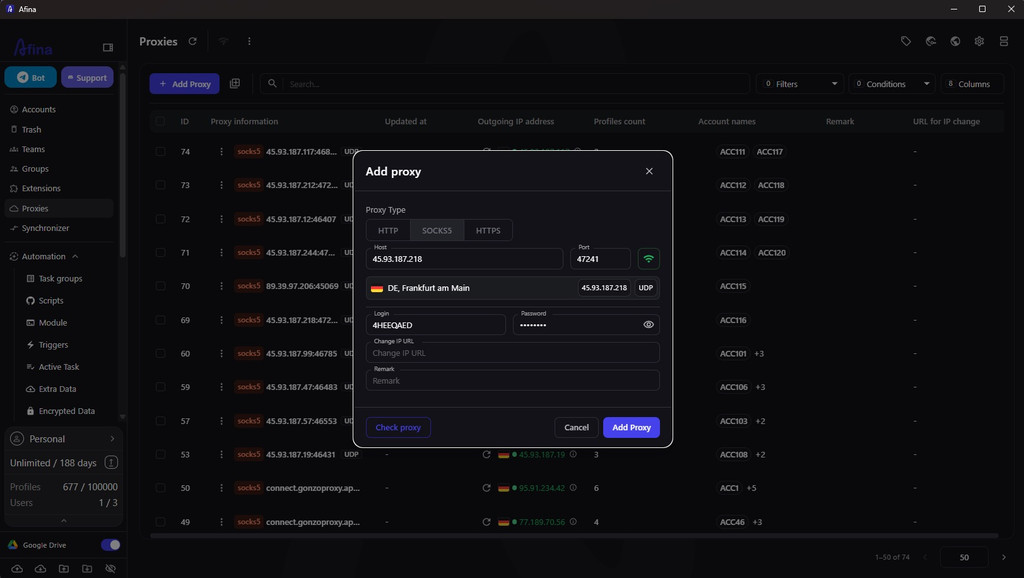
Afina is better understood as a workspace for accounts, not just another browser. A profile, proxy, cookies, cache, automation and team permissions live in the same place. That removes a lot of manual routine. But it does not remove basic hygiene. A weak proxy, a sudden geo change or strange account behavior can still create risk.
What is Afina Browser
Afina Browser is a desktop Chromium-based antidetect browser for Windows and macOS. Its job is simple: separate accounts into isolated profiles so websites do not see shared cookies, cache, LocalStorage, IndexedDB, extensions, proxy settings or browser fingerprints.
In a regular browser, several accounts often leave shared technical traces: the same data directory, the same fonts, similar Canvas or WebGL signals, a repeated User-Agent, one IP. With fingerprint management in Afina, these small parameters form the device profile. An anti-fraud system can connect accounts even when the email or phone number is different.
Afina creates a separate Chromium profile for every account, with its own folder on disk. The fingerprint is built from realistic device parameters instead of a random mix of values. That matters. A random combination of CPU, RAM, WebGL, Canvas, language and time zone can look less natural than a calm, consistent configuration.
Afina also syncs language and time zone with the proxy geo. If an account works from an IP in a specific country, the profile should match that IP not only by address, but also by Accept-Language headers, time zone and WebRTC behavior. Without that, the first login may work, while long sessions start falling apart.
What are Afina’s core features
Afina solves several common multi-accounting problems: linked profiles, unstable networking and repeated manual work. For a NodeMaven user, this is especially practical: the proxy does not sit somewhere outside the browser, but becomes part of a profile that can be checked together with how Afina routes UDP through SOCKS5.
How do isolated profiles and fingerprints work?
An Afina profile has its own cookies, cache, local storage, extensions, launch settings, proxy and fingerprint. For a team managing dozens of accounts, this is not a small detail. One broken or dirty profile does not drag the rest with it.
Afina lets you configure User-Agent, Canvas, WebGL, Audio, Rects, CPU, RAM, screen, language and time zone. For bulk work, part of these settings can be updated in groups. The logic stays the same: the profile should look coherent, not “unique at any cost”.
How does Afina handle proxies, UDP and WebRTC?
The network layer can ruin even a well-built fingerprint. If the HTTP IP, WebRTC Public IP, DNS or QUIC tell different stories, the website sees a conflict between the browser and the network. Afina supports HTTP, HTTPS and SOCKS5. With SOCKS5, it can route UDP if the proxy itself really supports UDP ASSOCIATE.
That is why UDP over SOCKS5 matters in workflows where WebRTC, QUIC, HTTP/3 or WebTransport should not bypass the proxy. Afina also checks proxies before use, shows active or inactive status, and detects the outgoing IP, country and time zone.
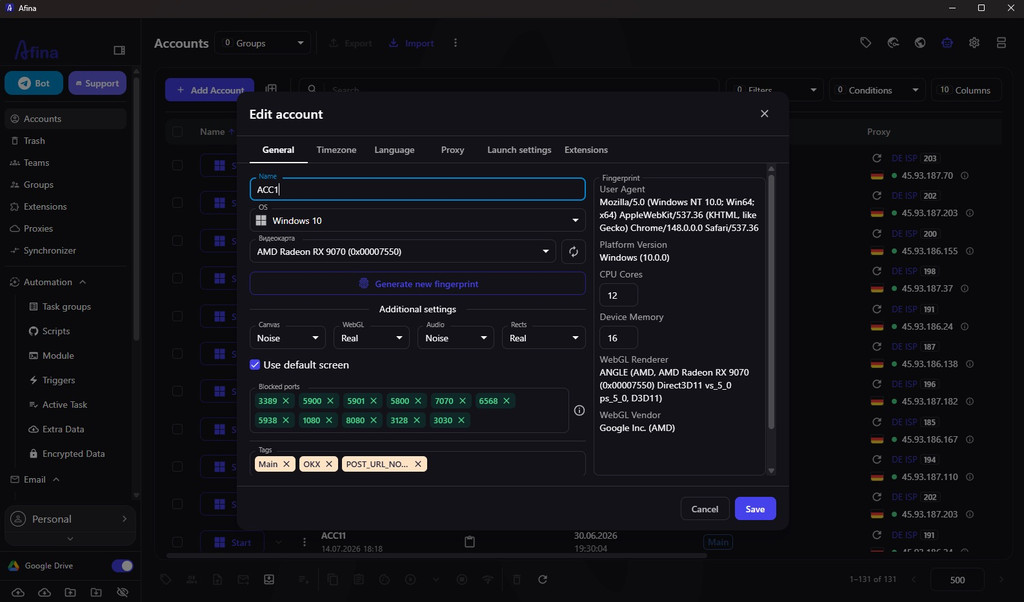
It is better to be precise here: Afina should not be described as having a classic OS-level kill switch or a finished kill switch for any IP change. Confirmed features include proxy checks, blocking on proxy country change and the option to disable WebRTC.
What can Afina automate?
Manual work across dozens of accounts quickly turns into mistakes: wrong profile, wrong proxy, skipped checker, different order of actions. Afina has a visual no-code scenario builder. The logic is assembled from blocks: navigation, clicks, waits, checks, conditions and branches.
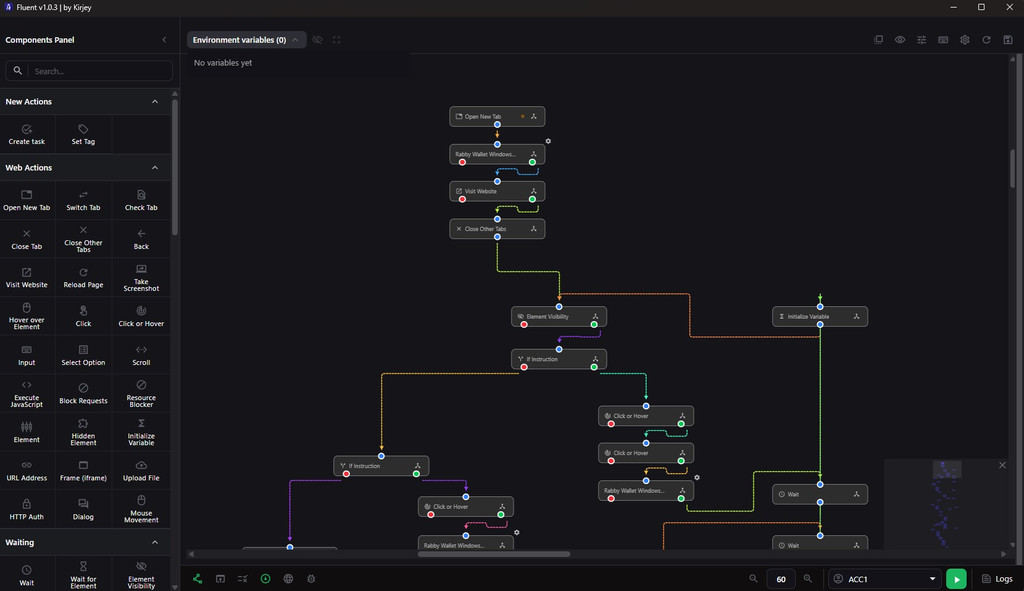
For more complex processes, Afina also supports JavaScript modules, a local REST API and CDP connections for Puppeteer and Playwright. The local API works with the desktop app, so automation can run from your own tools without a cloud middle layer. This is useful for profile creation, proxy checks, browser launch, cookies and account preparation for recurring tasks.
How does teamwork fit into the workflow?
For teams, Afina supports roles, member invitations and permission control. The owner can decide who launches profiles, adds accounts, moves them between groups or invites new people. Sensitive data is protected with local encryption. Keys should not become attachments in a work chat.
There is one practical caveat: team sync and key handling require discipline. If a team loses the master password, mixes access rights or never records who owns which profiles, the tool will not save the process from chaos.
How do you connect NodeMaven proxies to an Afina profile
Connecting NodeMaven to Afina is not a separate integration with a button inside the browser. It is a normal proxy setup: take the host, port, username and password from the NodeMaven dashboard and add them to an Afina profile or saved proxy record.
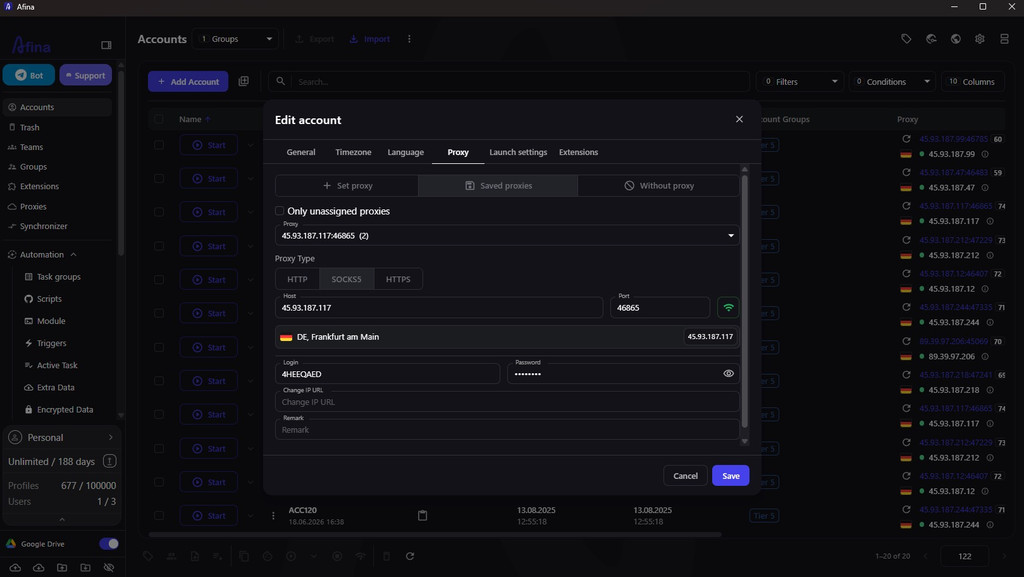
Keep the workflow simple:
- Open the NodeMaven dashboard and generate a proxy string for the needed proxy type
- Choose residential, mobile or ISP depending on the account task
- Set a sticky session for residential or mobile if the account needs a stable IP during long work
- Create or open a profile in Afina
- Go to the Proxy or Proxies tab
- Select HTTP, HTTPS or SOCKS5 according to the proxy string
- Enter host, port, username and password
- Run the proxy check in Afina
- Check that country, time zone, WebRTC and DNS do not conflict with the profile task
- Save the profile and launch the account only after a successful check
When there are many profiles, it is better to add proxies to the proxy list first, and then assign them to account groups. This makes it easier to see which IP is already in use, which proxies are inactive, and where a sticky session needs to be changed.
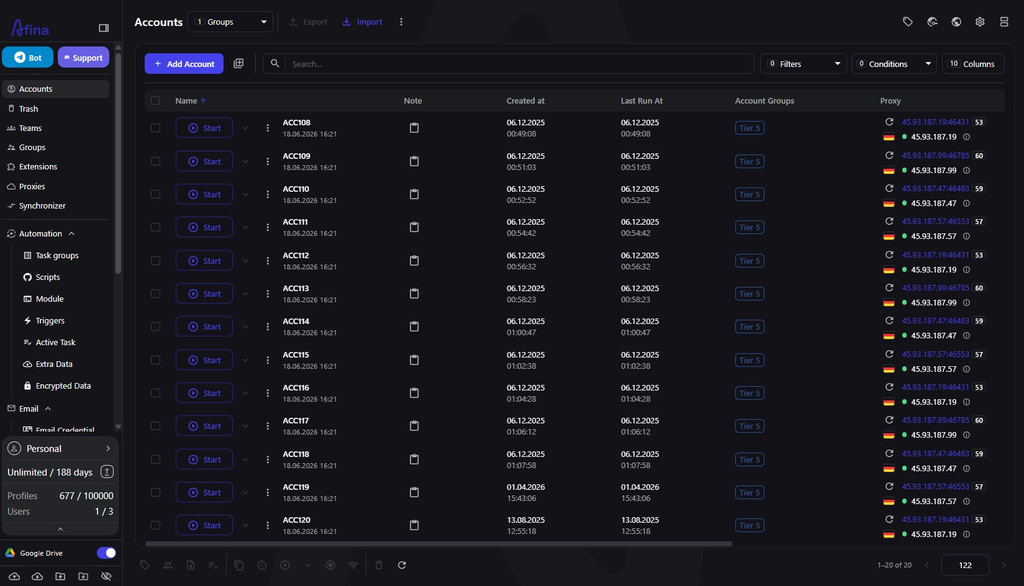
After bulk proxy assignment, review the account list before launch. Check that each profile has the right proxy type, expected geo, clear name or tag. One more thing: one IP should not accidentally land on several accounts with different roles. For working groups, mark profiles with sticky sessions, ISP proxies and proxies that already passed WebRTC or DNS checks.
Which NodeMaven proxy type fits which profile
The proxy type should match the account task. Do not choose only by the “more expensive means better” logic. NodeMaven offers residential, mobile and ISP proxies; sticky sessions are available for residential and mobile, while ISP works as a fixed static IP without rotating session types.
| Task | NodeMaven 代理 | 会话 | 为什么 |
|---|---|---|---|
| Long-living account for a dashboard or marketplace | ISP(互联网服务提供商) | Fixed IP | A stable address is easier for long sessions and repeated logins |
| SMM or mobile-first social platform | 移动代理 | Sticky up to 24 hours | Mobile ASN usually looks more natural for mobile-first platforms |
| Data collection or checks across different geos | 住宅代理 | Sticky or rotation | You can change geo, city or ISP for a specific task |
| QUIC, WebRTC or UDP-sensitive workflows | ISP with SOCKS5 UDP | Fixed IP | NodeMaven has UDP for ISP, and Afina can route UDP through SOCKS5 |
If you need a long stable profile, 静态 ISP 代理 are usually easier to control: the IP should not suddenly change in the middle of a session. If the task depends on different cities or carrier logic, mobile or residential sticky sessions may be more practical.
After choosing the proxy type, do not skip the check. The problem is not rotation itself, but illogical rotation: one ASN now, another one a minute later, WebRTC showing a third address, while the browser language remains from the previous geo.
What are Afina’s pros and cons
Afina fits users who need more than an antidetect profile. It covers the full workflow: account creation, proxies, checks, no-code automation, API and team roles. Its strength is that profiles, networking and automation sit in one desktop tool.
优点
- Isolated Chromium profiles with their own cookies, cache, proxy and fingerprint
- Realistic fingerprints based on plausible device parameters
- HTTP, HTTPS and SOCKS5, including UDP over SOCKS5 when the proxy supports it
- No-code scenarios, JavaScript modules, local REST API and CDP for Puppeteer and Playwright
- Bulk profile creation and group proxy assignment
- Team roles and local encryption for sensitive data
缺点
- No Linux version
- IPv6 proxies are not supported, IPv4 is required
- A kill switch for direct IP changes should not be described as a finished feature
- The result still depends on proxy quality, account behavior and platform rules
Who should use Afina
Afina is most useful for teams and specialists who work not with one account, but with groups of profiles. This includes affiliate teams, SMM agencies, e-commerce operators, Web3 teams, SEO teams and data teams that do not want to rebuild the same stack of browser, proxy, checkers and scripts every time.
For a simple one-time task, a regular browser with a good proxy may be enough. But when you need to launch profiles regularly, check IPs, keep cookies, repeat actions by scenario and avoid mixing access between people, Afina gives a more controlled system. This material is provided for informational and educational purposes only.
Promo code for new users:
- SALE20 – 20% off the Base, Standard and Max plans


