

How to Check a Proxy Server: 8 Tests That Catch Real Problems


Most proxy checks stop when an IP checker shows a new address. That confirms the request went through the proxy, but it can miss a wrong location, a WebRTC leak, an unstable sticky session, or a block on the website you actually need.
Run the checks in the same browser, script, or app that will use the proxy. Test the login details, exit IP, location, speed, session behavior, leaks, UDP, and the target itself. A cURL request can succeed while a browser profile still sends some traffic directly.
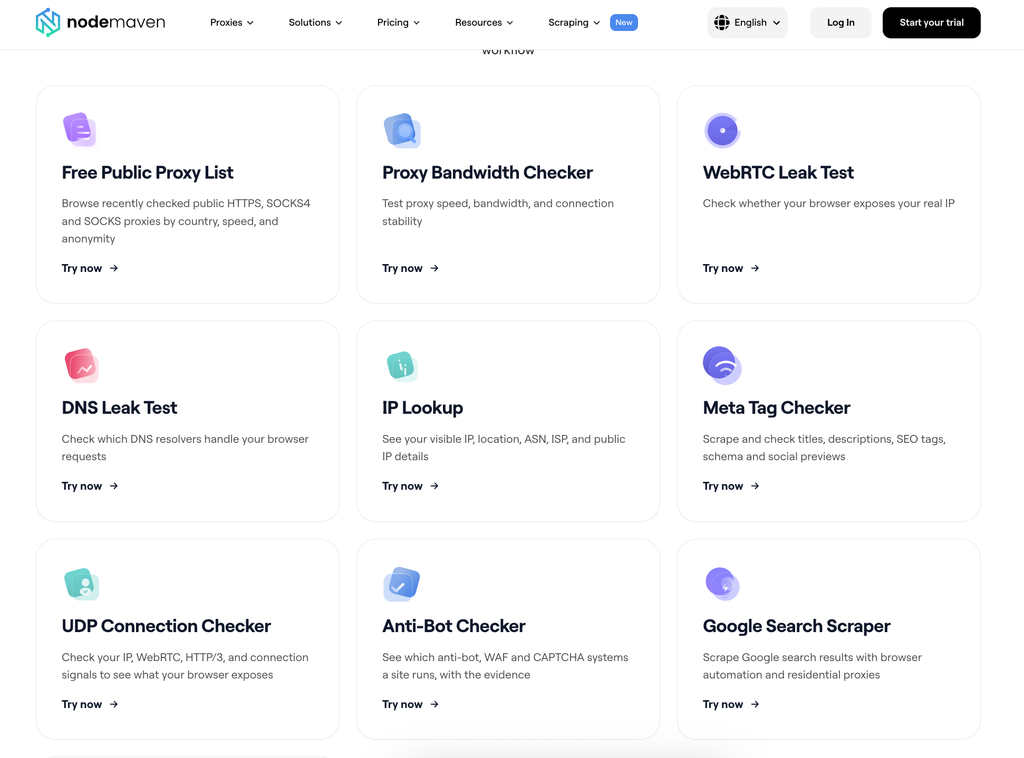
NodeMaven 的 free scraping tools cover these parts of the connection separately. This guide explains how to check each part of the proxy connection and test whether it works on your intended website or app.
关键要点
- est the proxy inside the browser, script, or application that will use it. A successful cURL request does not confirm that DNS, WebRTC, IPv6, and UDP follow the same route.
- NodeMaven provides free tools for each part of the check. 使用 连接检测器 for the route and UDP, IP 查询 for location and reputation, and the Proxy and Bandwidth Checker for fixed-payload transfers.
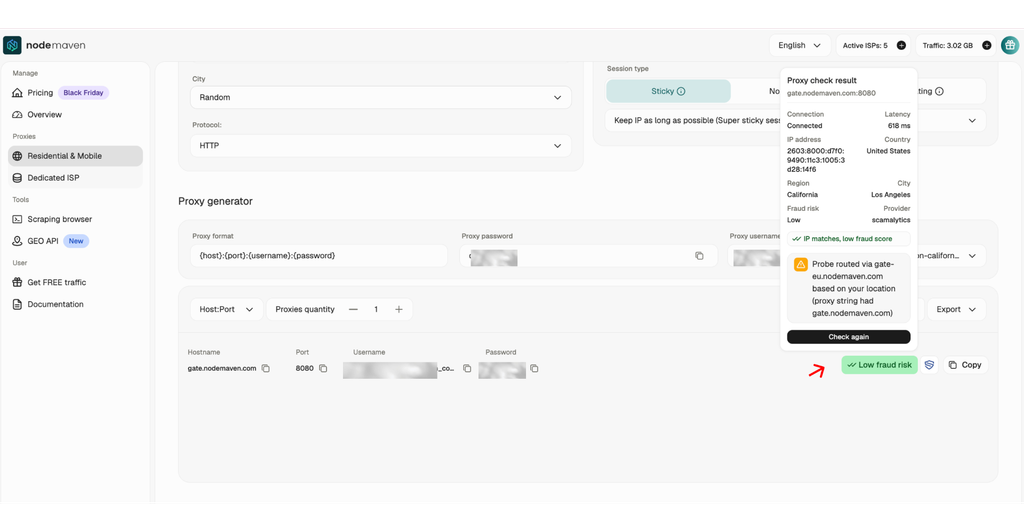
- The NodeMaven dashboard includes a built-in proxy checker. It verifies the connection, latency, exit IP, location, and fraud risk before you copy the proxy into another application.
- Count the expected content as a successful result. An HTTP 200 response may contain a CAPTCHA, consent screen, throttle page, or empty result instead of the requested data.
- Test the complete request sequence. A proxy may load the first page and encounter a challenge later, so reproduce the session length and number of requests used in production.
- Use the open-source proxy-benchmark to compare providers fairly. Keep the target, browser, country, request sequence, and test window fixed so you can see whether the failure follows the proxy, browser, or another part of the setup.

Test NodeMaven’s quality-filtered residential and mobile proxies with 750 MB of traffic for $3.50.
How do you test a proxy server?
Work through the checks in order. Start with the connection and finish with the real workload. There is little point investigating browser fingerprints if the password contains a typo or the client is connecting to an HTTP port as SOCKS5.
| 测试项 | 需要检查的内容 | 推荐方法 |
| 1. Connection | The gateway, port, protocol, and credentials work | 浏览器, cURL, or proxy client |
| 2. Exit IP | Your public IP changes to the proxy address | 连接检测器 |
| 3. Location and network | Country, city, ISP, ASN, and IP type match the order | IP 查询 |
| 4. Transfer and bandwidth | The proxy connects, returns an HTTP status, completes the selected payload, and transfers the expected byte count | Proxy and Bandwidth Checker |
| 5. Session behavior | Sticky sessions retain an IP and rotating sessions change it as configured | Repeated checks in 连接检测器 |
| 6. Leak protection | DNS, WebRTC, and IPv6 do not expose another public route | DNS 泄漏测试 和 WebRTC 泄漏测试 |
| 7. UDP and HTTP/3 | UDP-dependent traffic follows the intended route | 连接检测器 |
| 8. Target access | The website returns the requested content rather than a CAPTCHA, block, or empty page | A real request through the configured proxy or proxy-benchmark |
Once the IP changes, check DNS and WebRTC routing, session retention, UDP, and the actual target response. Amazon, Google, or Walmart can still return a CAPTCHA or block page through an otherwise working proxy.
1. Confirm that the proxy connects and authenticates
Before checking speed or reputation, make sure the client can reach the gateway. You need the correct server address, port, protocol, and authentication method. A mistake here usually produces a timeout, a connection error, or 407 Proxy Authentication Required before the request reaches the target.
Copy the details from the provider’s dashboard. Check whether the endpoint expects HTTP, HTTPS, or SOCKS5, since using the wrong protocol can look like a dead proxy. Providers may authenticate with a username and password, an IP allowlist, or both.
You can test an authenticated HTTP proxy with cURL:
For SOCKS5 with remote DNS resolution, use socks5h:
The h in socks5h tells cURL to resolve the hostname through the proxy. The official cURL proxy documentation lists the supported proxy types and authentication options, while our cURL proxy guide has more HTTP and SOCKS5 examples.
If the command returns an IP, the gateway accepted the connection and reached the test service. You still haven’t checked its country, speed, session behavior, or ability to open your target. A 407 response points back to the credentials or allowlist, not the quality of the exit IP. The 代理身份验证指南 covers those failures in detail.
2. Verify the exit IP, location, ISP, and reputation
打开 NodeMaven Connection Checker before enabling the proxy and record your IP. Connect the proxy, reload the page, and compare the result. The new exit should match the location selected in your provider dashboard. If the IP stays unchanged, check whether the profile is enabled, the app follows system proxy settings, or a browser, split-tunnel, or IPv6 rule bypasses the route.
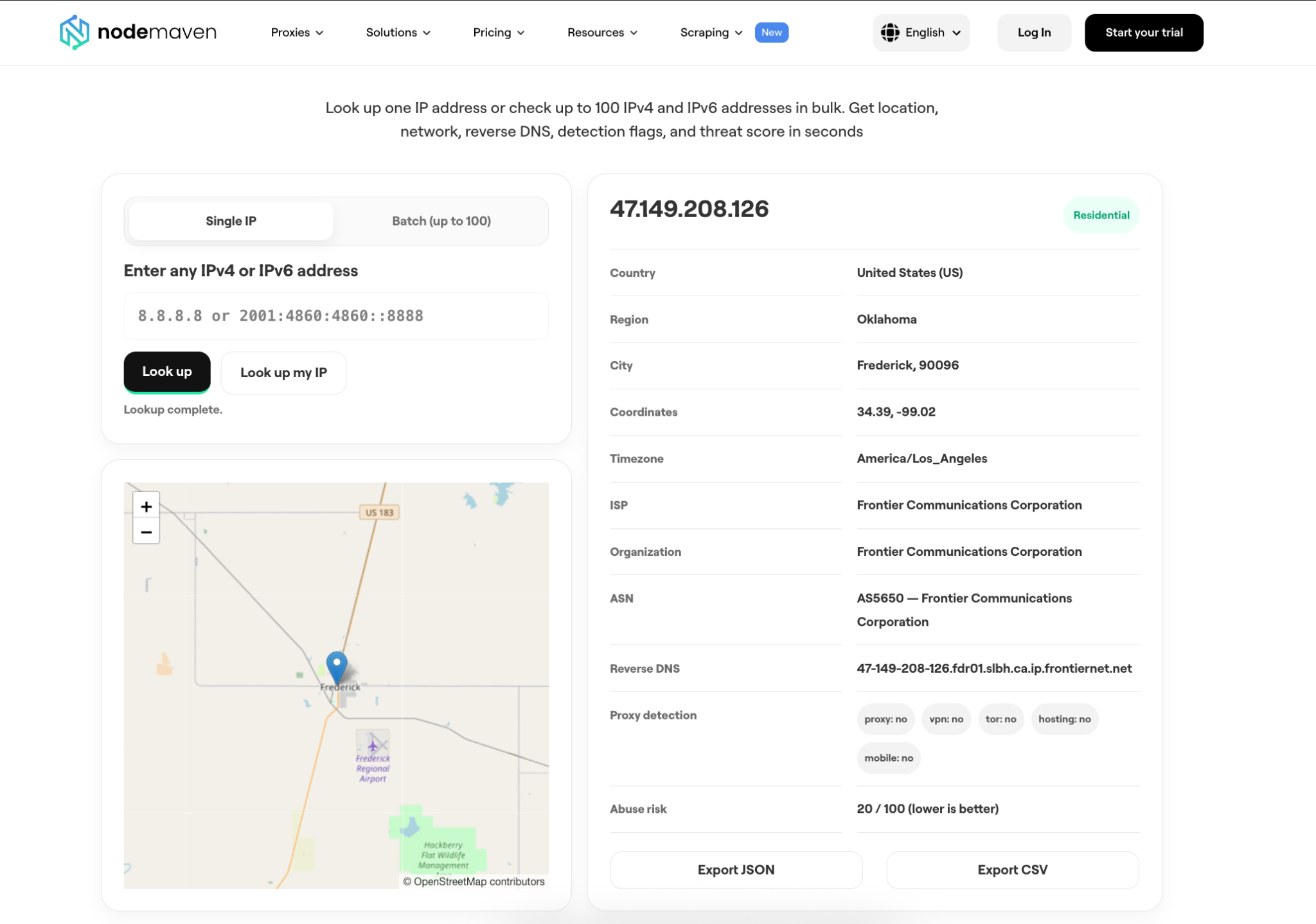
Paste the new IP into IP 查询 to see its country, city, ISP, ASN, reverse DNS, address type, and risk indicators. Batch mode accepts up to 100 addresses. City results can differ between databases, so check the country, ISP, and ASN first, then confirm location-sensitive content on the target website.
我们的 IP blacklist check guide explains how to read blacklist records and fraud scores. A clean result helps with screening, but the target may still react to browser behavior, request volume, or its own history with the address.
NodeMaven filters residential and mobile addresses before assigning them. For long-running profiles, ISP 代理 provide dedicated static IPs that remain assigned for the purchased period.
3. Test proxy speed, bandwidth, and connection reliability
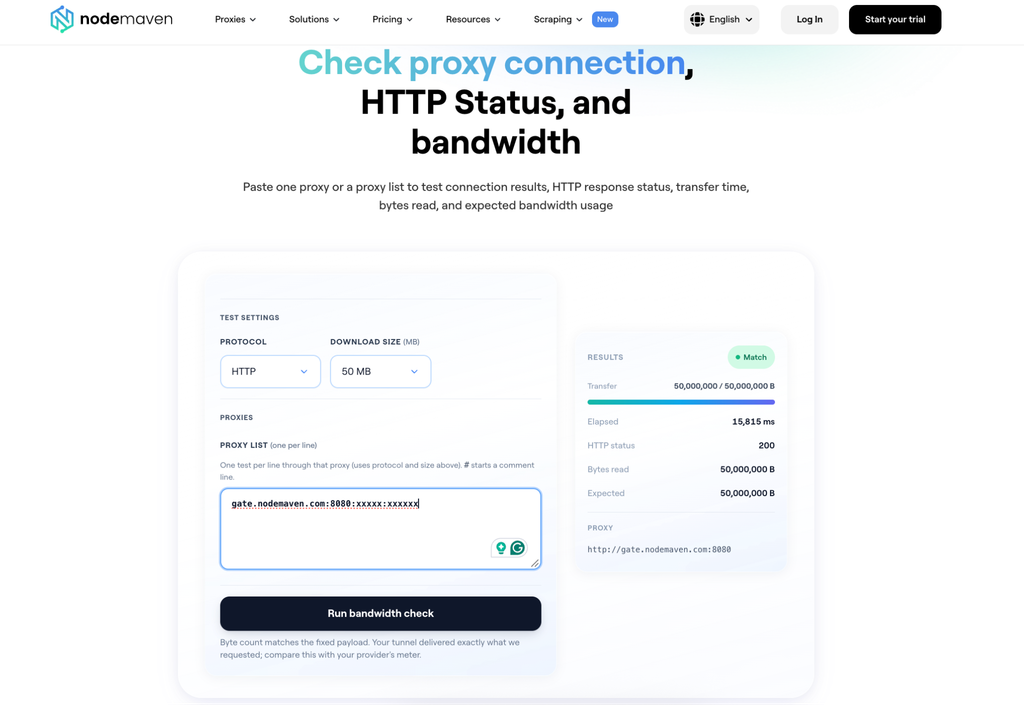
该 Proxy and Bandwidth Checker tests HTTP and SOCKS5 proxies with a fixed payload from 10 MB to 500 MB. It reports whether the proxy connected, the HTTP status, elapsed transfer time, bytes read, and the expected byte count.
Start with 10 MB for a quick check, then use a larger payload if the real job transfers more data. Run the same test several times and compare completed connections, median transfer time, and failures. Larger payloads consume paid traffic, so avoid running a 500 MB test across a long list without checking the cost.
Users made a similar point in a discussion about proxy speed tests: the fastest synthetic result may not perform best in production. For scraping, compare time and cost per usable page, including retries and block pages. NodeMaven ISP proxies include unlimited traffic for bandwidth-heavy browser sessions and repeated account workflows.
4. Check sticky sessions and proxy rotation
Check whether the proxy keeps or changes its IP as configured. A static ISP proxy should stay on one address, a sticky session should keep its IP for the selected period, and a rotating session should change according to its settings.
打开 连接检测器, record the IP, and repeat the check at the beginning, middle, and end of the session. Match the test length to the real workflow. If a scraper runs for 30 minutes, test it for 30 minutes. Then start a new session identifier to check rotation.
Logins, pagination, carts, and other multi-step tasks usually need the same IP throughout. NodeMaven residential and mobile proxies support sticky or rotating sessions, while ISP proxies provide a dedicated static address.
5. Check DNS and IPv6 routing
Your browser can show the proxy IP while DNS or IPv6 takes another route. Check both separately from the ordinary HTTP request, especially when location affects the page or account session.
Run a DNS leak test
打开 DNS 泄漏测试 inside the configured browser. It sends browser queries to an authoritative DNS service and reports the resolver IP, provider, ASN, country, and type.
If the resolver belongs to your local internet provider while the proxy exits elsewhere, DNS may be bypassing the intended route. Check remote DNS support in the proxy client, the browser’s DNS over HTTPS setting, and any split-tunnel rules. With cURL, socks5h resolves the hostname through SOCKS5; socks5 normally resolves it on the local device.
Test IPv6 separately
Some configurations route IPv4 but leave IPv6 untouched, so the same browser may use the proxy for one request and connect directly for another. Check both address families. If the proxy setup doesn’t cover IPv6, route it separately or disable it for that profile.
6. Check for WebRTC leaks
WebRTC opens connections differently from an ordinary page request. Compare every public address it exposes with the HTTP exit. Seeing the proxy IP on an IP-check site does not tell you what a STUN or TURN server observes.
该 WebRTC 泄漏测试 inspects ICE candidates exposed by the browser. It can show public IPv4 or IPv6 addresses, local addresses, and mDNS hostnames. Compare these observations with the HTTP exit.
The broader Connection Checker compares the browser-reported WebRTC address with server-observed STUN and TURN traffic, including UDP and TCP relays. Fix the browser or client if a second public IP appears before signing in to an account or starting a location-sensitive job. Our WebRTC leak guide covers the browser-side causes.
7. Confirm UDP and HTTP/3 support
Loading a normal web page mostly confirms that TCP works. Real-time traffic and HTTP/3 need a separate UDP check, and the test has to include the local client and network as well as the proxy server.
IETF RFC 1928 defines SOCKS5 UDP forwarding through the UDP ASSOCIATE command. That does not mean every SOCKS5 setup passes UDP. The proxy server, local client, and application all need to support it.
连接检测器 reports whether the browser negotiates HTTP/3 over QUIC or falls back to TCP. Its TURN checks test relayed WebRTC traffic over both UDP and TCP, which gives you a clearer result than loading a standard HTTPS page.
NodeMaven offers proxy options with UDP support, including ISP proxies with SOCKS5 and UDP. Test the full route after setup, since a client that handles only TCP will still stop UDP before it reaches the proxy.
Test NodeMaven’s quality-filtered residential and mobile proxies with 750 MB of traffic for $3.50.
8. Test the proxy on the real website or application
An IP checker proves that the proxy can reach the checker, not your target. Request the real page or API and verify the expected content, since an HTTP 200 response can still contain a CAPTCHA, consent screen, block, or empty result.
Check for a marker that appears only in a valid response: a product grid, required API field, or search result entry. The 反爬虫检测工具 can identify protection systems on the target, but it cannot tell you whether your proxy caused the challenge.
Community discussions make the same distinction. A proxy may pass a connection check and fail on the intended site,而 provider comparisons become unreliable when the browser, headers, or definition of success changes between tests.
Reproduce the full request sequence
Test each proxy through the full request sequence because a website may serve the first page and challenge later requests from the same IP. In our Walmart browser and proxy test, the same CloakBrowser setup and four proxy pools delivered 93% of first pages but 22% of pages two to five. The drop did not prove that the proxy was the only cause: Patchright received CAPTCHAs from the first request across the same providers, so the browser setup also affected the result.
Save the status, final URL, response size, and content verdict for every attempt. Remove credentials, proxy usernames, full IPs, and personal data before sharing response samples.
Compare providers under the same conditions
Compare providers in the same test window while keeping the target, browser, host, country, request sequence, and success rule fixed. Otherwise, a change at the target can look like a provider difference. NodeMaven’s open-source proxy-benchmark runs controlled comparisons and saves every attempt as a JSONL row.
我们的 24,156-page study found that the target, browser, timing, and location changed delivery. The Walmart and Amazon test also produced different results with the same proxy pools after the browser changed. Use the same setup for every provider, then compare usable pages, failures, location accuracy, and session continuity.
What does each failed proxy test mean?
Start with the first check that failed. One CAPTCHA or timeout doesn’t prove that the provider caused it. In our test of why proxies get blocked, the same proxy pools produced different results after the browser changed. Replace the provider only if the failure follows its route or assigned IPs.
| Symptom | What to inspect | Next test |
| 407 需要代理身份验证 | Incorrect credentials or missing IP allowlist entry | 当您构建新的异步爬虫时,请按照 proxy authentication checks |
| Connection refused | Wrong host, port, protocol, or an unavailable gateway | Compare the details with the provider dashboard, then test the proxy with cURL |
| 连接超时 | Slow or unreachable gateway, firewall, network route, or target | Use cURL against a neutral endpoint, then try another target or network |
| Exit IP does not change | The proxy is not applied or the application bypasses it | 打开 连接检测器 inside the configured application |
| Wrong country or ISP | Targeting parameters, pool routing, or a geolocation database mismatch | Check the address with IP 查询 and verify the proxy settings |
| cURL works but the browser fails | Browser routing, DNS, WebRTC, an extension, or split tunnelling | 运行 连接检测器, DNS 泄漏测试,以及 WebRTC 泄漏测试 in that browser |
| IP checker works but the target returns a CAPTCHA or 403 | Target rules, browser setup, IP reputation, request rate, or session behavior | Compare one variable at a time with proxy-benchmark |
| HTTP 200 returns the wrong page | CAPTCHA, consent screen, throttle page, redirect, or empty response | Check the final URL and response content using the proxy blocking workflow |
| Sticky session changes IP | Session identifier, configured duration, or pool behavior | Repeat the session in 连接检测器 and log the exit at each step |
For connection and gateway errors, use our proxy error guide. If the route works and the target still refuses the request, the proxy blocking guide shows how to compare the browser and proxy without changing everything at once.
Choose quality-checked proxies for production
NodeMaven reduces the amount of screening you need to do before using a proxy:
- IP 质量过滤器: screens 住宅代理 和 移动代理 pools before addresses reach customers.
- Dedicated ISP IPs: ISP 代理 stay assigned to one customer for workflows that need a consistent address.
- Built-in proxy checker: confirms the connection, latency, exit IP, location, and fraud-risk result inside the dashboard.
- Location and session controls: choose the required location and use rotating or sticky sessions according to the workflow.
- Cashback: receive cashback based on the residential or mobile traffic you use.
After checking the proxy in the dashboard, test it through the browser, script, and request sequence you plan to use. Increase traffic or add more profiles only after the full setup works.
Test NodeMaven’s quality-filtered residential and mobile proxies with 750 MB of traffic for $3.50.


